Trupeer Blog

Imagine your organization has a vast video library housing crucial training sessions, product demos, and internal meetings. Yet, employees struggle to find specific information, wasting hours sifting through content manually. This inefficiency can cost businesses significantly. According to research, employees spend nearly 1.8 hours each day searching for information, leading to decreased productivity and frustration. A static video library without effective search capabilities can become a black hole of lost time and opportunity. By building an AI-searchable video knowledge base that returns timestamp-specific answers, organizations can transform how information is accessed and used. For those looking to simplify their knowledge management, exploring best knowledge base examples can provide valuable insights and approaches.
Why does an AI-searchable video knowledge base matter?
The challenge with traditional video libraries is their lack of accessibility and searchability. When team members need to find specific information, they often navigate through hours of video content without any assurance they’ll find what they’re looking for. This issue becomes even more pronounced in larger organizations where videos serve as a critical medium for training, onboarding, and knowledge sharing. The inability to quickly pinpoint relevant information not only hampers productivity but also affects employee morale and the customer experience. In industries where timely access to information is crucial, such as customer support, this delay can result in lost clients or decreased customer satisfaction. By implementing an AI-searchable video knowledge base, companies can use these assets to drive efficiency and enhance customer success workflows.
A comprehensive AI-searchable video knowledge base addresses these issues by providing a smooth way to locate precise video segments based on specific queries. It allows users to enter queries in natural language and direct them to the exact part of the video where their question is answered. The stakes are high, failure to adopt such technology means staying behind competitors who offer quicker, more efficient access to information. This tool also opens up new possibilities for cross-departmental collaboration and learning. When various teams, such as sales, marketing, and customer service, can easily access and share knowledge, the entire organization becomes more agile and responsive to market changes.
What are the benefits of an AI-searchable video knowledge base?
Creating an AI-searchable video knowledge base offers several tangible advantages that can transform how your organization operates and delivers information.
Increased employee productivity. Employees reduce time spent searching for information by using a searchable video platform, which directly enhances productivity and focus. A knowledge base supports this efficient workflow.
Enhanced customer support. Faster access to relevant information allows customer support teams to resolve issues promptly, improving customer satisfaction rates. The AI-powered video tool ensures that teams have the resources they need instantly.
Improved training and onboarding. New hires can access specific training modules quickly, resulting in a smoother onboarding process and a faster transition to full productivity.
Cross-departmental collaboration. Teams from different departments can share and access knowledge smoothly, building better communication and collaboration across the organization.
Cost savings. By reducing the time employees spend searching for information, companies can save on labor costs, and reallocate those resources to more value-driven activities.
Scalability. As your organization grows, an AI-searchable video knowledge base can scale with it, maintaining efficiency and accessibility no matter the size of your video library.
Which Trupeer features help you build an AI-searchable video knowledge base?
Trupeer offers a suite of features designed to create a powerful, AI-searchable video knowledge base. These tools ensure that video content is not only easily created but also efficiently managed and accessible.
AI screen recording with auto-zoom and click detection
This feature simplifies the process of creating video content by automatically capturing on-screen activities with precision. The auto-zoom and click detection ensure that the viewer’s focus is directed to the most important actions on the screen, providing clarity and context. This capability is particularly useful for training and instructional videos where detailed actions need to be highlighted. By using the AI documentation platform, you can ensure that every important detail is captured accurately and efficiently.
AI voiceover in 65+ natural voices, adjustable pace and tone
Trupeer’s AI voiceover feature enhances video content by providing a professional and engaging narration. With over 65+ natural voices to choose from, you can select the one that best suits your audience and content style. The adjustable pace and tone allow for customization to match the context of the video. This is particularly beneficial for creating a consistent and professional audio experience across all videos in your knowledge base.
Auto chapters and segment detection
This feature automatically segments videos into chapters, making it easier for users to navigate to specific sections. By identifying key segments, Trupeer enables users to find information quickly, without having to watch entire videos. This not only enhances user experience but also significantly reduces the time spent searching for information. Integrating video knowledge base capabilities ensures that your content is organized and accessible.
AI-searchable knowledge base with timestamp deep-links
Trupeer’s AI-searchable knowledge base feature allows users to enter queries in natural language and receive precise video segments with timestamp deep-links as responses. This capability transforms static video libraries into dynamic and interactive resources, enabling users to find exactly what they need without wading through entire videos. It improves efficiency and accessibility, making it an essential tool for any organization looking to optimize its video content strategy.
Viewer engagement analytics, drop-off, and heatmaps
Understanding how users interact with your video content is crucial for continuous improvement. Trupeer’s analytics tools provide insights into viewer engagement, identifying where users drop off or which sections are most viewed. These insights help refine content strategy and ensure that your video knowledge base remains relevant and effective. By using the knowledge base generator tool, you can ensure that your content is continuously optimized based on user feedback and analytics.
How do you build an AI-searchable video knowledge base step by step with Trupeer?
Step 1: Record your video content
Begin by using Trupeer’s AI screen recording with auto-zoom and click detection. Open the Trupeer browser-based recorder, which requires no installation, or the desktop app if you prefer. Click "Start Recording" to capture your screen activity. The auto-zoom feature ensures that important actions are highlighted, while click detection accurately captures interactions. This feature is ideal for creating training videos or tutorials, as it automatically focuses on key areas, enhancing viewer comprehension. The recording process is smooth, and once completed, you can stop the recording and save the video directly to your Trupeer library, ready for further enhancement.

Step 2: Enhance with AI voiceover
After recording, enhance your video with Trupeer’s AI voiceover in 65+ natural voices. In the editing interface, select "Add Voiceover" and choose from a diverse range of voice options. Adjust the pace and tone to match your content’s mood, whether it’s a formal presentation or a more casual walkthrough. This feature allows for the creation of a professional audio track without the need for expensive recording equipment. Completing this step takes only a few minutes, and the result is a polished video with clear and engaging narration tailored to your audience's preferences.

Step 3: Automatically generate chapters
Use Trupeer’s auto chapters and segment detection to organize your video content. This feature automatically identifies key segments and chapters within your video, allowing users to navigate directly to relevant sections. Simply click "Generate Chapters" in the video editor, and Trupeer’s AI analyzes the content to create a structured outline. This process saves time and enhances user experience by enabling quick access to specific information. Generated chapters can be edited or renamed if needed, providing flexibility to align with your organizational standards.
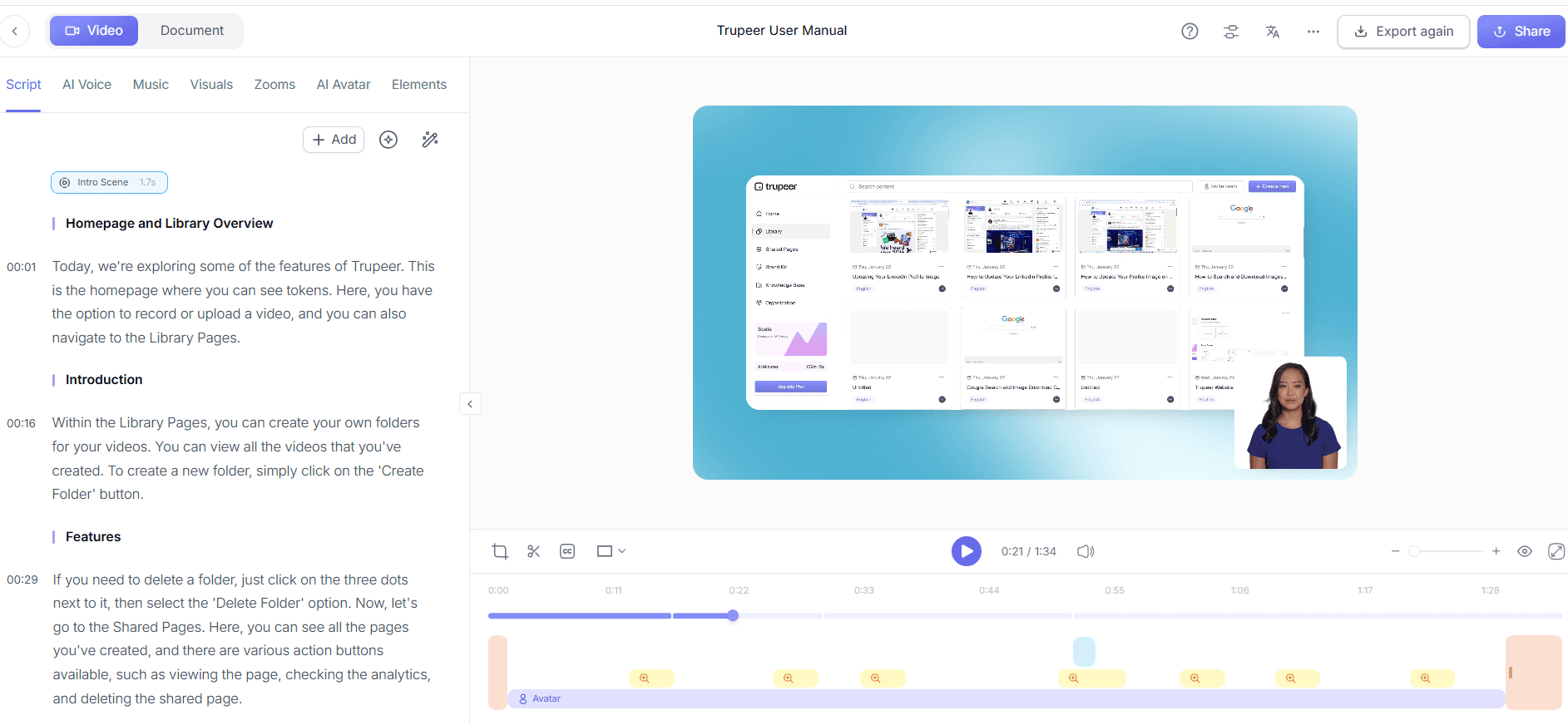
Step 4: Create a searchable knowledge base
With your video content ready, use Trupeer’s AI-searchable knowledge base to make it easily accessible. Go to the "Knowledge Base" tab in Trupeer and begin setting up your searchable library. Upload your enhanced videos, and Trupeer’s AI will index them, creating timestamp deep-links for direct access. This feature allows users to enter natural language queries and retrieve precise video segments that answer their questions. This setup transforms your video library into an interactive and dynamic resource, dramatically improving information retrieval efficiency. When SOPs come into the same conversation, a Scribe alternatives comparison helps clarify the scope.

Step 5: Analyze viewer engagement
Once your knowledge base is live, monitor its effectiveness using Trupeer’s viewer engagement analytics. Access this feature through the "Analytics" tab, where you can view data on how users interact with your videos. Heatmaps indicate which sections are most engaging, while drop-off analytics show where viewers lose interest. Use this data to refine your content and ensure it meets user needs. Regular analysis helps maintain the relevance of your knowledge base, driving continuous improvement and user satisfaction.

Step 6: Distribute and expand your reach
Finally, maximize your knowledge base’s reach using Trupeer’s distribution features. Share your videos through embeddable widgets or client-facing portals, ensuring easy access for both internal teams and external clients. Customize your knowledge base with your domain and enable SSO for secure access. This step not only broadens your content’s impact but also enhances your organization’s reputation as a leader in knowledge management. By using training video software with guide, you can ensure that your knowledge base remains an invaluable resource for your audience.

What tips help you build an AI-searchable video knowledge base?
Building an effective AI-searchable video knowledge base involves more than just technology. Here are some practical tips to ensure your knowledge base is a valuable resource for your organization.
Organize content logically. Structure your video library with clear categories and tags. This organization aids in smooth searching and retrieval, enhancing user experience.
Use consistent branding. Apply brand kits and templates to maintain a consistent visual style across all videos, reinforcing your brand identity.
Regularly update content. Keep your knowledge base current by updating outdated materials and adding new content regularly to address changing user needs.
Encourage user feedback. Solicit feedback from users to identify areas for improvement and ensure the knowledge base meets their needs effectively.
Train your team. Ensure your team is proficient in using the knowledge base by conducting regular training sessions, increasing adoption and usage.
use analytics. Use viewer engagement analytics to understand user interactions and refine content strategy for better results.
Integrate with other tools. Combine your knowledge base with other internal tools, like an internal knowledge base wiki software, to create a comprehensive resource hub.
Teams weighing tools often start with a Loom alternatives comparison before standardizing on a workflow.
Frequently asked questions
How does an AI-searchable video knowledge base improve productivity?
An AI-searchable video knowledge base enhances productivity by drastically reducing the time employees spend searching for information. With AI capabilities, users can input natural language queries and receive direct links to specific video timestamps that address their questions. This ensures employees access the right information quickly, allowing them to focus more on their core tasks rather than wasting time handling through entire video files. By simplifying the information retrieval process, organizations can significantly boost overall efficiency and employee satisfaction.
What makes Trupeer's AI-searchable knowledge base different from others?
Trupeer’s AI-searchable knowledge base stands out due to its advanced AI indexing and deep-linking capabilities. Unlike other platforms, Trupeer enables users to access specific video segments directly through natural language search. Its AI-driven tools automatically generate chapters and segment videos, facilitating easy navigation and precise information retrieval. also, Trupeer integrates smoothly with existing systems through custom-domain hosting and SSO, making it a versatile and secure solution for organizations seeking to optimize their video content strategy.
Can Trupeer's knowledge base handle multilingual content?
Yes, Trupeer supports multilingual content through its AI translation capabilities. It can translate video content into over 40 languages, with AI dubbing for non-English audiences, ensuring your knowledge base is accessible to a global audience. This feature is particularly beneficial for multinational companies looking to deliver consistent training and information across different regions. By using Trupeer’s video localization tool, organizations can ensure that their content is inclusive and reaches a diverse audience effectively.
Does Trupeer provide analytics for knowledge base usage?
Trupeer offers comprehensive analytics to monitor knowledge base usage and viewer engagement. Through the platform, you can track metrics such as viewer drop-off rates, popular segments, and overall engagement, providing insights into how users interact with your content. These analytics are crucial for identifying areas for improvement and ensuring that your knowledge base remains relevant and effective. By continuously analyzing this data, organizations can make informed decisions to enhance their content strategy and user experience.
Is it possible to integrate Trupeer's knowledge base with existing systems?
Yes, Trupeer is designed to integrate smoothly with existing systems. It offers custom-domain hosting, SSO integration, and embeddable video widgets, ensuring that your knowledge base can be incorporated into your current infrastructure. This flexibility allows organizations to maintain a cohesive digital ecosystem while enhancing their knowledge management capabilities. By integrating Trupeer’s solutions, businesses can simplify access to critical information and improve overall operational efficiency.
Related Blogs


