AI Instructional Video Generator
Turn guides, scripts, or screen recordings into instructional videos automatically. Narration, captions, zoom effects, brand kit applied on the fly. No editing app, no studio session.
Get started for free

Trupeer's AI Instructional Video Generator transforms scripts, screen recordings, or workflows into professional training videos with AI narration, visuals, captions, and animations automatically. This platform creates engaging how-to content, onboarding tutorials, and process guides without editing skills or production teams.
The setup most teams come in with. An L&D specialist gets handed a 12-page SOP and the ask: "Turn this into instructional content the team will actually watch." The script is fine. The screen recording can happen on Tuesday. But the editing, the captions, the zoom effects, the brand styling that's another three days of work and there isn't a video editor on staff. So the SOP ships as a PDF nobody opens. Or somebody records a rough Loom that doesn't look polished. Or the project gets postponed two more sprints.
Why AI Instructional Video Generator is required?
Training teams spend weeks scripting, recording, editing, and formatting instructional videos across multiple tools. Inconsistent video quality across departments reduces learner engagement and retention. Manual captioning, voiceovers, and visual enhancements overwhelm non-video experts. Companies struggle to update training content when processes change, requiring complete reshoots. Remote and global teams lack accessible multilingual instructional materials. Measuring training effectiveness becomes impossible without standardized, trackable video formats.
The actual moment this hits home. The compliance training is due in two weeks. The L&D lead has the script ready. The recording can happen Wednesday. But the four steps after that voiceover, captions, brand styling, packaging for the LMS take three days each in calendar time when nobody's a full-time video editor. So either compliance training launches late, or it launches looking like a 2014 PowerPoint, or it gets outsourced for $3,000 to an agency that delivers in another two weeks. None of those options work when the audit is on the calendar.
What this AI Instructional Video Generator does
Trupeer's generator analyzes your content to automatically produce complete instructional videos with synchronized AI voiceovers, step-by-step visual highlights, captions, transitions, and branding. It converts complex processes into clear, scannable learning experiences optimized for employee onboarding, compliance training, and skill development.
The mechanics worth being plain about. The AI works on what you give it. If you provide a screen recording, the AI cleans up the recording: cursor jitter smoothed, filler removed, zooms applied at click moments. If you provide a script, the AI generates an avatar-delivered video reading the script. If you provide both, the AI works with both. What the AI doesn't do is invent footage. So the visuals reflect what you recorded, not stylized abstractions. For most internal training, that's the right output. The trainee needs to see what the actual system looks like, not a stock-footage approximation.
Core Capabilities
Convert scripts into narrated instructional videos automatically
Transform recordings into polished training modules with highlights
Generate multilingual versions for global learning teams
Create accompanying guides and assessments alongside videos
Generate captions automatically in the source language. Translate to 65+ languages for global rollouts, applied to both voiceover and written guide in the same job.
Re-record one changed step when the system or process updates. The AI re-processes just that segment. Both the video and the written guide update in place.
How Trupeer’s AI Instructional Video Generator works
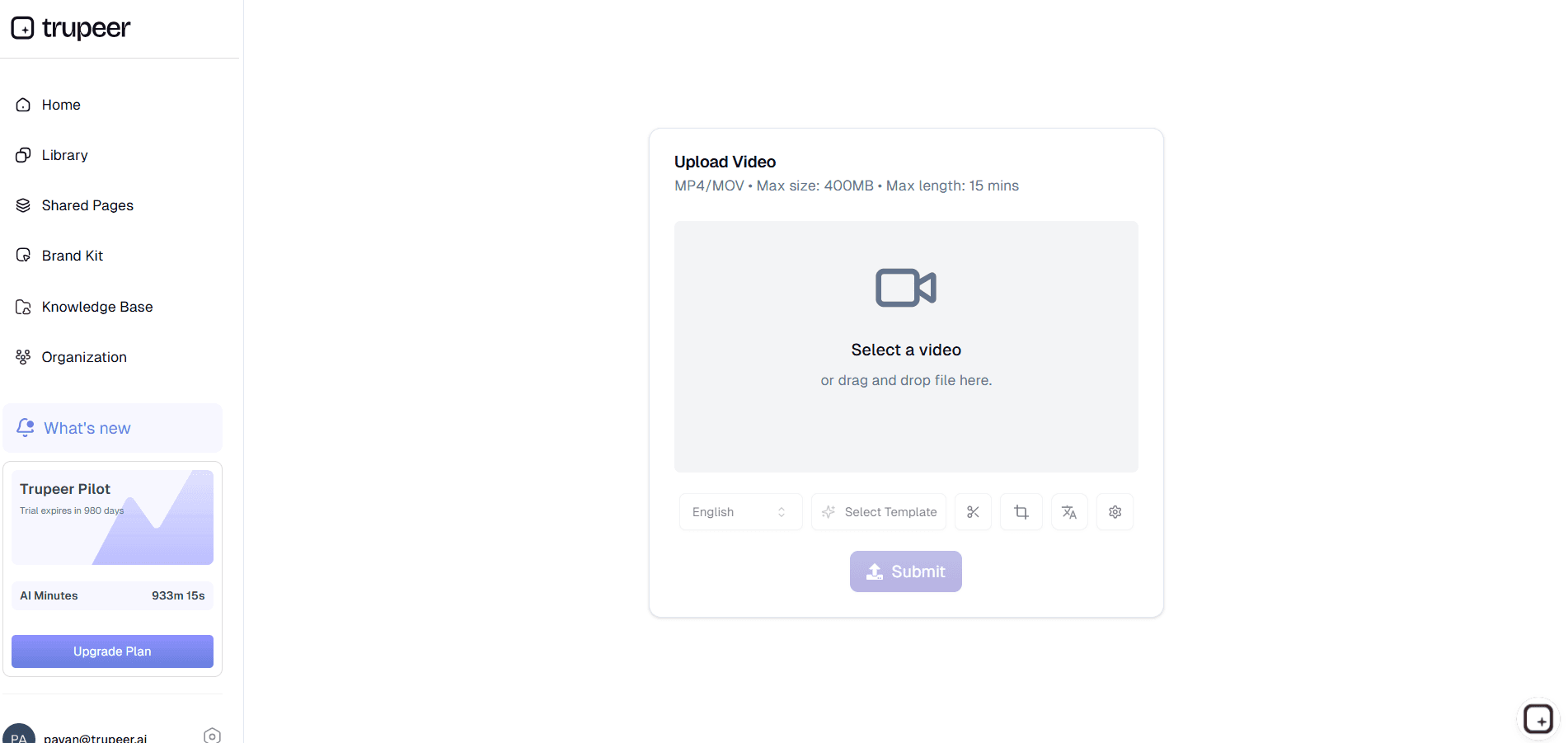
Step 1: Input Content
Upload recording, script, or process description to begin analysis.
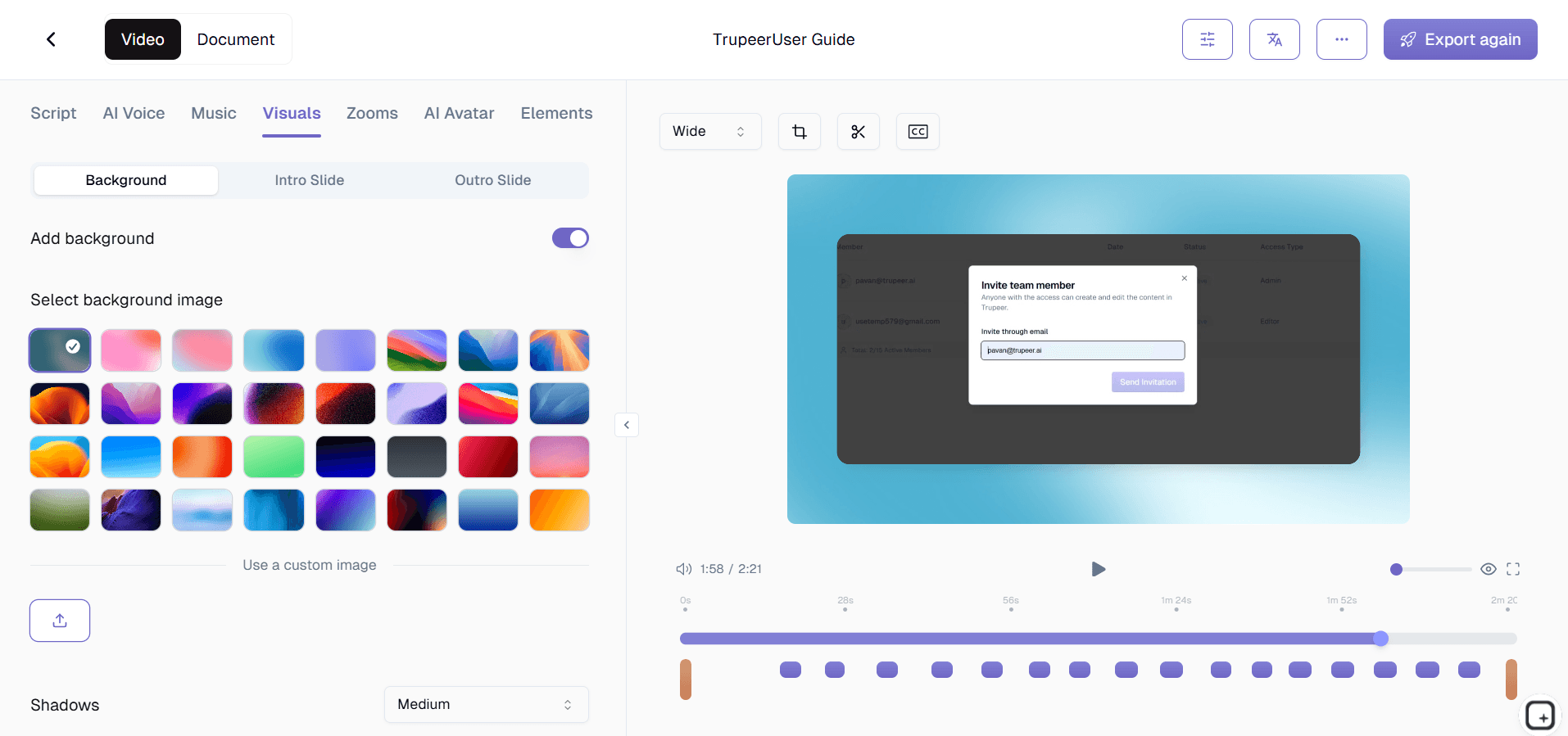
Step 2: AI Creates Video
Generator produces complete video with narration, captions, and effects.
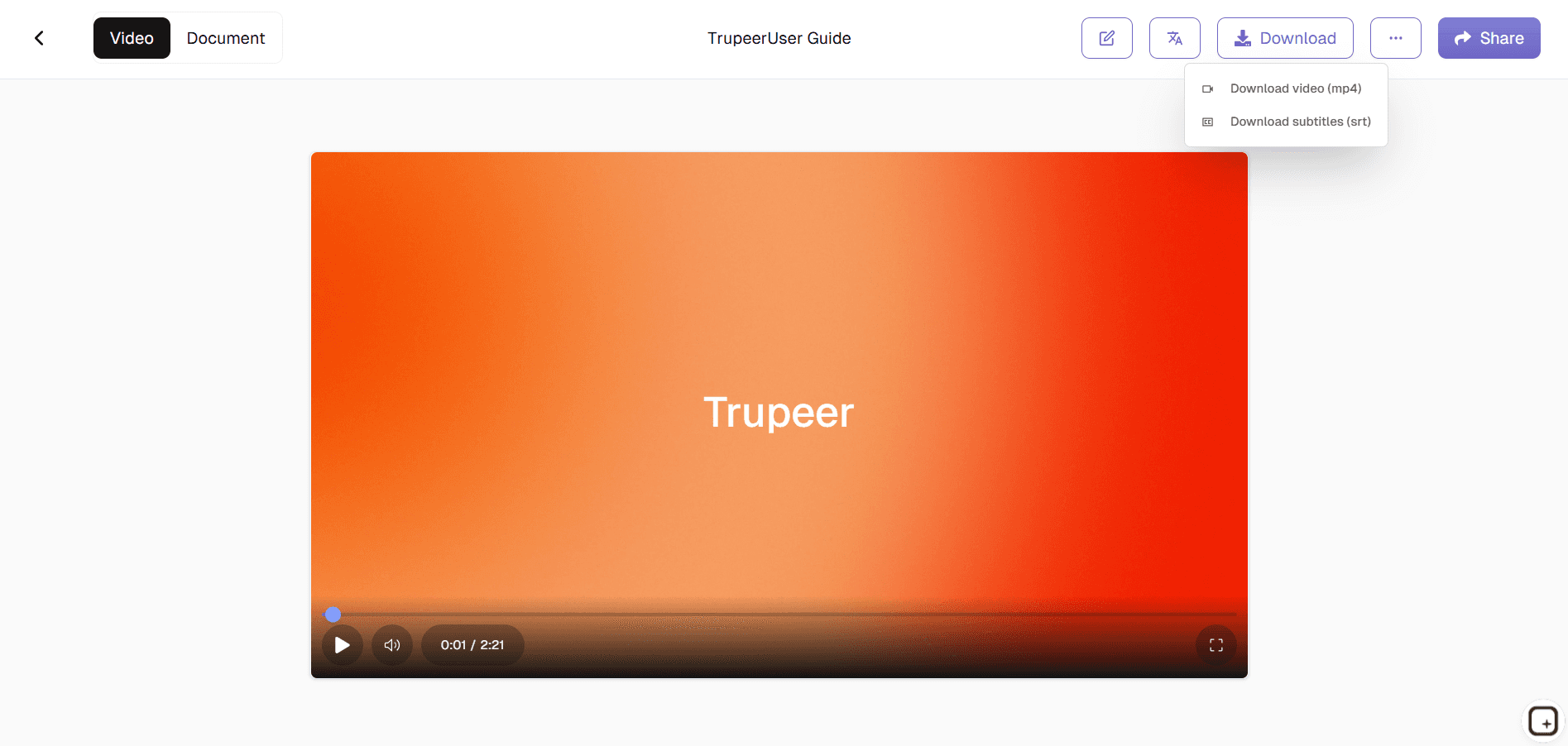
Step 3: Customize & Deploy
Adjust branding then publish across LMS platforms or share links.
Who this Trupeer’s AI Instructional Video Generator is for
Designed for learning and development teams creating scalable training content across organizations.
L&D Managers:
Build comprehensive onboarding libraries replacing live sessions with on-demand instructional videos that scale to thousands of employees while maintaining consistent quality and branding across all locationsTraining Coordinators:
Convert compliance procedures and safety protocols into engaging video modules with automatic captions and multilingual support, ensuring regulatory adherence while improving completion ratesTechnical Trainers:
Transform complex software workflows into step-by-step instructional video tutorials with smart zooms and annotations, reducing support tickets by 40% through self-service learningHR Onboarding Specialists:
Create department-specific training paths combining video, quizzes, and guides automatically, accelerating new hire ramp-up from weeks to days with measurable progress trackingGlobal Learning Teams:
Generate localized training content in 50+ languages instantly, ensuring consistent messaging and compliance across international offices without translation delays or localization costs
The common thread: nobody on these teams is a video editor. The L&D manager scripts content. The training coordinator handles compliance logistics. The HR onboarding specialist designs the new-hire experience. None of them want to spend their afternoons in Adobe Premiere. The AI handles the post-production work so they can stay in their actual jobs. Calendar time spent on instructional video production drops from weeks per module to hours. Sometimes minutes, depending on the length and the brand-kit complexity.
Key Features of Trupeer’s AI Instructional Video Generator
Complete instructional video production from raw content to learning-ready modules with enterprise-grade customization and analytics.
Smart Content Analysis:
The detail worth being concrete about. The AI watches the click sequence in a recording. When you click into a Settings menu, it picks that up as a moment that matters and applies a zoom. Same with form field interactions, button presses, dashboard navigation. The written guide that comes out lists those same moments as numbered steps, with screenshots inline. So the trainee gets to see exactly where to click rather than scanning the whole UI for the relevant button. This is what "smart content analysis" actually covers in practice: identifying the click moments and structuring both outputs around them.Multi-Modal Voice Generation:
Voice catalog with dozens of natural-sounding voices and accents across the supported languages. Pick one per video, change between videos in the same library. Custom voice cloning on paid tiers trains the system on a specific person's voice so the same voice carries through every module in the training library. Translation across 65+ languages applies to both the video voiceover and the written guide, generated in the same job. So one English script becomes training in Spanish, German, Japanese, and Portuguese the same week, from one production cycle.Annotations and On-Screen Highlights:
The video output includes cursor highlights at click moments, zoom effects at the regions that matter, and captions auto-generated from the voiceover. The written guide includes callouts and arrows on screenshots that point to the specific buttons and fields each step references. Worth being honest about what isn't here: clickable hotspots embedded inside the MP4 file, quiz overlays inside the video, or branching scenarios where trainee choices change the next video segment. Those interactive features live in dedicated interactive video platforms (Mindstamp, HiHaHo, H5P) and in course authoring tools like Articulate Storyline. Trupeer produces the source video and the written walkthrough that those tools can build interactivity on top of.Enterprise Branding Engine:
Applies company templates, compliance overlays, and accessibility features (closed captions, transcripts) consistently across all videos, ensuring brand compliance while meeting WCAG 2.1 standards automatically. The brand kit holds the logo, colors, fonts, intro slide, and outro slide. Apply it once. Every video generated in the workspace gets the same treatment automatically. So the training module produced by the L&D manager and the training module produced by the HR business partner look like they came from the same company. Captions auto-generate from the voiceover, which covers the accessibility baseline most teams need for enterprise procurement. Worth verifying the specific WCAG conformance level with the product team if your audit requirements call for it.LMS-Ready Export Formats:
Output downloads as MP4 (the video) and PDF or Word (the written guide). Both formats upload into Cornerstone, Docebo, TalentLMS, Workday Learning, Moodle, or any LMS that accepts video and document uploads. Worth being clear about the integration shape: Trupeer doesn't push content into LMS platforms via direct API integration, doesn't package content as SCORM or xAPI bundles, and doesn't sync completion data back from the LMS. Those features live at the LMS layer. The team uploads the Trupeer outputs into the LMS, and the LMS handles the SCORM packaging, the tracking, and the reporting from there. Most enterprise L&D teams already have this two-step workflow in place; Trupeer slots into the production half.Re-Record Changed Steps Without Full Rebuilds:
When the system UI changes or the process updates (and it will), re-record just the segment that changed. Often 30 seconds. The AI re-processes only that segment. Both the video and the written guide update in place. The rest of the training stays as it was. So a UI refresh that would otherwise break 30 instructional videos becomes 30 quick re-recording sessions. Useful for SaaS companies shipping product updates every sprint and trying to keep their training library current. Without this, training videos drift out of date by the second quarter after launch, and the team apologizes in tickets when learners notice.
Where Trupeer fits next to Synthesia, Articulate, and dedicated LMS platforms
The instructional video tooling space has three rough clusters worth understanding. Synthesia and HeyGen are AI avatar platforms. Script in, avatar-delivered video out. No screen recording component. So for instructional content that's entirely talking-head delivery (compliance refreshers, executive announcements, policy walkthroughs), they work well. For instructional content that needs to show actual software workflows on screen, they don't help. Trupeer covers both: avatar-led delivery from a script, or screen-recorded walkthroughs of actual systems. Same brand kit, same translation pipeline, applied to both routes.
The second cluster: Articulate Storyline, iSpring, Adobe Captivate. These are course authoring tools built for SCORM-packaged courses with branching scenarios, embedded quizzes, completion certificates, and trainee progress tracking. If the training has to be a formal course with prerequisites and assessments, those are the right tools. They're also more time-intensive to produce content in. Trupeer doesn't replace them. The third cluster: dedicated LMS platforms (Cornerstone, Workday Learning, Docebo, TalentLMS) host and track training, but don't help produce instructional video content. Most enterprise training operations end up using two tools: a production layer (Trupeer for the volume of routine instructional videos) and a hosting/tracking layer (the LMS). The combination works. Trupeer covers the production speed problem. The LMS covers the deployment and measurement problem.
Explore Related Tools
Benefits of Using Trupeer’s AI Instructional Video Generator
Time-Efficient
Create fully edited instructional videos in minutes, no filming or manual editing required.
Professional Output
AI automatically adds narration, visuals, and transitions for a clean, polished look.
Customizable & Scalable
Easily adjust tone, visuals, and length to match your training needs or brand style.
How to Create an Instructional Video with Trupeer
Step 1
Upload Your Script or Training Material
Step 2
Let AI Generate Narration, Visuals & Captions Automatically
Step 3
Review, Customize, and Export Your Video for Instant Sharing
Frequently Asked Questions
Is this AI Instructional Video Generator free?
Yes, core instructional video generation available at no upfront cost for teams.
What inputs does AI Instructional Video Generator support?
Screen recordings, SOP documents, slide decks, or workflow descriptions.
What formats can AI Instructional Video Generator export?
MP4, SCORM packages, interactive HTML5 for LMS platforms.
How does AI Instructional Video Generator ensure engagement?
Smart cuts, visual emphasis, and interactive elements based on content analysis.
Can enterprises customize AI Instructional Video Generator outputs?
Complete branding, compliance, and LMS integration customization available.
More Tools


