4.8/5
Free AI Manual Creator
Generate full product manuals from screen recordings. Both the polished video walkthrough and the formatted written manual, complete with screenshots and numbered steps, come out of the same source recording in under an hour.

Trupeer's AI manual creator revolutionizes how professionals create documentation by transforming screen recordings into comprehensive, professional manuals automatically. Instead of spending hours writing documentation from scratch, you can simply record your screen or upload an existing recording, and our AI generates both polished videos and detailed written manuals that match your brand standards. The core challenge most teams face is the time-consuming nature of manual creation. Traditional documentation requires recording processes, writing detailed instructions, formatting content, adding screenshots, and ensuring brand consistency. This often takes days or weeks for complex procedures. Trupeer's user manual creator eliminates these bottlenecks by automatically converting your screen recordings into publication-ready manuals with proper formatting, consistent branding, and professional presentation.
What sets Trupeer apart from other documentation tools is our dual-output approach. While other platforms focus solely on written content or video creation, our AI manual creator provides both formats simultaneously. Record once with our AI screen recorder, and receive a polished video plus comprehensive written documentation. This approach is particularly valuable for training videos and product demo videos where teams need both visual and text-based resources. The technology behind our AI manual creator combines advanced computer vision, natural language processing, and automated video editing. Our AI analyzes your screen recordings to identify key actions, interface elements, and workflow steps. Traditional manual creation methods create bottlenecks that slow down AI Screen Recorder initiatives, Training Manual Generator programs, and internal training efforts.
How Does AI Manual Creator Work?
The AI manual creator process is designed for simplicity while delivering professional results. Whether you're creating instruction manuals for software applications or developing technical documentation for complex processes, the workflow remains consistent and user-friendly.
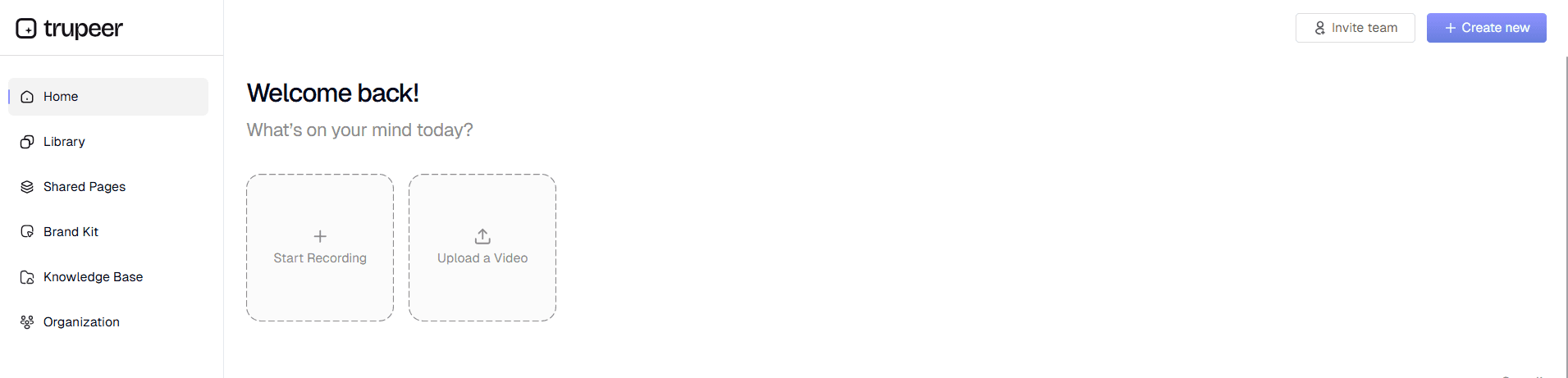
Step 1: Record or Upload Your Content
Start by capturing your process using Trupeer's built-in screen recorder or upload an existing raw recording. Our system accepts various formats and qualities, making it easy to work with existing content. The AI begins analyzing your recording immediately, identifying key interface elements and user actions that will form the foundation of your manual.
Step 2: AI Processing and Enhancement
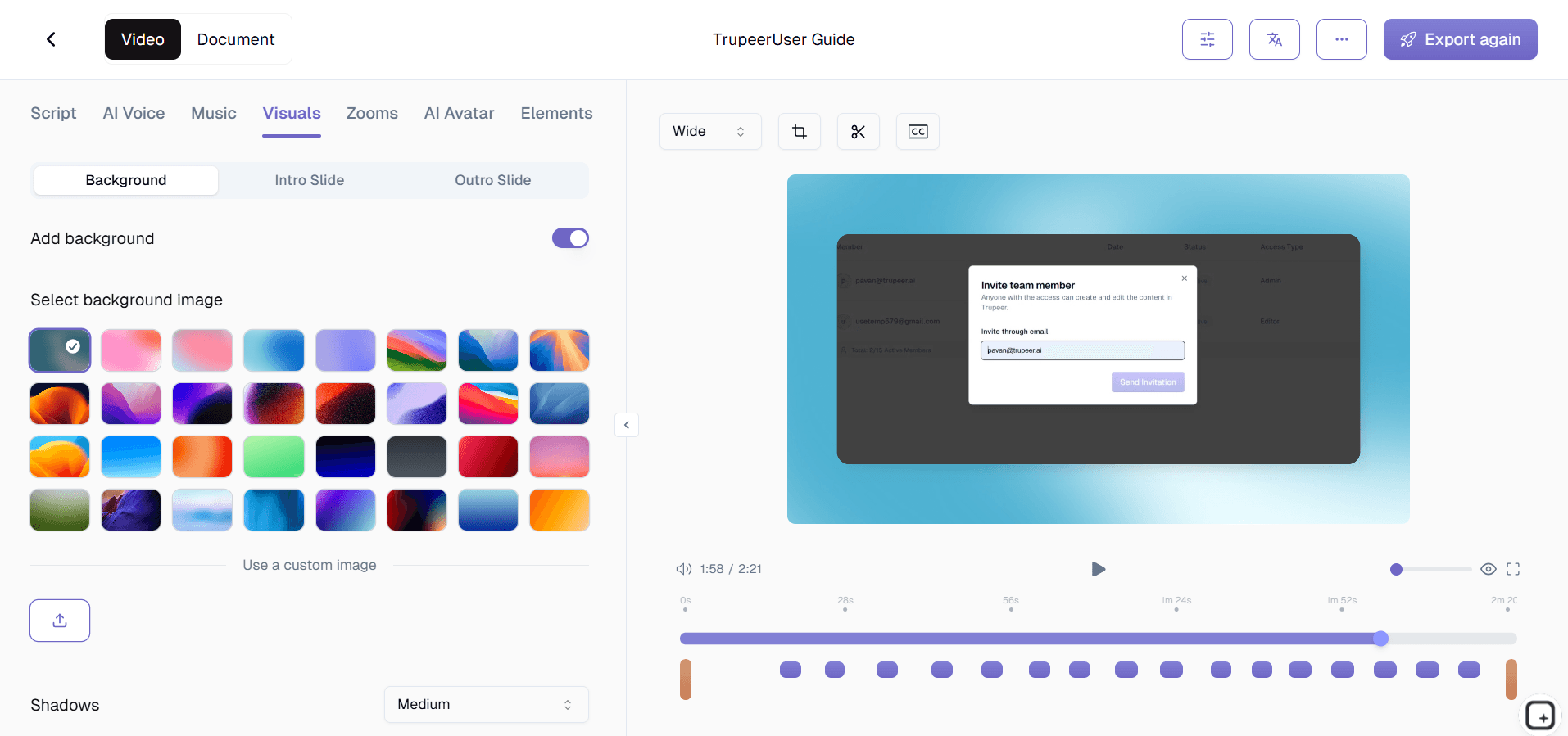
Our AI automatically processes your recording, removing background noise, eliminating filler words, and adding professional zoom effects to highlight important interface elements. Simultaneously, the system generates written documentation by analyzing your actions and creating step-by-step instructions that correspond to your screen activities.

Step 3: Template Application and Customization
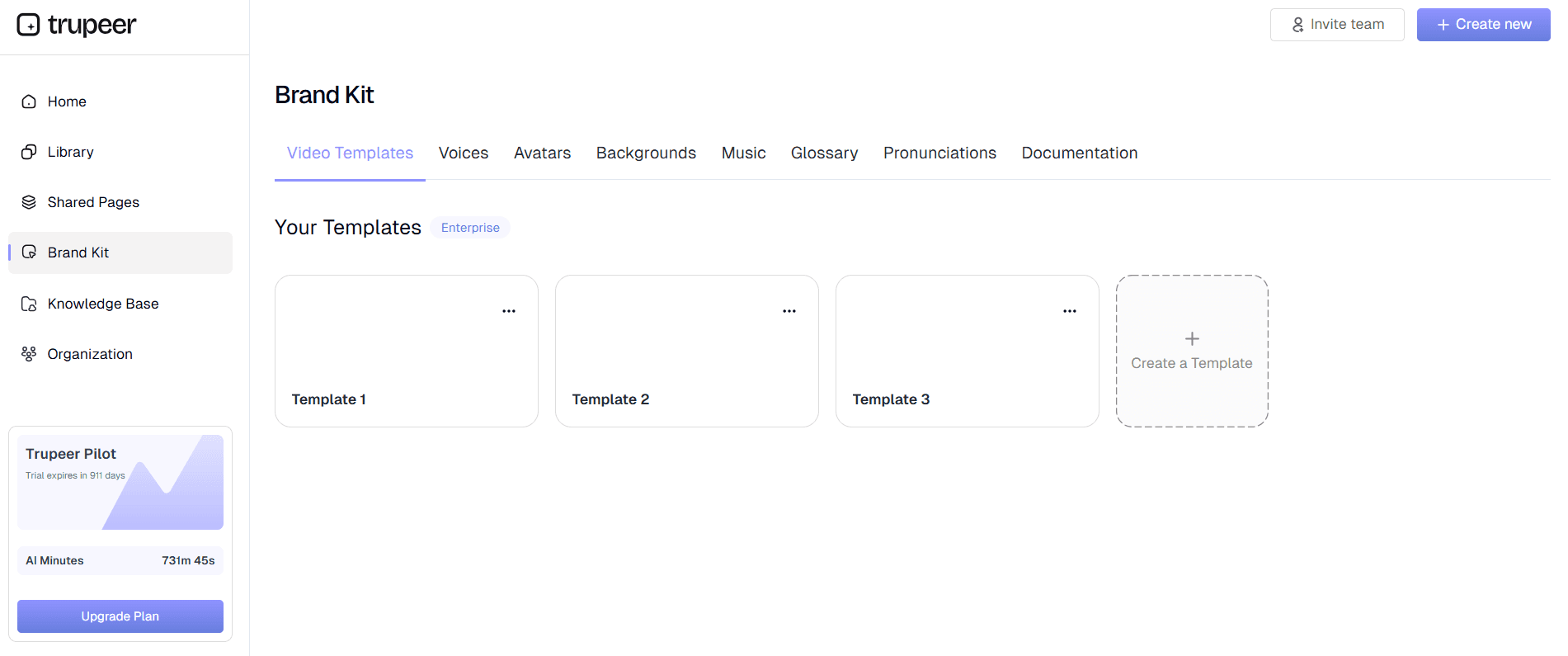
Choose from our library of documentation templates or use your saved custom templates. The AI applies consistent formatting, styling, and structure to your manual while maintaining your brand standards. This step ensures your documentation matches your organization's style guidelines without manual formatting work.
Step 4: Brand Kit Integration
Apply your brand kit to ensure consistent visual presentation across all documentation. This includes your company colors, logos, fonts, and intro/outro sequences for video content. The AI automatically incorporates these elements into both video and written formats.
Step 5: Multi-Format Export and Sharing
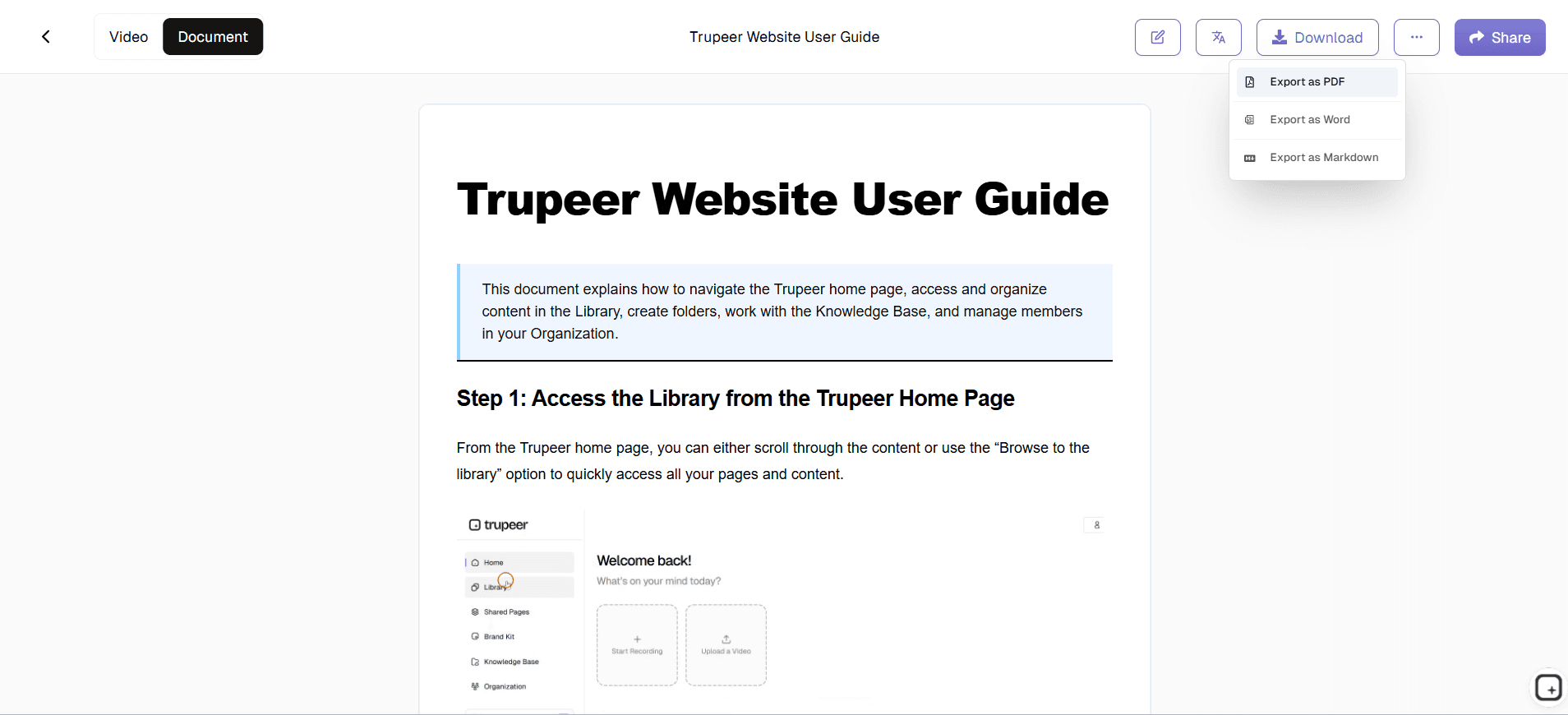
Export your completed manual in multiple formats including polished video, written documentation, or both. Share via direct links, embed codes for websites, or download files for distribution through your existing channels. The system generates everything you need for immediate deployment.
Key Features and Capabilities
Our AI manual creator offers comprehensive features designed for professional documentation needs. Each capability addresses specific challenges teams face when creating and maintaining manual documentation across different departments and use cases.
Automatic Documentation Generation: The AI analyzes your screen recording and generates comprehensive written instructions automatically. Unlike traditional online user guide creators, you don't start with blank documents. Simply record your process, and the AI creates detailed, step-by-step instructions that correspond to your actions. This feature dramatically reduces the time required for initial draft creation while ensuring accuracy and completeness.
What this looks like in practice. The AI watches the click sequence in your recording. Click into Settings, navigate to API Keys, generate a new key, copy it to clipboard. The written manual that comes out lists those four steps with screenshots at each click. No staring at a blank document deciding how to phrase step 1. The first draft exists by the time the recording finishes processing. Most teams use the auto-generated draft as-is. Some do a 10-minute review pass to add context-specific warnings or compliance notes before publishing.
Customizable Documentation Templates: Save and reuse documentation templates with your preferred formatting, styling, and structural elements. Whether you're creating technical manual creators or simpler user guides, templates ensure consistency across all your documentation. Each template can include specific sections, formatting rules, and brand elements that automatically apply to new manuals.
The benefit compounds across a manual library. Set up the template once with the table of contents structure, chapter headings, the way figures should be captioned, where the version history table goes. Every manual generated after that follows the same structure automatically. So the 12 manuals the team ships across the year all look like they came from the same publisher. Not from 12 different individual contributors with mismatched formatting choices. Worth setting templates up before generating the first batch. Retrofitting 30 existing manuals to a new template costs real time.
AI Video Enhancement: Your raw screen recordings get professional editing treatment including noise removal, filler word elimination, and dynamic zoom effects that highlight important interface elements. This ensures your video manuals maintain viewer engagement while clearly demonstrating each process step.
The video and the written manual stay in sync because they come from the same source recording. So when somebody updates the manual a year later by re-recording one chapter, the video chapter and the corresponding written section both update together. No drift where the video shows the old UI and the written manual describes the new one, or vice versa. This is the part that breaks most manual maintenance workflows. Trupeer's approach holds the two formats together as one artifact.
Multi-Language Support: The mechanics in plain terms. Generate the manual in English first. Then translate to Spanish, German, Portuguese, Japanese, or any combination of 65+ supported languages. Translation applies to the video voiceover, the written content, the screenshots' on-screen text, and the captions, all in one job. So an enterprise customer running operations in Madrid, Berlin, São Paulo, and Tokyo gets the same manual in four languages from one production cycle. Worth being honest: highly specialized vocabulary (legal disclaimers, regulated industry terminology) sometimes needs a local language reviewer to catch nuances. For most content (training, product use, internal procedures), the AI translation ships as-is.
Brand Consistency Tools: Apply consistent branding across all manual formats using custom color schemes, logos, and styling elements. This ensures your documentation maintains professional appearance and brand recognition regardless of who creates the content or which department publishes it.
For external-facing manuals (customer documentation, partner materials, sales collateral), branding matters more than internal teams realize. A manual without consistent typography, color treatment, and logo placement signals to the reader that it was thrown together. A manual with proper branding signals that the team takes the document seriously. The brand kit applies all of these elements automatically across every page of every manual. Even when 6 different people on the team contributed to the underlying recordings.
Integration Capabilities: Export your manuals in formats compatible with existing knowledge management systems, learning platforms, and documentation repositories. This flexibility ensures your AI-generated manuals integrate seamlessly with your current workflow and distribution channels.
The exports work outside Trupeer, which matters more for manuals than for other doc types. Manuals tend to live a long time. A customer manual published in 2024 might still get downloaded in 2027. If the team eventually migrates away from Trupeer or the company gets acquired and changes documentation tools, the existing manuals don't get stranded. The MP4, PDF, and Word files keep working in any reader, on any platform. So picking Trupeer doesn't lock the manual library to one vendor's hosting infrastructure.
Why Should You Use AI Manual Creator?
The benefits of using Trupeer's AI manual creator extend beyond simple time savings. Organizations implementing our solution report significant improvements in documentation quality, team productivity, and end-user satisfaction with their manuals and guides.
Time Reduction: Traditional manual creation can take days or weeks depending on complexity. Our AI manual creator reduces this to hours by automating the writing, formatting, and editing processes. Teams can focus on content accuracy and strategic improvements rather than tedious formatting and initial draft creation. This efficiency gain is particularly valuable for Documentation Generator teams who need to rapidly create customer-facing documentation.
A concrete example. A technical writer at a mid-size SaaS company spends roughly 3 weeks producing a full product manual: 2 days of process recording with the product team, 8 days writing up the procedures, 4 days creating diagrams and screenshots, 3 days formatting and laying out in InDesign, then 2 to 3 days of review cycles. Total: about 80 hours of writer time per manual. The Trupeer flow drops the writing-and-screenshotting phase from 8 days to under an hour. Layout work drops from 3 days to roughly zero because the brand kit and templates apply automatically. The writer's time per manual lands closer to 12 hours. Whether the exact savings hold depends on how technical the content is and how often the team needs custom diagrams beyond what screen recordings cover.
Consistent Quality Standards: AI-generated manuals maintain consistent writing style, formatting, and presentation quality regardless of who creates the content. This eliminates the variability often seen with manual documentation where different team members have varying writing skills and attention to detail.
What inconsistency actually looks like across a team's manual library. Five different writers contribute manuals over a year. Each one has their own writing style, screenshot conventions, way of numbering steps, comfort level with adding warnings. Some manuals open with a brief context section. Others jump straight to step 1. Some use callout boxes for warnings. Others embed warnings in the prose. The customer reading three manuals from the same company gets three different reading experiences. The AI plus templates plus brand kit produces output that follows the same structure regardless of which team member generated the recording. So the manuals read like one author wrote them. Even when six did.
Dual-Format Output: Receive both video and written documentation from a single recording session. This versatility supports different learning preferences and use cases within your organization. Some team members prefer visual demonstration while others need written reference materials for quick consultation.
The customer-support use case worth thinking about. Customer downloads the user manual. Opens the PDF. Tries to follow chapter 3 step 4. Gets confused about which UI element to click because the screenshot is small. Opens the video version of the same chapter on YouTube or the help center. Watches the 90 seconds that covers that step. Continues with the PDF for the rest of the chapter. This pattern is more common than most manual creators realize. People don't pick one format. They switch between formats depending on which one answers their current question faster. Producing both formats from one source means the customer never has to leave the documentation ecosystem to find the answer they need.
Scalable Documentation Process: As your product or processes evolve, updating documentation becomes straightforward. Record the updated process, and generate new manuals quickly without starting from scratch. This scalability is crucial for fast-moving teams and products with frequent updates.
A specific scenario where this matters. Your product ships a major UI overhaul. Every existing manual now references screens that no longer exist. The old way of updating: full re-write of every affected manual, 3 weeks of writer time per manual, 12 manuals to update, 8 months of work. The Trupeer way: re-record the changed workflows. The AI updates the screenshots and the corresponding written steps. Updates land in days instead of months. The product launch and the manual updates can ship in the same quarter. Without Trupeer's update mechanics, most teams in this scenario quietly let half the manuals go stale and apologize when customers notice.
Professional Presentation: AI-enhanced videos and formatted documentation create professional impressions with customers and internal stakeholders. Your manuals look polished and authoritative, enhancing your organization's credibility and user confidence in following your instructions.
The credibility test for a manual is whether it looks like a product, not a draft. Inconsistent fonts, screenshots at different zoom levels, paragraphs that vary in style, headers that aren't properly hierarchical: all of these tell the reader the manual was thrown together. A manual where every screenshot is properly highlighted, every step is consistently formatted, every section header uses the same typography, every callout looks the same: this tells the reader the team takes documentation seriously. Customers and auditors notice. The brand kit and template system handle all of this automatically. So even the team without a dedicated designer ships manuals that look like they came from a team with one.
Who Can Use AI Manual Creator?
Trupeer's AI manual creator serves diverse professional needs across industries and team functions. The versatility of our platform makes it valuable for anyone who needs to document processes, create training materials, or develop user-facing guides.
Content Creators and Technical Writers: Professional content creators use our AI manual creator to streamline their workflow and focus on high-value editorial tasks rather than initial draft creation. The AI handles the time-consuming documentation structure and basic content generation, allowing writers to focus on refinement, accuracy verification, and strategic messaging.
Marketing Teams: Marketing professionals leverage the tool for creating AI Video Editor and accompanying written materials for campaigns, sales support, and customer onboarding. The ability to generate both video and written content from one recording session significantly improves marketing team efficiency while ensuring message con
sistency across channels.
Educators and Trainers: Educational professionals use the AI manual creator for developing course materials, training programs, and instructional content. The system's ability to create both visual demonstrations and detailed written instructions supports diverse learning styles and provides comprehensive educational resources from a single content creation session.
Product Teams: Product managers and developers use our training manual generator to document features, create user guides, and develop internal process documentation. The tool's integration with screen recording makes it particularly effective for software product documentation where visual demonstration is crucial for user understanding.A manual captures how the work is done; getting the team to adopt the new way is a change management process.
Sales Professionals: Sales teams create customer-specific demonstrations, proposal materials, and AI Screen Recorder documentation using our platform. The professional output quality and brand consistency features ensure sales materials maintain high standards while being produced efficiently by non-technical team members.
Small Business Owners: Entrepreneurs and small business owners use the AI manual creator to document their processes, create customer support materials, and develop training resources for new employees. The tool's ease of use and comprehensive output make professional documentation accessible even without dedicated technical writing resources.
The common thread across these audiences: nobody on these teams has 80 free hours per manual to spend on writing, screenshotting, and laying out documentation. The product manager wants to be building products. The technical writer wants to be doing strategic content work. The training specialist wants to be designing learning programs. Long-form documentation work is the kind of work that gets postponed until the deadline forces it. Recording the workflows that go into the manual collapses the writing-and-formatting phase into the AI processing step. So the deadline-driven scramble that used to define manual creation becomes a sequence of routine recording sessions. Most teams that adopt this pattern ship more manuals in the first year with Trupeer than they shipped in the previous three years combined.
Best Practices for Using AI Manual Creator
Maximizing the effectiveness of your AI-generated manuals requires understanding how to optimize your input content and leverage the platform's advanced features. These proven practices help ensure your documentation meets professional standards and serves your intended audience effectively.
Plan Your Recording Strategy: Before starting your screen recording, outline the process you'll demonstrate and prepare your workspace. Close unnecessary applications, organize your desktop, and practice the workflow to ensure smooth execution. Clear, well-paced recordings produce better AI-generated documentation and more professional final output.
Utilize Custom Templates: Invest time in creating and saving documentation templates that match your organization's standards and common use cases. Well-designed templates streamline future manual creation and ensure consistency across all your documentation. Consider creating different templates for different types of manuals such as user guides, technical procedures, or training materials.
Leverage Brand Kits Effectively: Configure comprehensive brand kits that include all your visual identity elements. This ensures every manual automatically incorporates your branding without additional manual work. Regular brand kit updates keep your documentation current with any brand evolution or guideline changes.
Review and Refine AI Output: While our AI generates high-quality initial drafts, reviewing and refining the content ensures accuracy and alignment with your specific requirements. Focus your editing efforts on technical accuracy, terminology consistency, and organizational preferences rather than starting documentation from scratch. Check out our tutorials for advanced editing techniques and optimization strategies.
Structure the manual before recording. The trick that turns AI-generated manuals from "rough draft" into "shippable document": outline the chapters first, then record one workflow per chapter. The AI organizes content cleanly when the source recordings each cover one logical topic. The team that records a single 90-minute marathon walkthrough of an entire product and asks the AI to chop it into a manual gets messy output. The team that records 12 separate 8-minute walkthroughs, each covering one chapter's worth of content, gets a clean manual structure. The recording effort is the same. The output quality difference is significant.
Set up the custom glossary with product-specific terminology. Manuals tend to use specific terminology consistently. Product names. Internal feature names. Industry-specific terms. Acronyms. If the product is called "Pulse" internally, the AI needs to know that "pulse" in the recording transcripts refers to the product, not the medical concept. The custom glossary handles this. Set it up on day one with all product names, feature names, and frequently-used industry terms. Doing it before the first manual ships beats finding and replacing terminology errors across 8 chapters of an already-published manual.
Where Trupeer fits next to Adobe FrameMaker, MadCap Flare, and traditional manual creation tools
The traditional manual creation tool space has two clusters. Adobe FrameMaker, MadCap Flare, and Author-it are dedicated technical writing platforms built for long-form structured documentation. They handle XML-based content, single-source publishing across multiple output formats, conditional content for different product variants, and the kind of detailed formatting control that documentation teams need for printed technical manuals. They're powerful and they have a learning curve to match. Most teams that run FrameMaker or Flare have a dedicated technical writing function with people whose full-time job is content production. Trupeer doesn't replace those tools for the use cases they're built for. Different layer entirely.
The second cluster: lightweight documentation platforms like Document360, ReadMe, GitBook, and Notion-as-docs. These are easier to use than FrameMaker but optimized for digital-first documentation (help centers, API docs, internal wikis). They're not built for the long-form printed-manual use case where the output needs to be a polished PDF that gets distributed to customers. Trupeer fits between these clusters: easier to use than FrameMaker because the AI does the writing and screenshotting work, but capable of producing polished long-form manuals because of the templates and brand kit system. For teams that need full FrameMaker-grade single-source publishing across multiple product variants, Trupeer isn't the right tool. For teams that need to produce customer manuals, training manuals, employee handbooks, and product documentation that looks professional but doesn't require a dedicated technical writing department, Trupeer is built exactly for that workflow.
Explore Related Tools
Why Choose AI Manual Creator
Automatic Documentation Generation
AI creates detailed written instructions from your screen recordings automatically.
Professional Video Enhancement
Removes noise, eliminates filler words, and adds professional zoom effects.
Customizable Brand Templates
Apply consistent branding and formatting with reusable documentation templates.
How to Use Trupeer's AI Manual Creator
Step 1
Record screen or upload video
Step 2
AI processes and enhances content
Step 3
Apply templates and export manuals
Frequently Asked Questions
How does AI manual creator differ from traditional documentation tools?
Unlike traditional tools that require writing from scratch, our AI manual creator generates comprehensive documentation automatically from screen recordings. You record once and receive both polished video and written manuals with professional formatting and brand consistency.
Can I use existing recordings with the AI manual creator?
Yes, you can upload existing raw recordings and let our AI enhance them with noise removal, zoom effects, and automatic documentation generation. The system works with various video formats and qualities to create professional output.
What types of manuals can I create with this tool?
You can create user guides, technical manuals, training documentation, product demos, SOPs, and instructional content. The AI adapts to different content types while maintaining professional formatting and presentation standards.
How long does it take to generate a manual?
The AI processing typically takes a few minutes depending on recording length. Most manuals are ready within 10-15 minutes of upload, including both video enhancement and written documentation generation with applied branding and formatting.
Can I customize the generated documentation format?
Absolutely. Use our customizable templates to define formatting, styling, and structure preferences. Save templates for reuse across different manuals to maintain consistency while adapting to specific documentation requirements and brand guidelines.
More Tools



