4.8/5
How to Create SOPs With AI
Create SOPs from real work instead of writing them from memory. Record a process, generate a first draft, review it, publish it.
Create SOPs with AI Now

Ask three people how a process gets done and you sometimes get three different answers. Same tool. Same company. Same workflow, technically.
One person skips steps because they already know the shortcut. Somebody else learned it from an old onboarding call. Another teammate has their own version saved in a Notion doc from eight months ago. Nobody planned for inconsistency. It just shows up quietly, usually around the time onboarding feels messy or mistakes start repeating.
That is part of why teams start looking for AI to create SOPs in the first place. Writing standard operating procedures sounds responsible until someone actually owns the task. The process has to be documented, screenshots added, instructions cleaned up, steps rewritten so they make sense to someone new, formatting fixed, and then almost immediately something changes. A workflow updates. A screen looks different. The SOP quietly becomes “mostly accurate.”
Trupeer helps teams create SOPs from real workflows instead of writing them manually after the fact. Record a process once, upload a walkthrough, or capture a screen flow and Trupeer turns it into structured step-by-step SOP documentation with written instructions, screenshots, visual guidance, and reusable formatting already in place. The process stays closer to showing the work than reconstructing it from memory.
Most teams already know how the process works, documenting it is usually the part that never gets finished.
You can record a workflow as it happens or upload a recording you already have, so existing training sessions and demos can be reused rather than redone. Once a procedure exists, SOP software handles where it lives, who can see it, and how it stays current.
Why Traditional SOP Creation Is Slow
The bottleneck is almost never willingness. It is that the cost of producing one procedure is high enough that documentation loses to whatever else is on the list that week.
Writing takes longer than doing:
a process that takes a few minutes to perform can take far longer to document once screenshots, formatting and review are included. That ratio is why most teams end up with a handful of documented procedures rather than a full setScreenshots are the real work:
capture, crop, annotate, paste, repeat, for every step. It is tedious enough that people write "navigate to the settings page" instead and hope the reader managesMemory leaves gaps:
the author skips the steps they have automated in their own head, which are exactly the steps a new starter needsThe expert is the bottleneck:
the person who knows the process is the person with the least free time, so documentation waits for a quiet week that never comesRevision is worse than creation:
updating an existing procedure means reopening it, re-screenshotting, and re-sharing. So it does not get updated, and within a year nobody trusts it
Can AI Create SOPs?
It can create a usable first draft, which is a more useful answer than yes or no.
What AI genuinely does: watches a recording of the work, splits it into ordered steps, captures a screenshot for each, drafts the instruction text, and formats the result consistently, turning the initial documentation work into a much shorter first-draft step. What it cannot do is know why a step exists, what the exceptions are, or whether the process you recorded was the right one.
So the honest position is that AI changes the economics rather than removing the human. A person still reviews, adds the context that never appeared on screen, and signs it off. What changes is where the work goes: from writing everything manually to reviewing and improving an AI-generated first draft. That shift is the difference between documenting one process and documenting all of them.
How to Create an SOP With AI
Eight steps, in the order that produces the least rework.
1. Choose the process:
pick one that is asked about repeatedly, or that only one person knows. Do not start with the most complicated thing you do.2. Record the workflow:
perform the task at normal pace, pausing briefly between distinct actions so the steps separate cleanly.3. Upload the recording:
or use footage you already have, such as a training session or a client walkthrough.4. Generate the first draft:
choose whether you want a document, a video, or both.5. Review the steps:
merge steps that are one action, split any that contain several, delete the false starts, and replace positional wording like "click the third tab" with the name of the thing.6. Add exceptions and context:
the reason a step exists, the thresholds, what to do when the expected screen does not appear, and who to contact when the procedure runs out.7. Approve and publish:
get sign-off from the person who owns the process, then share by link or publish to a knowledge base.8. Review when the process changes:
the step everyone skips. A procedure nobody revisits becomes wrong quietly, and an out-of-date procedure is worse than a missing one.
How Does AI Create SOPs?
AI SOP creation follows a five-step workflow that transforms raw screen recordings into polished documentation in minutes. The system combines advanced computer vision with natural language processing to understand your workflow and generate comprehensive SOPs automatically.
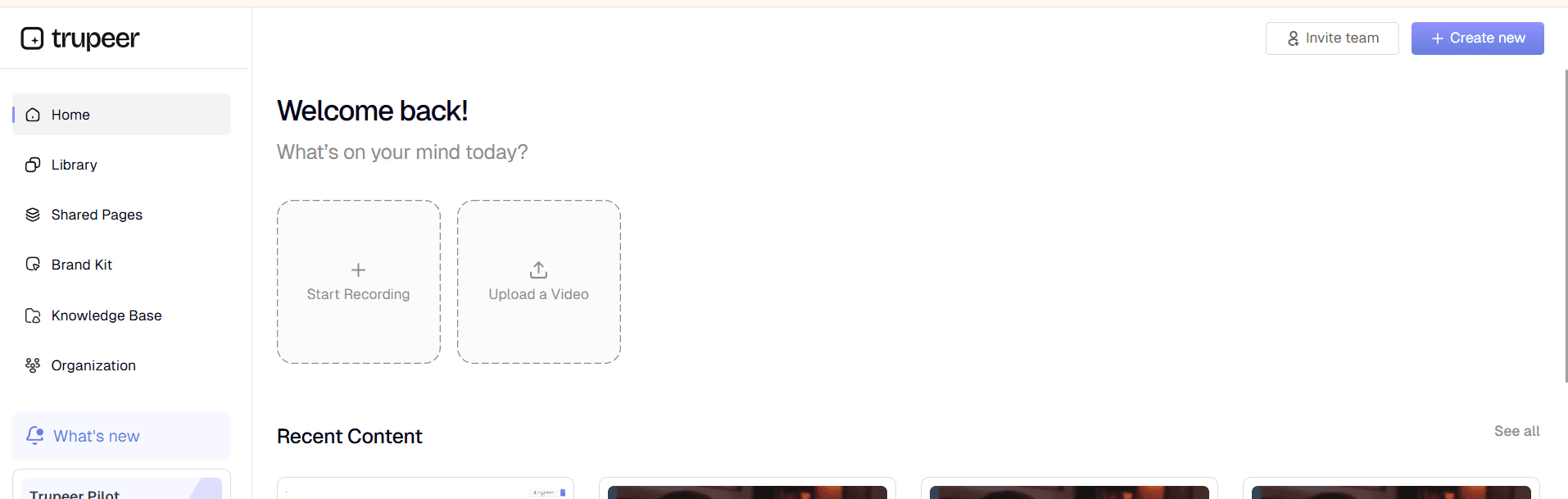
Step 1: Record or Upload Your Process
Begin by either recording your screen using Trupeer's built-in screen recorder or uploading an existing recording. Record the workflow with Trupeer, or upload an existing recording. That recording becomes the source material for the generated procedure. If you have existing recordings, simply drag and drop them into the platform, and the AI will begin processing immediately.
Step 2: AI Analysis and Enhancement
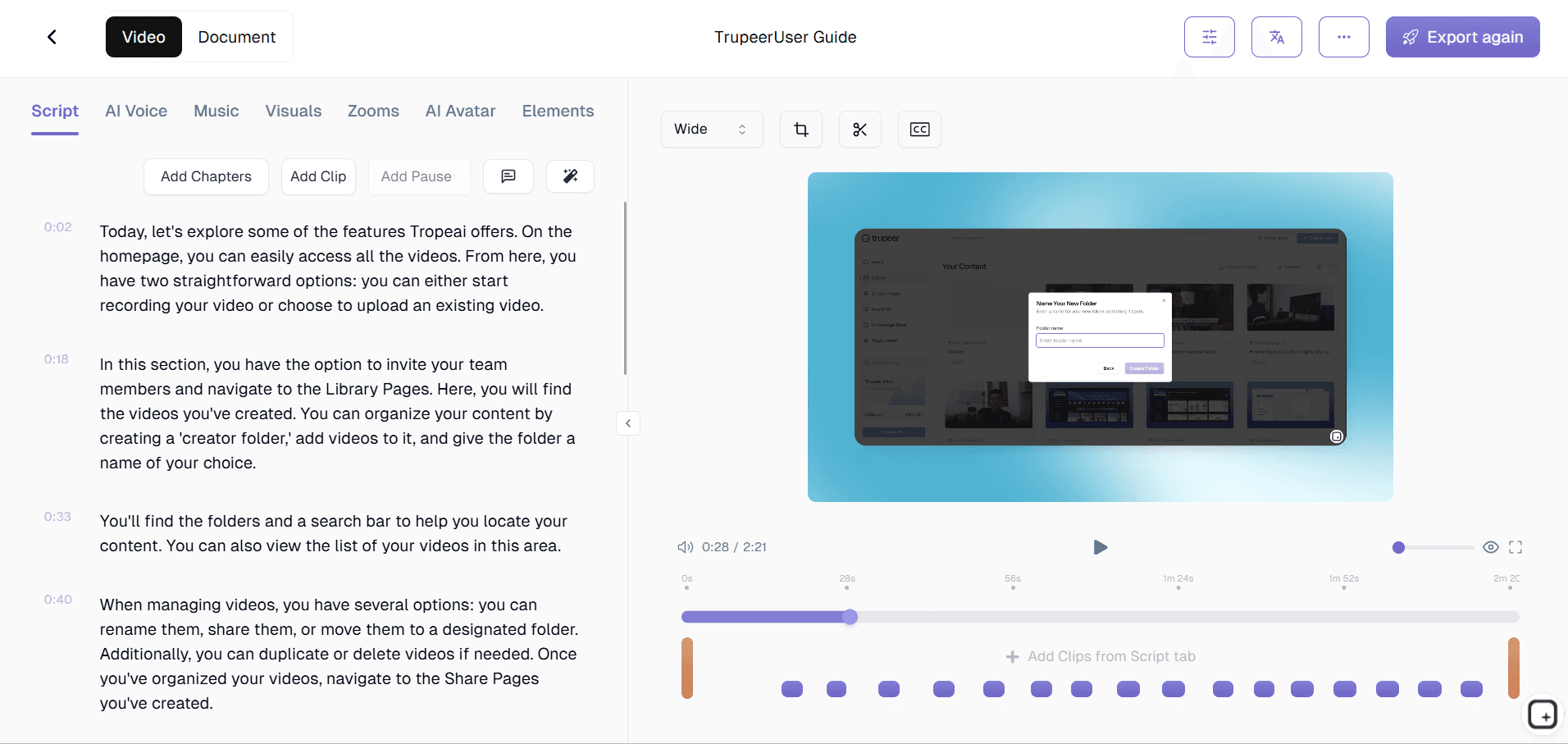
Once your recording is in the system, our AI technology goes to work. It analyzes the recording to identify visible actions and group them into discrete steps. The AI automatically removes filler content, enhances audio quality, and adds intelligent zoom effects to highlight important areas. This process ensures your final SOP focuses on essential steps without unnecessary distractions.
Step 3: Automatic Documentation Generation
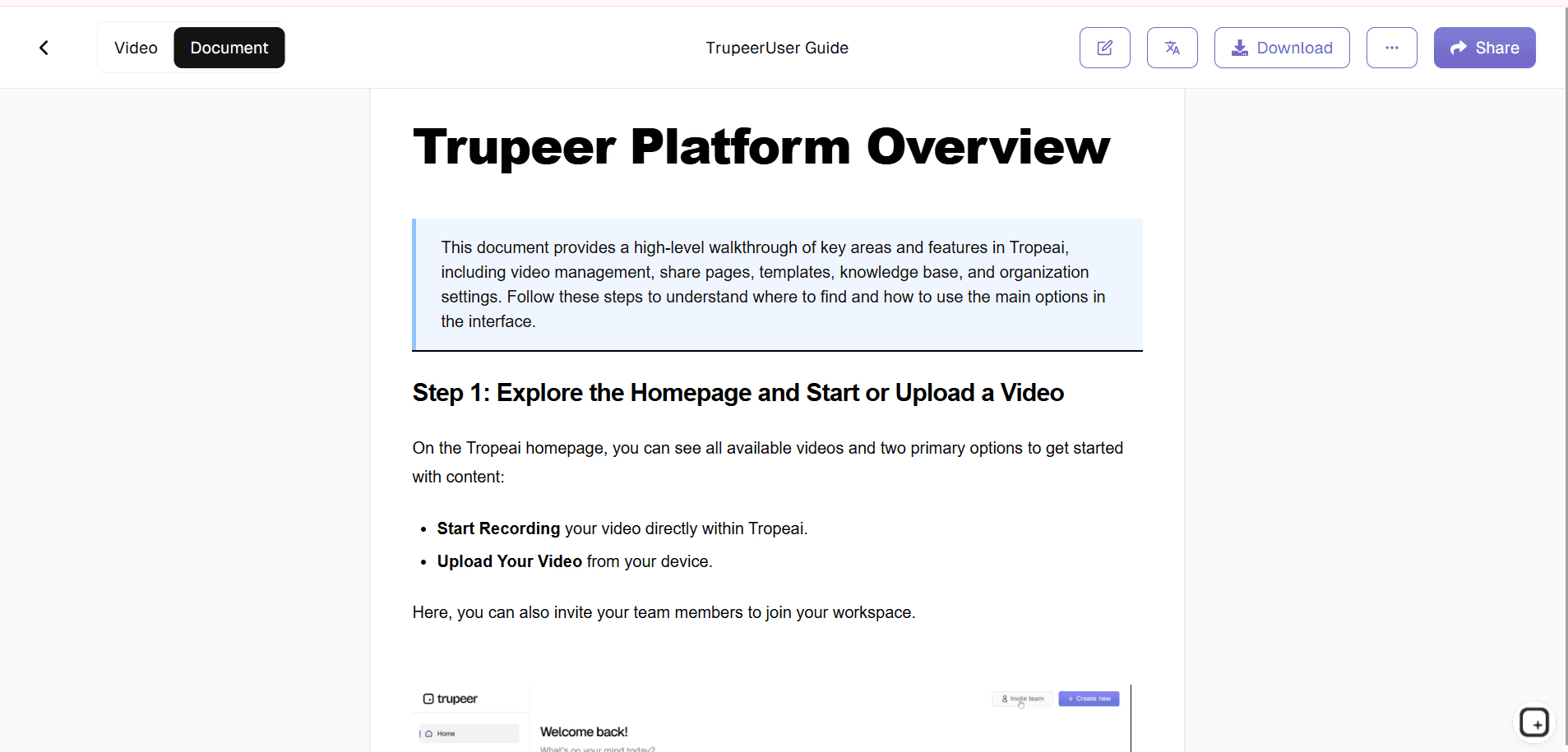
The AI converts your visual workflow into written instructions, creating clear, step-by-step procedures. It generates descriptive headings, identifies prerequisite requirements, and organizes information in a logical sequence. The system also captures relevant screenshots and embeds them at appropriate points in the documentation.
Step 4: Template Application and Customization
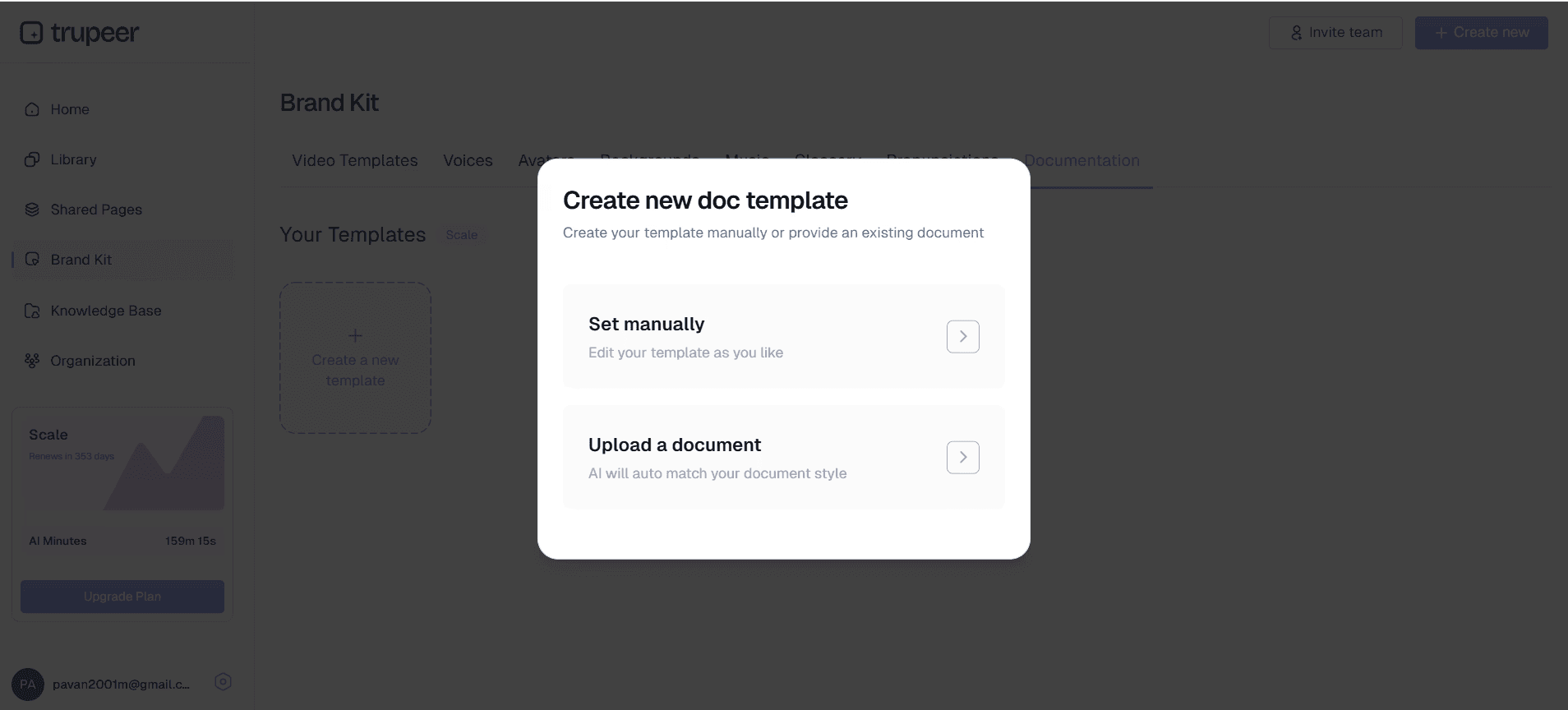
Your generated SOP is automatically formatted using your preferred template. You can apply your brand kit to ensure consistent visual identity, adjust formatting styles, and customize the structure to match your organization's documentation standards. The platform saves your template preferences, making future SOP creation even faster.
Step 5: Review and Publishing
The final step involves reviewing your AI-generated SOP and making any necessary adjustments. You can edit content directly within the platform, add additional context or warnings, and ensure the documentation meets your specific requirements. Once satisfied, you can export the SOP in multiple formats or share it directly with your team through secure links.
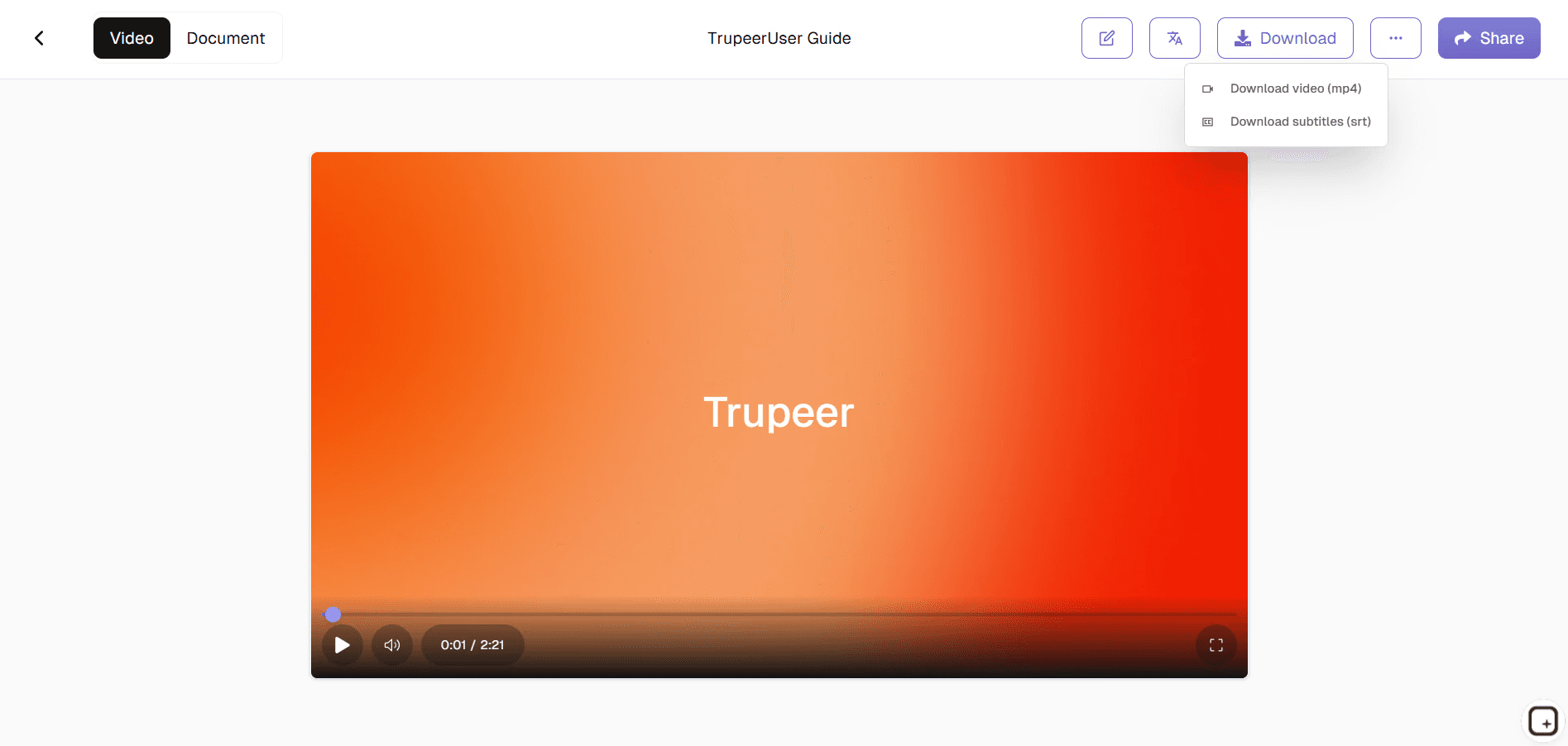
What Should an AI-Generated SOP Include?
AI produces the steps and the screenshots. The rest of this list is what makes the difference between a transcript of some clicking and a procedure someone can follow, and most of it you add during review.
Title and purpose:
what it covers and why it existsScope:
which situations it applies to, and which it does notPrerequisites:
required tools, access and permissions. Discovering at step seven that you lack a login is the most common reason a procedure gets abandonedStep-by-step instructions:
one action per step, in the order performedScreenshots or visuals:
cropped and annotated to the control that mattersWarnings and exceptions:
what to do when reality diverges from the happy pathExpected outcome:
how the reader knows they finished correctlyOwner:
the named person responsible for keeping it accurateLast reviewed date and version:
so a reader can judge whether to trust it
Creating SOPs From Video and Screen Recordings
AI SOP creation almost always starts from footage rather than a blank page, so it is worth being specific about what can go in and what comes out.
Can You Turn Screen Recordings Into SOPs Automatically?
Yes. A screen recording is the ideal input because every action is visible, so the AI has something concrete to work from rather than a description. Record the task once with any screen recorder, or capture it directly in the browser, and the output is a written procedure with a screenshot per step. If you already have footage, there is a dedicated walkthrough on converting a screen recording to an SOP.
Creating SOPs From Existing Video
You do not need to record anything new. Training sessions, handover calls, client walkthroughs, and old Loom or Teams captures all work as input. Most organisations have more of this footage than they realise, and working through a backlog of twenty existing recordings usually produces more documentation than scheduling any new ones. Output quality tracks input quality: a recording where the screen is clearly visible and the narration is intelligible produces a better procedure than a wide-angle meeting capture.
Video SOPs and Written SOPs From One Recording
The same capture can produce both a step-by-step document and a narrated video. That matters more than it sounds, because when the two are made separately they drift: the process changes, somebody updates the written procedure, and the training video carries on teaching the old method to every new starter who watches it. One source removes that failure mode.
People also read and watch differently. Someone mid-task wants to scan a numbered step; someone learning the process for the first time wants to watch it performed. Video SOPs suit onboarding and anything involving a drag, a timing-dependent action, or a judgement about what a screen is showing. Written SOPs suit reference, audit, and anything a reader needs to find in ten seconds. Publishing both from one recording means you are not choosing between them.
Turning an SOP Into a Training Video
The reverse direction works too. An existing procedure recording becomes a training video with narration cleaned of filler words and dead air, zoom applied to the action, captions, and branded formatting from your brand kit, without a separate editing project. For distributed teams the same video can be published across 65+ languages rather than re-recorded per market.
Manual SOP Creation vs AI-Assisted SOP Creation
Stage | Manual | AI-assisted |
|---|---|---|
Capturing the workflow | Written from memory | Recorded as performed |
Screenshots | Captured and pasted by hand | Generated from the recording |
Step writing | Written from scratch | Drafted by AI, then edited |
Formatting | Applied manually, varies by author | Template-assisted |
Adding context and exceptions | Human | Human |
Review | Human | Human |
Approval | Human | Human |
Updating after a change | Edit and re-screenshot manually | Re-record the changed part and regenerate |
Note the three rows that do not change. AI moves the production work, not the judgement.
Key Features of AI SOP Creation
Six capabilities do most of the work. Everything else is a variation on one of them.
Record or upload existing workflows:
capture the process live, or start from footage you already have.Automatic step-by-step generation:
the recording becomes ordered steps with drafted instruction text.Screenshots and visual context:
a captured frame per step, with annotation and blur where the screen showed something it should not.Templates and branding:
apply your required sections and branded formatting so output is consistent across authors.Translation for distributed teams:
publish the same procedure across 65+ languages from one source.Easier updates when workflows change:
re-record the part that changed and regenerate, rather than rebuilding the document.
Why Use Trupeer to Create SOPs?
Start from real work:
the procedure comes from a recording of the process rather than somebody's memory of it, so the first draft is closer to accurate.Get a usable first draft:
steps, screenshots and formatting arrive together, which turns documentation into a review task instead of a writing task.Publish in more than one format:
a written procedure and a narrated video come from the same source, so the two cannot drift apart.Make updates easier:
re-record the changed part and regenerate, rather than reopening and rebuilding the whole document.
Who Can Use AI to Create SOPs?
Operations teams:
recurring workflows, shift and site handovers, and quality procedures. These are the processes where inconsistency shows up as rework, so they are usually worth documenting first.HR and training teams:
onboarding, systems training, and role-specific workflows. Recording the process once replaces the part of onboarding that currently depends on shadowing whoever is least busy.IT and software teams:
internal tooling, access provisioning, deployment runbooks, and technical workflows. This knowledge tends to live in chat threads until somebody needs it at three in the morning.Customer support teams:
troubleshooting steps, escalation paths, and account procedures. Documented properly, agents stop guessing and answers stop varying by who picks up the ticket.Sales and marketing teams:
CRM workflows, campaign setup, and repeatable execution. Useful wherever a process spans several tools and everyone has quietly developed their own route through it.Consultants and agencies:
client handovers and repeatable delivery processes. Documentation doubles as a deliverable here, which changes the standard it has to meet.
Limitations of Using AI to Create SOPs
These are failure modes rather than teething problems, and knowing them is what makes the review step efficient instead of guesswork.
What is not visible or captured can be missed:
verbal approvals, policy requirements, judgement calls, escalation rules and the reason a step exists may all need adding manuallyIt documents what you did, not what you should have done:
record a process performed badly and you get a well-formatted description of a bad processOnly one path gets captured:
a recording shows the happy path. The exceptions, which is where most errors happen, are not in the footageStep boundaries are a judgement:
a good one, but expect to merge and split a few steps in every procedureNon-screen work needs another approach:
machine setup, warehouse handling, and lab procedures need video shot on a device plus written steps, not screen captureNobody has approved it:
a generated draft carries no sign-off. The process owner still has to confirm it is right before anyone follows it
Best Practices for Creating SOPs With AI
Prepare the workflow before recording:
run through the process mentally first, have every tool and login open, and close anything irrelevant. Interruptions and dead ends in the recording become confusion in the generated steps, and clearing them up afterwards takes longer than a minute of preparation would have.Use deliberate actions:
move at a normal working pace and pause briefly between distinct actions. Rapid clicking and multitasking make it harder to tell where one step ends and the next begins, which is the judgement the AI has to make.Use templates:
set up the sections your procedures must always carry, such as scope, prerequisites, approvals or safety warnings. It is worth having a few templates for different procedure types rather than one that half fits everything.Review the output properly:
fix step boundaries first, then wording, then add what the recording could not show. Anything a person had to know but never appeared on screen is the part only you can supply.Test with a real user:
hand it to someone who does not know the process and watch where they stop. That tells you more in five minutes than another editing pass, and it is the only reliable check that the procedure works.
Ways to Create SOPs With AI
There are several routes to the same outcome, and which one suits you depends on how much control you want and where you are starting from.
Generate a draft automatically:
recording in, procedure out, minimal configuration. The SOP generator covers thisMake one with AI, free:
the same job framed around trying it without commitment, on the AI SOP makerControl structure and formatting:
sections, step order, screenshots, branded formatting. That is the SOP builderCreate, publish, and manage the whole library:
the category view sits on SOP software, with governance on SOP management softwareCompare specific products:
if you are weighing Trupeer against Scribe, Tango, Trainual and the rest, the comparison of the best SOP creation software is more use than any single tool page
For the practice rather than the products, SOP best practices covers what to document first, ownership, and review cycles.
Explore Related Tools
Why Choose Trupeer to Create SOPs With AI
Instant Documentation
Transform screen recordings into professional SOPs in minutes, not hours.
Consistent Quality
AI ensures every SOP meets professional standards with comprehensive coverage.
Template Customization
Apply your organization's branding and formatting preferences automatically.
How to Create SOPs With AI
Step 1
Record your workflow process
Step 2
Let AI analyze recording
Step 3
Review and publish SOP
Frequently Asked Questions
How does AI to create SOPs work?
Trupeer's AI analyzes your screen recordings to automatically generate step-by-step SOPs. Simply record your workflow or upload an existing recording, and the AI creates comprehensive documentation with clear instructions and embedded screenshots.
Can I customize the generated SOPs?
Yes, you can fully customize your SOPs using Trupeer's template system and brand kits. Apply your organization's formatting, add custom sections, and include specific terminology to match your documentation standards.
What file formats can I export SOPs in?
Trupeer supports multiple export formats including PDF, Word documents, and web-friendly HTML. You can also share SOPs directly through secure links or embed them in your existing knowledge base systems.
How accurate are AI-generated SOPs?
Trupeer's AI achieves high accuracy by analyzing actual screen recordings rather than relying on written descriptions. The visual context ensures every step is captured precisely, though we recommend reviewing output for organization-specific requirements.
Can I create SOPs in multiple languages?
Yes, Trupeer's translation feature automatically converts your SOPs into multiple languages. This capability is perfect for global organizations that need consistent documentation across diverse teams and regions.
More Tools


