4.8/5
Free AI Business Playbook Software
Create and share playbooks for onboarding, sales & processes with AI.
Get started for free

Trupeer produces business playbook documentation from screen recordings. Record the workflow once during the actual work, the AI generates a structured playbook document with numbered steps, annotated screenshots, and a matching video walkthrough. The output ships as PDF or Word for download, embeds inside Notion, Confluence, SharePoint, or Document360 for hosting, or lives in Trupeer's Shared Page format with visibility controls per document.
A note on category before going further. "Business playbook software" gets used to mean two different things. The first meaning: workflow execution platforms like Trainual, Process Street, Whale, and Tango Workflows. These host playbooks and run them as assigned workflows for the team. Owners get assigned to steps, completion gets tracked, role-based views surface different sections to different people, and analytics show which steps are getting completed or skipped. Trupeer isn't this kind of platform.
The second meaning: tools that help teams produce the procedural content that goes into a playbook. SOPs, training guides, sales playbook procedures, customer onboarding workflows, operational checklists. Trupeer fits this second category. The AI handles the content production work that traditionally took days of manual writing and screenshotting. Then the content gets hosted wherever the team already runs playbooks (in Trainual or Whale if the team uses one of those platforms, in Notion or Confluence if the team uses a wiki, in Trupeer's knowledge base if the team doesn't have an existing system).
Why Business Playbook Software is required?
The pattern most teams hit. Senior employees know how the work gets done because they've been doing it for two or three years. New employees don't, because nobody wrote the playbook down. So onboarding takes 6-12 weeks because new hires have to learn each procedure by shadowing somebody senior or by interrupting people with "wait, how do we do this?" questions. The senior team member's calendar fills up with the same explanations they gave six months ago to a different new hire. Multiply this across departments, locations, and quarters, and the cost compounds quickly. This is why it pairs well with the business plans templates the onboarding and the documentation come from the same source.
The other pattern. The playbook exists in Trainual or Whale or Notion. The steps are listed. The owners are assigned. But when an owner sits down to execute their assigned step, they read the documentation and discover it was written 18 months ago, references a UI that's changed, and skips the three confirmation prompts that have been added since. So the documentation is technically there, but it's wrong. Owners ask on Slack instead. The playbook becomes documentation theater it looks complete, but nobody trusts it.
Both patterns share a root cause: the procedural content underneath the playbook structure has to be accurate and current, or the playbook stops working. Trupeer fixes the procedural content production specifically. Record the actual procedure, AI generates the documentation. When the procedure changes, re-record the affected step, the documentation updates in place. So the playbook's procedural content stays in sync with reality.
What this Business Playbook Software does
Trupeer's business playbook documentation tool generates the procedural content that gets organized into playbooks. The AI handles three jobs in one processing pass:
First, it extracts the sequential steps from the recording with timestamps, captures annotated screenshots at each click, and generates the matching written procedure document. So a 6-minute recording of "how we run the quarterly sales close" becomes a structured document with 12 numbered steps and screenshots at each one. Total writing time: roughly zero.
Second, it produces a matching video walkthrough of the same procedure. The same recording that fed the written document produces the polished video version with filler words removed, zoom effects timed to click moments, and brand kit styling applied automatically. Both formats from the same source.
Third, the documents get organized into Trupeer's built-in knowledge base structure with sections and chapters, with visibility settings per document (public, organization-only, selected domains, invite-only). So the playbook documentation lives in a structured library the team can navigate, or gets exported into whatever playbook hosting platform the team already uses.
Core Capabilities:
Generate written procedural documents from screen recordings with screenshots and numbered steps inline
Produce matching video walkthroughs from the same source recording
Organize procedural documents into sections and chapters with search across the library
Visibility settings per document: public, organization-only, selected domains, invite-only
Export to PDF, Word, or MP4 for hosting outside Trupeer
Translate documents to 65+ languages on paid tiers, applied to both written guide and video voiceover
How Trupeer’s Business Playbook Software works
Step 1: Record your procedure
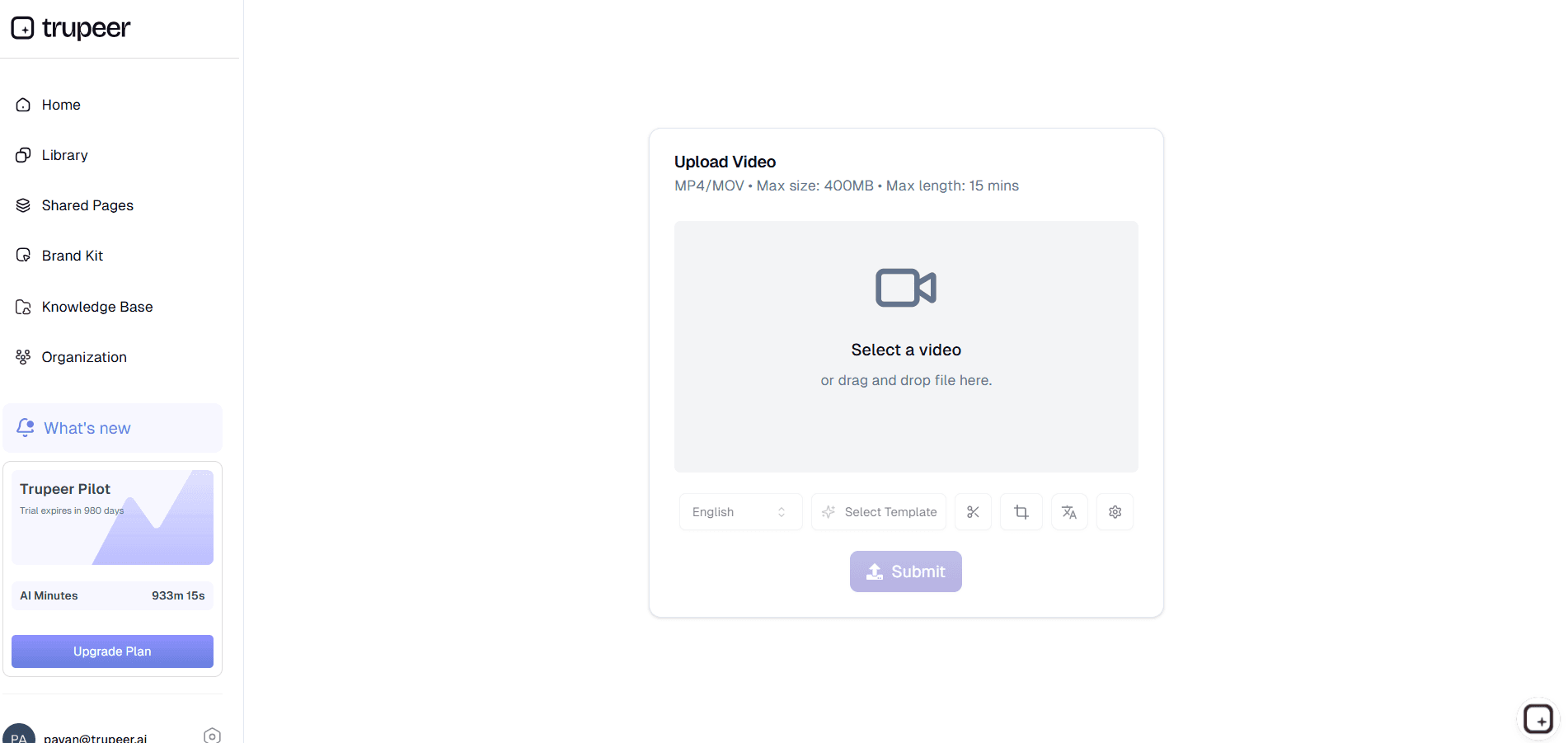
Open the browser-based screen recorder and walk through the procedure you want to document. Talk through the steps the way you'd teach a new team member. Or upload an existing recording from Loom, Zoom, or similar tools.
Step 2: AI generates the playbook content
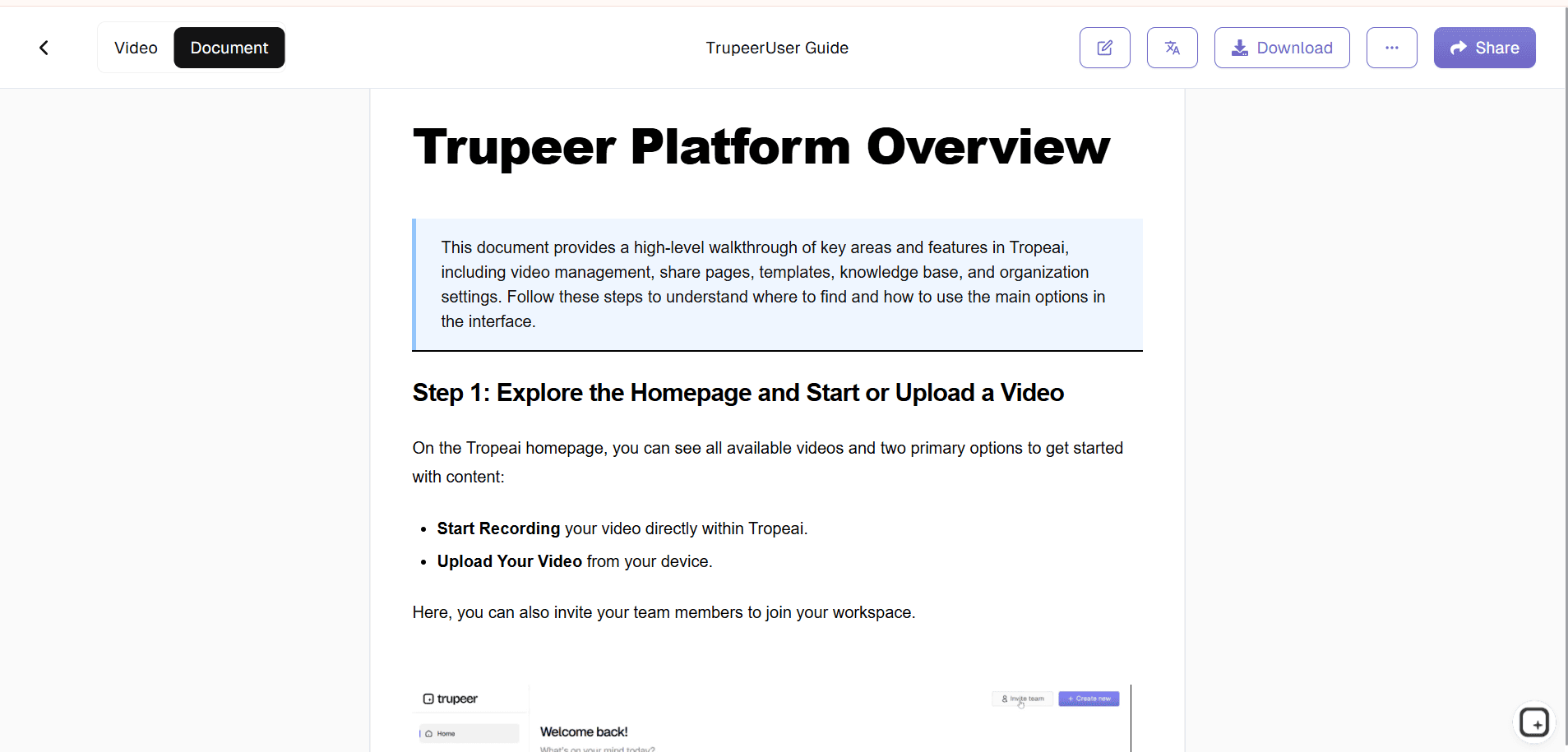
The platform extracts each step from the recording, captures annotated screenshots, generates the written documentation, and produces the matching video walkthrough. Filler words removed, cursor jitter smoothed, brand kit applied. Total AI processing: usually 5-15 minutes depending on recording length.
Step 3: Organize and distribute
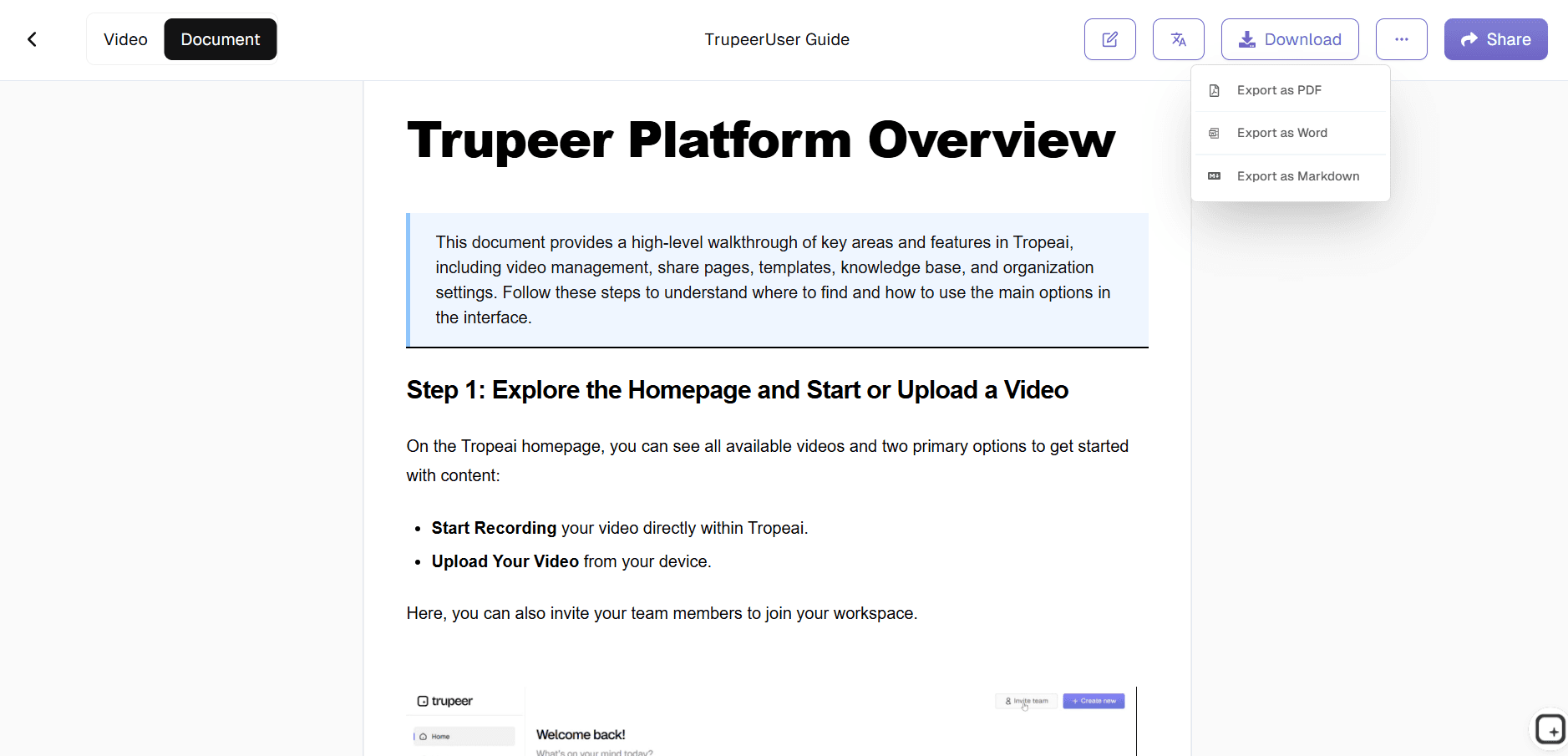
Review the auto-generated document, make any edits, organize it into the knowledge base sections that match your playbook structure. Share via Shared Page link, embed in your existing playbook platform, or download as PDF or Word.
Who this Trupeer’s Business Playbook Software is for
Trupeer's business playbook documentation tool serves teams that need to produce procedural content for their playbooks regularly but don't have a dedicated technical writing function.
Operations Managers: Document the recurring procedures the team runs every quarter (close, launch, audit prep, new hire onboarding) so the same process runs the same way regardless of who's executing it that quarter. The playbook stays current as procedures evolve because updates happen by re-recording one changed step.
Sales Operations and Sales Enablement: Document repeatable sales motions — demo procedures, discovery call workflows, onboarding handoff steps, deal review playbook procedures. Same source recording produces both the video walkthrough for new rep training and the written reference document for the playbook's hosted content.
Customer Success Leaders: Document the customer onboarding playbook procedures, account health review workflows, expansion conversation frameworks, and quarterly business review procedures. Each procedure has its own document with screenshots, inline steps, and matching video — all linked from the team's existing playbook structure.
HR and L&D Specialists: Document employee onboarding procedures, benefits enrollment workflows, performance review cycles, and policy walkthroughs. The annual playbook updates with re-recordings of one changed step rather than full rebuilds when systems or processes shift.
Franchise and Multi-Location Operations: Produce standardized procedural documentation that ships to every location. Translate to local languages from one source recording. Brand kit ensures every location's playbook documentation looks consistent regardless of who recorded the source.
Scale-Up Companies: Capture procedural knowledge from senior employees before it leaves with them. Recording the actual procedures during normal work creates documentation as a byproduct, not as a separate writing project that always slips.
Key Features of Trupeer’s Business Playbook Software
AI generates procedural content from recordings: The AI watches the click sequence in your recording and generates the matching written document with numbered steps and screenshots inline. So 30 manual screenshot operations turn into zero. The writer reviews what was captured, swaps any that need adjustment, ships.
Matching video walkthrough from the same source: Same recording that generated the written document produces the polished video version. Filler words removed, cursor jitter smoothed, zoom effects timed to click moments, brand kit styling applied. Both formats from the same source recording.
Knowledge base with sections and chapters: Organize procedural documents into the structure that matches your playbook. Each playbook category gets its own section. Search across the library returns the right document when somebody types a query. Past the 50-document mark, this is where most documentation systems start breaking. Trupeer's search keeps working.
Visibility per document: Operational playbook documents stay organization-only. Customer-facing playbook steps shared with the customer's team get selected-domains visibility. Compliance-sensitive procedures stay invite-only. Set visibility per document, change it later without rebuilding anything.
Updates by re-recording one changed step: When the underlying procedure shifts (system UI update, workflow refinement), re-record just that step. The AI re-processes the segment. Both the video and the written document update in place. So the playbook's procedural content stays current as systems and processes change.
Where Trupeer fits next to Trainual, Process Street, Whale, and playbook execution platforms
The business playbook tooling space has two distinct categories. The first is playbook execution platforms: Trainual, Process Street, Whale, SweetProcess, Tango Workflows, and similar tools. These host playbooks and run them as assigned workflows. Owners get assigned to procedures, completion gets tracked, role-based access surfaces different procedures to different team members, dashboards show which playbooks are being executed and which are getting skipped. These platforms are built for the execution layer of playbooks. Trupeer isn't built for this layer and doesn't try to be.
The second category is procedural content production for playbooks. Tools that generate the documents that get organized into playbook structures. Trupeer, Scribe, Tango (the click-capture tool, not Tango Workflows), and Guidde fit this category. The buyer is usually in operations, sales enablement, customer success, HR, or L&D. The use case: produce procedural content faster and more accurately than manual writing allows. Trupeer's specific positioning within this category: both video and written document from one recording, brand kit and 65+ language translation built in, and re-record-one-step update mechanics that keep the procedural content current as procedures change.
The honest pattern most teams settle into. Use a playbook execution platform (Trainual, Process Street, Whale) as the hosting and assignment layer. Use Trupeer as the content production layer feeding into it. The execution platform handles "who's assigned to which playbook step, who's completed it, who needs reminders." Trupeer handles "what does the procedure for each step actually look like, with screenshots and a video walkthrough." Most teams running both tools find the pairing works because each tool does its specific layer well. For teams without an existing execution platform that just need procedural documentation organized in a knowledge base structure, Trupeer's built-in knowledge base covers the hosting side as well. Either pattern works.
Explore Related Tools
Benefits of Using Trupeer’s Business Playbook Software
AI-Generated Playbooks
Create polished business playbooks in minutes using AI automation.
Multimedia Integration
Add AI avatars, voiceovers, and visuals for interactive team learning.
Centralized Business Knowledge
Keep all strategies, workflows, and processes in one accessible hub.
Create a Business Playbook with Trupeer
Step 1
Upload or Draft Your Processes
Step 2
AI Enhances & Structures Content.
Step 3
Share & Train Teams
Frequently Asked Questions
1. What is Business Playbook Software?
It’s a tool to document and share your company’s key processes, strategies, and workflows in a structured way.
2. How does Trupeer help in building playbooks?
Trupeer uses AI to create, organize, and enhance playbooks with interactive elements like avatars and video guides.
3. Can I create a sales playbook with Trupeer?
Yes, Trupeer is perfect for documenting sales scripts, strategies, and training workflows.
4. Is Trupeer suitable for startups?
Absolutely. Startups can use Trupeer to document processes early and scale smoothly.
5. Can I update playbooks easily?
Yes, Trupeer allows you to edit and update playbooks anytime, ensuring they stay relevant.
More Tools


