4.8/5
Free Client Onboarding Tool
Stop repeating the same product walkthrough on every kickoff call. Trupeer AI turns one recording into a polished client onboarding video plus a written setup guide, in any of 65+ languages.
Make Onboarding Content Free

Trupeer AI's client onboarding tool takes the product walkthrough that the customer success manager runs on every kickoff call and turns it into a polished video plus a written setup guide, ready to brand and translate into 65+ languages. SaaS and B2B teams use it to stop repeating the same demo on every onboarding call and instead ship a Shared Page link the client can watch, share with their team, and refer back to whenever a new joiner needs to ramp on the product. The real cost on most client onboarding shows up in content production: the walkthroughs and setup guides nobody has time to produce properly between calls.
Record the product walkthrough once. Get a polished onboarding video and a written setup guide in the same job.
Customer success managers stop repeating the same demo on every kickoff call.
Translate onboarding content into 65+ languages for global clients.
Share via a branded Shared Page link clients can post in Slack, embed in their intranet, or hand to new joiners.
Update by re-recording the changed step when the product changes. The rest of the onboarding content stays intact.
What Trupeer AI produces for client onboarding
A customer success manager records the product walkthrough they've been giving on every kickoff call for the past two quarters. Trupeer AI handles the post-production. Filler words and "let me share my screen" moments get removed. Cursor jitter and zoom transitions get smoothed. A draft client onboarding video and a draft written setup guide arrive in the same job, so the CSM doesn't have to maintain two separate sources of truth for the same product. The same onboarding can feed straight into the onboarding video, so you're not putting it together separately.
The video output is MP4, ready to embed in any onboarding email, Slack channel, help center, or client portal. Document output is PDF or Word, ready for the client's internal knowledge base or for handing to the client's training team. Brand kit applies automatically: corporate logo, colors, fonts, intro and outro slides all match the rest of the team's customer-facing materials. AI avatars are available when a senior CSM moves on and the team wants the next person to inherit the same on-screen presence. Custom voice cloning lets the team keep a single brand voice across every onboarding video, even when the recording team rotates.
How the client onboarding tool works in three steps
The full flow takes one recording and produces ship-ready client onboarding content. No separate writing pass, no video editing tool, no production backlog between kickoffs.
Step 1: Record the kickoff walkthrough
Hit record in the browser, walk through the product the same way the CSM walks through it on a kickoff call, or upload an existing recording from a Zoom session that landed well. Recording a 20-minute walkthrough is faster than building a 4-page client onboarding template from scratch, and what comes out lands better with the client because it shows the actual product running, not a slide deck describing it.
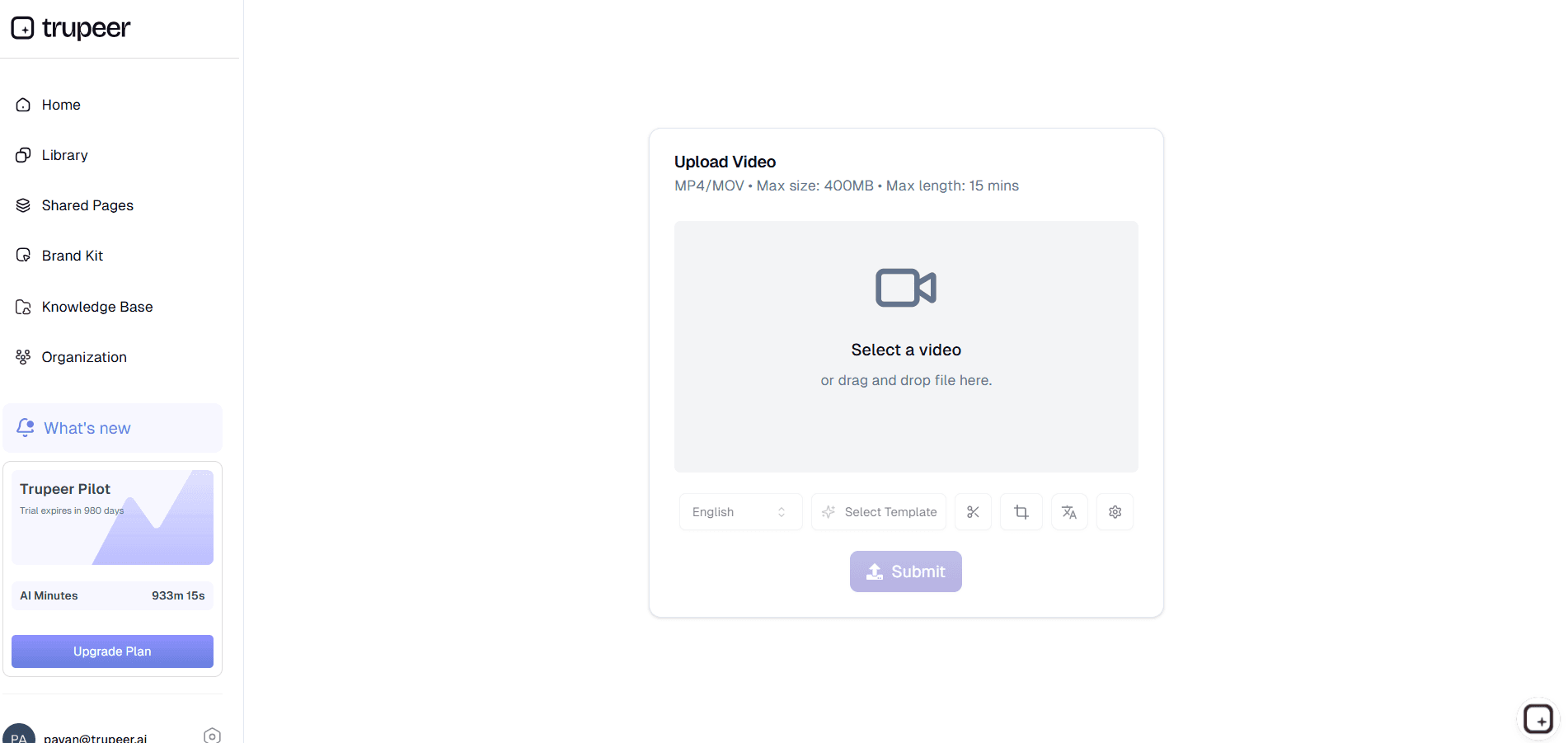
Step 2: Trupeer AI generates video and written setup guide
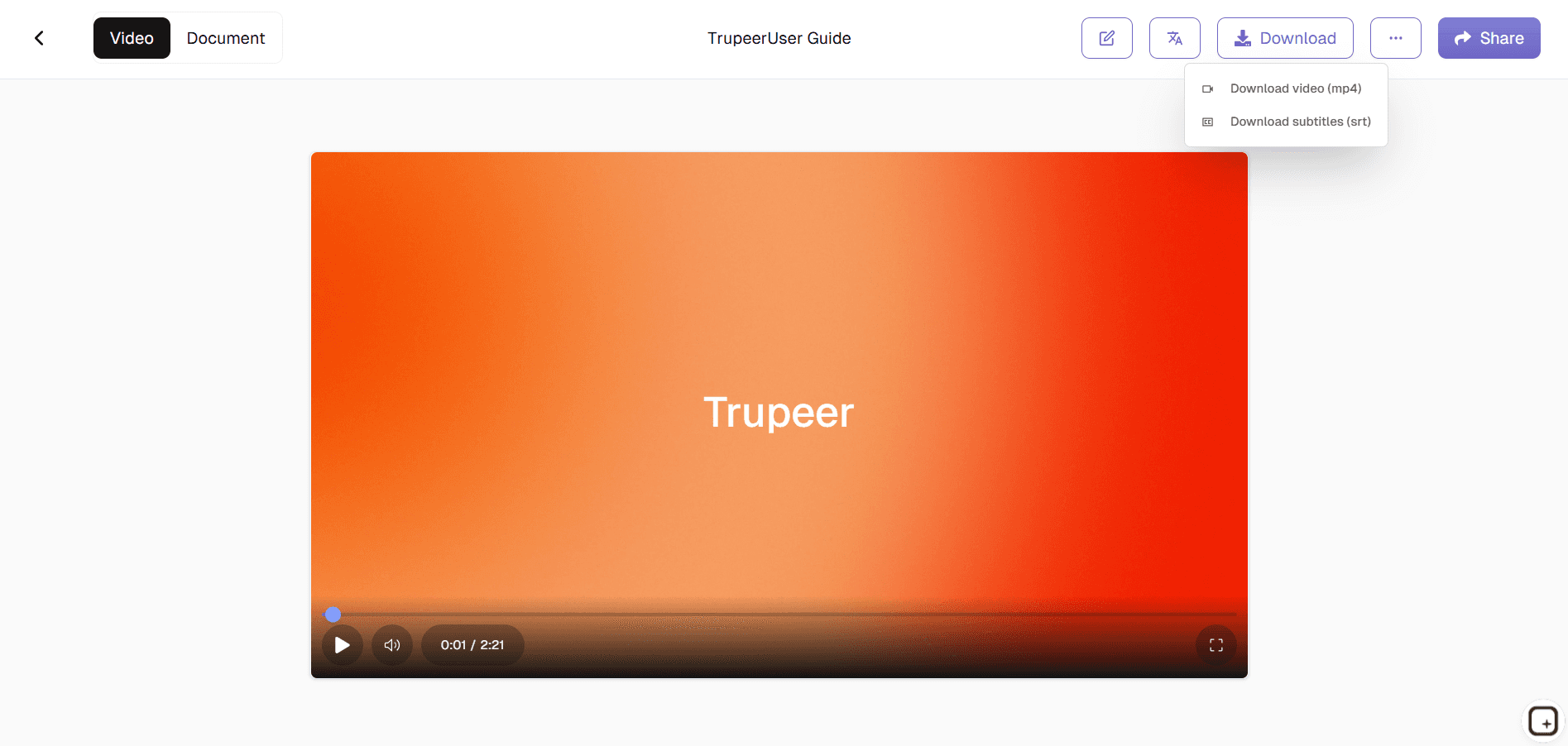
Filler words get removed. Zoom and cursor effects get added where they help the client follow what's happening on screen. A draft onboarding video and a draft setup guide show up in the editor together. The custom glossary handles internal product names, feature names, and integrations that the AI wouldn't otherwise know how to pronounce or spell correctly.

Step 3: Brand, translate, and ship
Apply the brand kit so the corporate logo, colors, and intro/outro slides match the rest of the team's onboarding materials. Translate into Spanish, Portuguese, Mandarin, Hindi, or any of 65+ languages the client's team speaks. Then ship via a Shared Page link the CSM can drop into the kickoff email, paste into the shared Slack channel, or schedule into the client's next training session.
Who actually opens Trupeer AI for client onboarding
The person who opens this tool is usually a customer success manager or onboarding specialist at a B2B SaaS company where every CSM runs through the same product walkthrough on every kickoff call. Consistently, the strategic work (deal closed, kickoff scheduled, success criteria agreed) is already done. What slows things down is the time CSMs spend re-explaining the same product flow to a new client every Tuesday. Trupeer AI lets the CSM record that walkthrough once and ship it as a polished asset clients can watch on their own time.
The same workflow shows up across adjacent roles. Onboarding specialists use it to ship structured client onboarding content for new SaaS rollouts. Implementation managers use it for technical setup walkthroughs that the client's IT team needs in detail. Account managers use it to record feature deep-dives for clients who've expanded into a new product tier. Customer education leaders use it to build the onboarding video library that ships alongside the documentation. Some teams treat it as a replacement for hiring a dedicated customer onboarding specialist; others use it alongside one to multiply that person's output.
Client onboarding content types Trupeer AI handles
Client onboarding usually starts with the same handful of content pieces every time: a welcome video that sets expectations for the kickoff call, a product walkthrough that shows how the core features work, a setup or configuration guide for the technical user wiring up the integration, and a training walkthrough for the end users who'll actually use the product day-to-day. Trupeer AI handles all of them through the same recording-to-doc flow, which is what most teams searching for a client onboarding template or a customer onboarding template are actually trying to build.
For SaaS customer onboarding specifically, the content piece that pays off fastest is the standard product walkthrough every CSM has memorized. Recording it once means the live kickoff call becomes a conversation about the client's specific goals instead of a 40-minute demo. The same logic applies to feature-specific walkthroughs: instead of scheduling a 30-minute Zoom every time the client adopts a new feature, send a 4-minute Shared Page link with the relevant walkthrough and follow up with a 10-minute call to answer questions. SaaS onboarding software at the project-tracking layer handles the task list. Trupeer AI handles the content the task list points to.
For B2B customer onboarding more broadly, the same pattern applies to setup guides, technical configuration walkthroughs, and integration documentation. Recording the actual setup once is faster than writing a customer onboarding template from scratch, and the result lands better because the client can watch the work being performed. New customer onboarding becomes a question of which Shared Page links to send and in what order, instead of a question of which CSM has bandwidth to do the next walkthrough. That shift is what most teams searching for ways to improve customer onboarding are actually looking for: faster content production, not better workflow tracking. The same logic applies to a client onboarding workflow, a client onboarding process flow, or a structured client onboarding checklist that the CSM team can hand off without losing context.
Across the broader customer onboarding software market (Userpilot, Pendo, WalkMe, and Appcues for in-product guidance; Rocketlane, GuideCX, and ChurnZero for project management; standard customer onboarding checklist or customer onboarding strategy templates floating around Notion), the content gap is the same. Most teams have figured out their customer onboarding process at the workflow layer. What's missing is the content: the videos and documents the workflow actually points to. The best onboarding software in this content layer is whatever lets the CSM team produce a real client onboarding solution without booking a video editor or a technical writer for every walkthrough. Software onboarding in modern SaaS is a content-heavy job, and digital customer onboarding only delivers on its promise when the content the workflow distributes is current, useful, and built for the actual user. That gap is what most customer onboarding best practices articles describe but rarely solve, since solving it means producing more content faster, not writing more strategy decks about it.
Where Trupeer AI fits next to Rocketlane, GuideCX, and other client onboarding software
Trupeer AI doesn't replace the project-tracking layer. Rocketlane, GuideCX, ChurnZero, Vitally, and other client onboarding software handle task lists, ownership, deadlines, and progress tracking. Most heavyweight client onboarding solutions in the market sit in that project-management category. Trupeer AI handles the content production layer that feeds those task lists. A task that says "send the product walkthrough video" is only useful if the video exists. A task that says "send the integration setup guide" is only useful if the guide exists. Most teams running customer onboarding solutions have the workflow tracking working fine and are stuck on the content layer, because content is harder to template and harder to produce than tasks.
The two tools work alongside each other instead of competing. The project tracker handles "what needs to happen and when." Trupeer AI handles "what the client actually watches, reads, or does at each step." Customer onboarding automation usually means automating the workflow (auto-assign tasks, auto-trigger notifications, auto-update statuses). What it doesn't automate is the content production. That's still manual work for the CSM team unless they're using a tool like Trupeer AI to generate the videos and documents the workflow points to. Automated customer onboarding only works end-to-end when both layers are covered: the workflow layer in the project tracker, the content layer in Trupeer AI.
Updates for product changes and translation for global clients
Client onboarding content rots faster than most teams expect because products change every release. A UI update breaks the walkthrough video, the new pricing tier breaks the welcome explainer, and a feature deprecation breaks the deep-dive recording. Most teams handle this by quietly letting the content drift and apologizing on calls when the client notices. Trupeer AI handles it by re-recording just the changed step. The Shared Page link the CSM distributed last quarter now points to the current version automatically, with the updated step folded into the rest of the onboarding flow.
For global clients, translation closes the language gap. The same kickoff walkthrough reaches the Madrid client's team in Spanish, the São Paulo client's team in Portuguese, and the Berlin client's team in German, from the same source recording, in the same week. Most client onboarding tools treat translation as an afterthought or skip it entirely. Trupeer AI translates both the video and the written documentation in the same job, with the brand kit, glossary, and on-screen text all carried through. Pairing the generator with the Trupeer AI SOP builder covers the standard operating procedures that sit underneath the client onboarding workflow.
Why customer success teams use Trupeer AI for client onboarding
Stop running the same kickoff demo
Record the walkthrough once. Live kickoff calls become conversations about the client's goals, not 40-minute demos.
Video and written guide together
One recording produces both formats. Clients who prefer to read get the guide. Clients who prefer to watch get the video.
Updates when the product changes
When the UI shifts, re-record the affected step. Both video and document update in place. Shared Page links stay current.
Make client onboarding content in three steps
Step 1
Record the product walkthrough or upload existing footage
Step 2
Trupeer AI generates the video and written setup guide
Step 3
Brand, translate, and share via one Shared Page link
Frequently Asked Questions
Is the client onboarding tool free to use?
Yes for the core flow. Record a product walkthrough, generate the video and written setup guide, and share via a Shared Page link without paying. Paid tiers add brand kits, AI avatars, custom voice cloning, team workspaces, translation across 65+ languages, and longer recording limits. Pricing details on the pricing page.
What is customer onboarding (also called client onboarding), and what does Trupeer AI generate?
Customer onboarding (often used interchangeably with client onboarding) is the structured process of getting a new client to first value with a product or service: kickoff calls, product walkthroughs, setup configuration, integration, training the client's team, and reaching the agreed go-live milestone. Trupeer AI doesn't manage the workflow or track the tasks (other customer onboarding software handles that). It generates the content that lives at each step: welcome videos, product walkthroughs, setup guides, feature deep-dives, training videos for end users.
What inputs and outputs does the client onboarding tool support?
Inputs: screen recordings, webcam recordings, uploaded video files (including Zoom recordings), audio files, and text scripts. Outputs: video as MP4 and onboarding documentation as PDF or Word (DOCX). Both also ship as a Shared Page, which is a branded link that embeds anywhere the team already shares content. Translation in 65+ languages applies to both video and document in the same job.
Does Trupeer AI integrate with our existing client onboarding software?
Trupeer AI generates a Shared Page link that drops into any workflow or task management tool: Rocketlane, GuideCX, ChurnZero, Vitally, HubSpot, Salesforce, or whatever else the team uses. The project tracker stays in place. Trupeer AI handles the content layer underneath the task list. A task that says "send the product walkthrough" now points to a polished Shared Page link instead of a Loom recording from last quarter.
What happens when the product changes?
Re-record just the step that changed. Trupeer AI re-processes that segment, and both the video and the written documentation update in place. Anyone who has the Shared Page link sees the new version automatically. The client doesn't need to be told "use this new link." The link itself stays current, which solves the staleness problem most onboarding content runs into within a quarter of being recorded.
More Tools


Understand how work happens.
Carry it into your next transition.
Start Free Trial
Book a Demo
Resources

