4.8/5
Create Process Guides in Seconds
Record a workflow once. Trupeer AI generates a video walkthrough plus a written step-by-step guide from the same recording, with brand kit applied and translation into 65+ languages built in.
Create Process Guide Free

Trupeer AI's process guide creator takes a screen recording and produces both a polished video walkthrough and a written step-by-step guide from the same job. The team records the workflow once, the AI removes filler words, adds zoom on the key actions, and writes the document alongside. Most tools force a choice between video tools that don't generate documents and screenshot tools that don't produce video. Trupeer AI does both in one pass, which is the actual reason teams searching for a process guide tool aren't satisfied with what's already on the market.
Record once, get video plus written process guide in the same job.
AI removes filler words, smooths cursor jitter, zooms on the parts of the screen where the work is happening.
Brand kit applies automatically: logo, colors, fonts, intro/outro slides match the rest of the team's documentation.
Translate the guide into 65+ languages, applied to both video and written document together.
Update by re-recording the changed step. Both formats update in place.
What Trupeer AI produces for a process guide
Someone records a screen walkthrough of the process they want to document. Trupeer AI handles the post-production. Filler words and "let me just find the right tab" moments get removed. Zoom effects highlight the parts of the screen where the action is happening. A draft video and a draft written step by step guide arrive in the same job, so the team doesn't have to maintain two separate sources of truth for the same workflow. That also covers how to guides because the steps are captured as you go, you don't have to write them up afterwards.
Video output is MP4, ready for the help center, internal wiki, or onboarding sequence. Document output is PDF or Word, with numbered steps and screenshots that match the moments in the video. Brand kit applies automatically: logo, colors, fonts, intro and outro slides match the rest of the team's documentation library. The custom glossary handles internal product names that the AI wouldn't otherwise know how to spell or pronounce. Cursor highlighting, region focus, and automatic zoom on UI interactions show up in the AI screen recording output without anyone manually adding them.
How to create a process guide in three steps
The full flow takes one recording and produces ship-ready content. No video editing tool, no separate writing pass, no documentation work to chip away at over the next quarter.
Step 1: Record or upload the workflow
Hit record in the browser, capture the workflow as it's actually performed, or upload an existing screen recording from another tool. A 10-minute recording becomes a 3-5 minute video plus a structured written guide, since the filler material gets removed during processing. The richer the recording, the richer the process guide that comes out the other side.
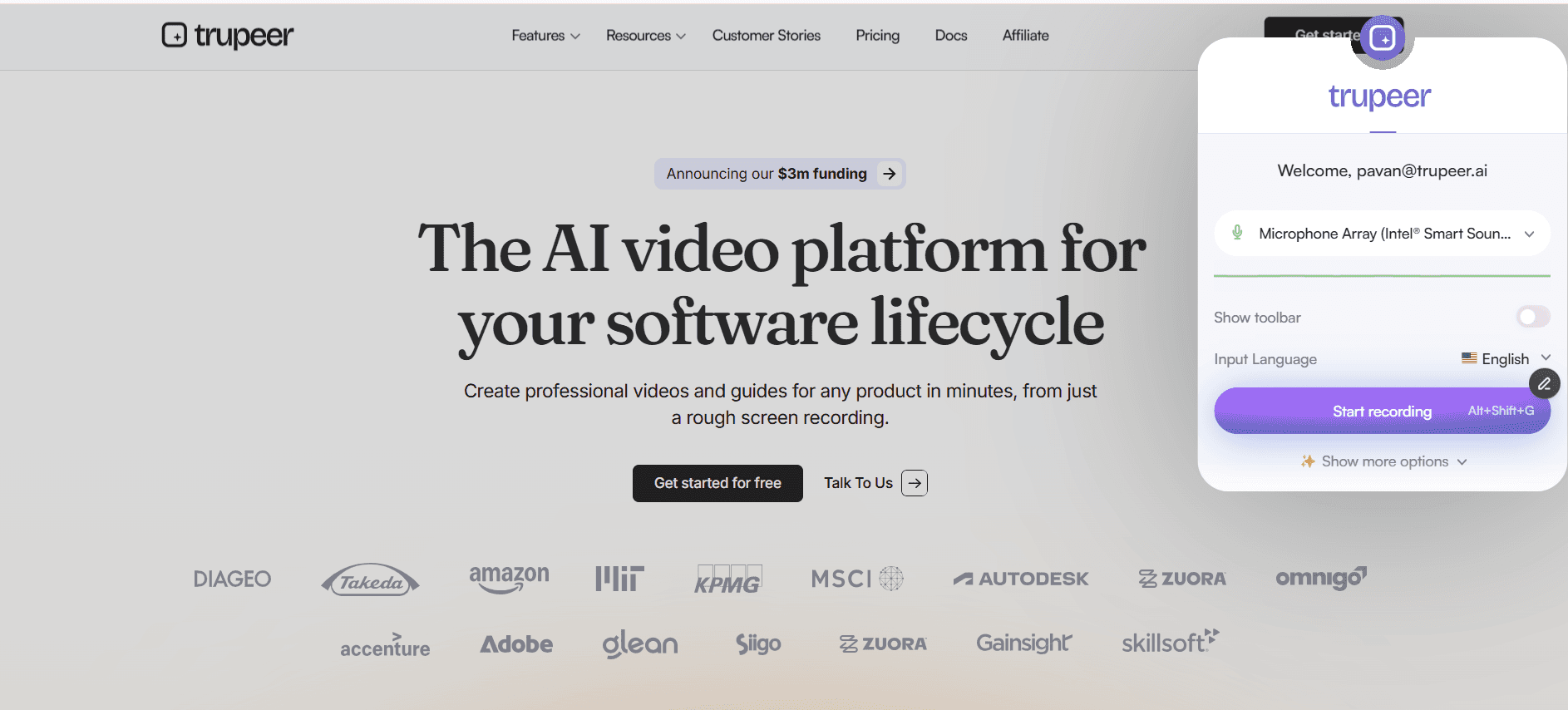
Step 2: Trupeer AI generates video and written guide
Filler words get removed. Zoom and cursor effects get added where they help the viewer follow the work. A draft video and a draft step-by-step guide show up in the editor together. The custom glossary applies, so internal product names get spelled and pronounced correctly in both outputs.
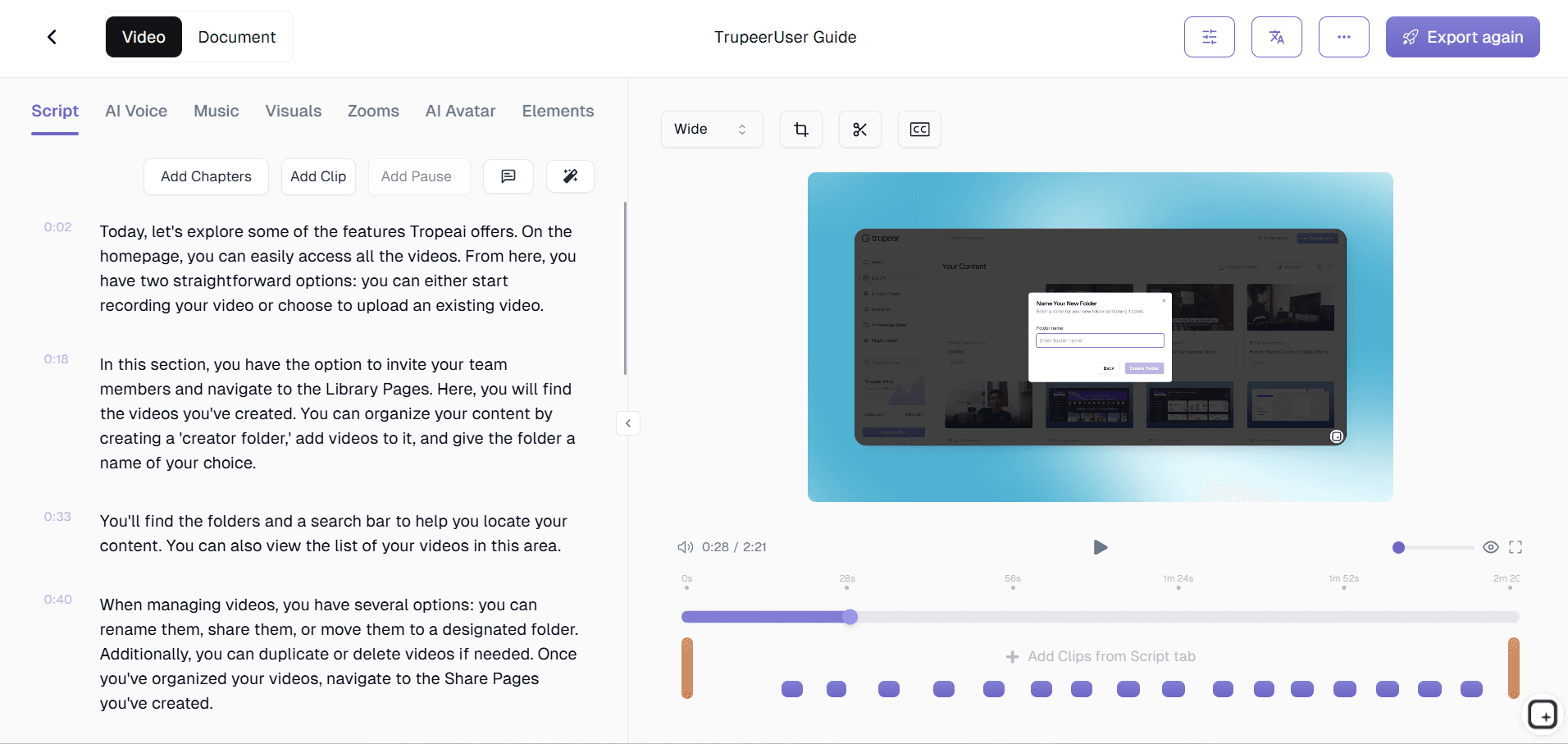
Step 3: Brand, translate, and share
Apply the brand kit so logo, colors, and intro/outro slides match the rest of the team's materials. Translate into Spanish, Mandarin, Hindi, Portuguese, or any of 65+ languages the company speaks. Then ship via a Shared Page link the team can embed in any knowledge base, intranet, LMS, or help center.
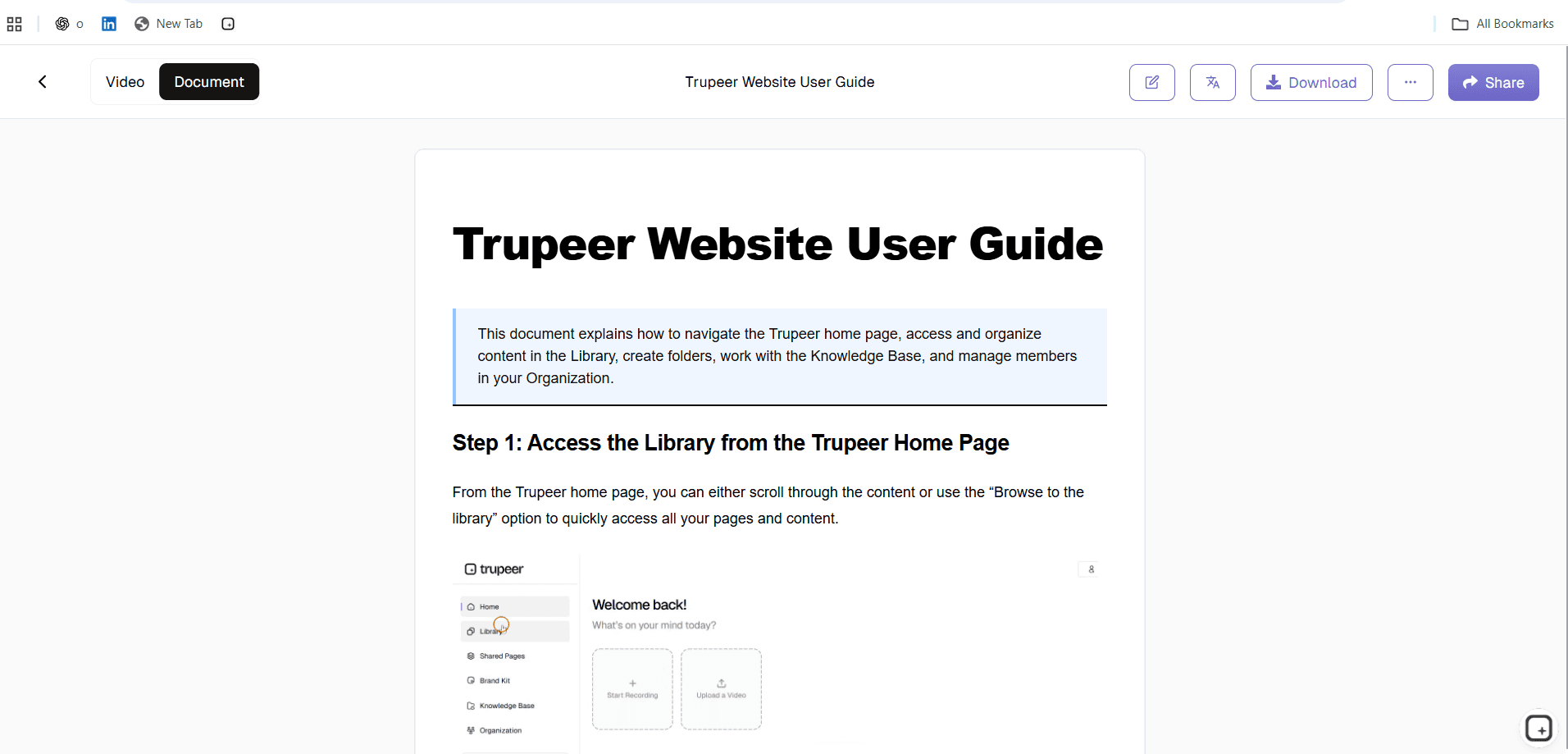
Who actually opens a process guide creator
The person who opens this tool is usually someone who's been asked to document a workflow that lives in their head: a senior CSM who has been doing the same product walkthrough on every kickoff call, an operations lead who knows the close process better than anyone else, a support manager who has the escalation tree memorized. Consistently, the knowledge exists, the documentation doesn't, and writing it from scratch is the activity nobody wants to do. Trupeer AI lets that person record the workflow once and ship the documentation as a polished asset, instead of putting it on a backlog that never gets cleared.
The same workflow shows up across functions. Operations and ops engineers use it for internal process documentation. Customer success teams use it for onboarding walkthroughs and feature deep-dives. Support teams use it for troubleshooting guides and incident response procedures. HR teams use it for employee onboarding workflows, benefits enrollment, and policy walkthroughs. Marketing and product teams use it for feature explainers and customer-facing how-to content. Educators and training leads use it to build the procedural content that sits underneath their training programs.
Process guide content types Trupeer AI handles
A process guide is any structured explanation of how to perform a task, with the steps laid out in the order someone needs to execute them. The format varies by context: a help center article might want a written step-by-step guide with screenshots, a new-hire onboarding sequence might want a video walkthrough plus a written companion guide, and a customer success walkthrough might want a 3-minute video embedded in an email. Trupeer AI handles all of these from the same recording, since the same source material can be exported in multiple shapes depending on the audience.
The categories that come up most often: software walkthroughs (how to use a specific feature), operational procedures (how to run a specific workflow), training content (how the team handles a recurring task), customer-facing how-to content (how the customer accomplishes their goal in the product), and compliance documentation (proof that a process was performed correctly). The same underlying recording produces all of them, varying only in which audience the brand kit, language, and length get tuned for. That's the structural difference between using a process guide template downloaded from a Google search and using a process guide creator that generates the content from the actual work. A step by step guide template might give the team a frame; a step-by-step guide template populated by the AI gives them shippable content. Teams that started with a process guide template typically migrate to Trupeer AI once they realize the template was the easy part.
Where Trupeer AI fits next to Loom, Scribe, and manual documentation
Most existing tools force a tradeoff. Loom, Vidyard, and ScreenPal record video well but don't produce a structured written guide. Scribe, Tango, and Guidde produce written step-by-step guides with screenshots but don't generate a polished video alongside. Manual documentation produces both eventually but costs hours of writing time per guide. Trupeer AI does both in one pass, because the same recording feeds both outputs: the video is the cleaned-up version of the recording, the written guide is the structured transcription with embedded screenshots from the same source.
The dual-output approach matters because different audiences want different formats. A senior engineer scanning for a specific procedure wants to skim a written guide; a new joiner watching the same procedure for the first time wants to see the video; a global team needs the same content in five languages; and a help center needs an embeddable video plus a copy-paste-able written walkthrough for the same article. One recording covering all of those use cases is faster than producing each one separately, and the format question stops requiring a choice between video and document.
Updates and translation: keep process guides current as workflows change
Process guides rot fast because the underlying software changes. A UI update breaks the walkthrough, a new feature breaks the procedure, a workflow change breaks the entire guide. Most teams handle this by quietly letting the documentation drift and apologizing when someone notices. Trupeer AI handles it by re-recording just the changed step. The AI re-processes only that segment, and both the video and the written guide update in place. Any Shared Page link the team distributed last quarter now points to the current version automatically.
For global teams, translation closes the language gap. The same process guide reaches the team in Madrid in Spanish, in Tokyo in Japanese, in Berlin in German, from the same source recording, in the same week. Translation applies to both the video voiceover and the written documentation, with the brand kit, glossary, and on-screen text carried through. Pairing the process guide creator with the Trupeer AI SOP builder covers the standard operating procedures that sit underneath the recorded workflows.
Why teams use Trupeer AI to create process guides
Video and written guide in one pass
Most tools force a choice between video and written documentation. Trupeer AI produces both from the same recording, in the same job.
Cleaner output than a raw recording
Filler words removed, cursor jitter smoothed, zoom effects added on the parts of the screen that matter. Brand kit applied automatically.
Update by re-recording, not rewriting
When the workflow changes, re-record the affected step. Both video and written guide update in place. Shared Page links stay current.
Create a process guide in three steps
Step 1
Record the workflow on screen or upload existing footage
Step 2
Trupeer AI generates the video and written step-by-step guide
Step 3
Brand, translate, and share via one Shared Page link
Frequently Asked Questions
Is the process guide creator free to use?
Yes for the core flow. Record a workflow, generate the video and written guide, and share via a Shared Page link without paying. Paid tiers add brand kits, AI avatars, custom voice cloning, team workspaces, translation across 65+ languages, and longer recording limits. Pricing details on the pricing page.
What is a process guide, and what does Trupeer AI generate?
A process guide is a structured explanation of how to perform a specific task, with the steps laid out in execution order. Trupeer AI generates two outputs from the same recording: a polished video walkthrough (MP4) and a written step-by-step guide (PDF or Word) with screenshots and numbered steps. Both formats serve the same content from different angles, depending on whether the audience prefers to watch or read.
What inputs does the process guide creator accept?
Inputs: screen recordings made in the browser, webcam recordings, uploaded video files (including Zoom recordings), audio files, and text scripts. Outputs: video as MP4 and process guide as PDF or Word. Both also ship as a Shared Page, which is a branded link that embeds anywhere the team already shares content.
How long does it take to create a process guide?
The recording itself takes as long as the workflow takes to perform. The AI processing typically completes in a few minutes, after which both the video and the written guide are ready for review and customization. The team can then apply the brand kit, translate into other languages, or hand the draft to a reviewer before publishing.
What happens when the workflow changes?
Re-record just the step that changed. Trupeer AI re-processes that segment, and both the video and the written guide update in place. Anyone who has the Shared Page link sees the new version automatically. The team doesn't need to chase down every place the old link was embedded, rebuild the documentation, or coordinate with everyone who has bookmarked the link.
More Tools



