4.8/5
Customer Service AI Writer
Generate help articles and walkthrough videos from screen recordings. The customer service AI writer that creates self-service content, not the kind that drafts ticket replies.
Generate Help Content Free

Trupeer AI is the customer service AI writer that produces help articles and walkthrough videos from screen recordings, not the kind that drafts ticket replies. The AI for customer service category is mostly chatbots, conversational AI agents, and reply automation tools (Intercom Fin, Zendesk AI, Salesforce Agentforce). Trupeer AI works one step earlier: it generates the help content that customers find before opening a ticket, and that agents send via macros when tickets do come in. The bottleneck on most support operations is the lack of good self-service content, not the speed of agent replies.
Generates help articles and walkthrough videos from screen recordings, in the same job.
Customer service AI writer for self-service content, not for ticket reply drafting.
Translate help content into 65+ languages for global customer bases.
Share via a branded Shared Page link that embeds into the help center, Slack, or directly into agent macros.
Update by re-recording the changed step when the product changes. The whole library stays current.
What Trupeer AI produces for support teams
A support manager or senior agent records the resolution to a common ticket type. Trupeer AI handles the post-production. Filler words and "let me check that for you" moments get removed. Zoom effects highlight the parts of the screen where the customer actually needs to act. A draft walkthrough video and a draft written help article arrive in the same job, so the team doesn't have to maintain two separate sources of truth for the same resolution.
Video output is MP4, ready for the help center, the YouTube support channel, or the email macro. Document output is PDF or Word with numbered steps and screenshots, ready for the help center as a written article or for handing to a reviewer. Brand kit applies automatically: logo, colors, fonts, intro and outro slides all match the rest of the team's customer-facing content. The custom glossary handles internal product names, feature names, and integrations that the AI wouldn't otherwise know how to pronounce or spell. The combination of video and written article is what most help centers need but rarely have, since producing both formats has traditionally required a writer and a video editor working in parallel.
How the customer service AI writer works in three steps
The full flow takes one recording and produces ship-ready help content. No separate writing pass, no video editor, no help center articles piling up every quarter.
Step 1: Record the resolution walkthrough
Hit record in the browser, walk through the resolution the same way a senior agent walks a customer through it on a call, or upload an existing recording from a Zoom session that landed well. The AI works on what's recorded. Recording a 5-minute walkthrough is faster than writing a help article from scratch, and what comes out lands better with customers because it shows the actual product running, not a description of how it works.
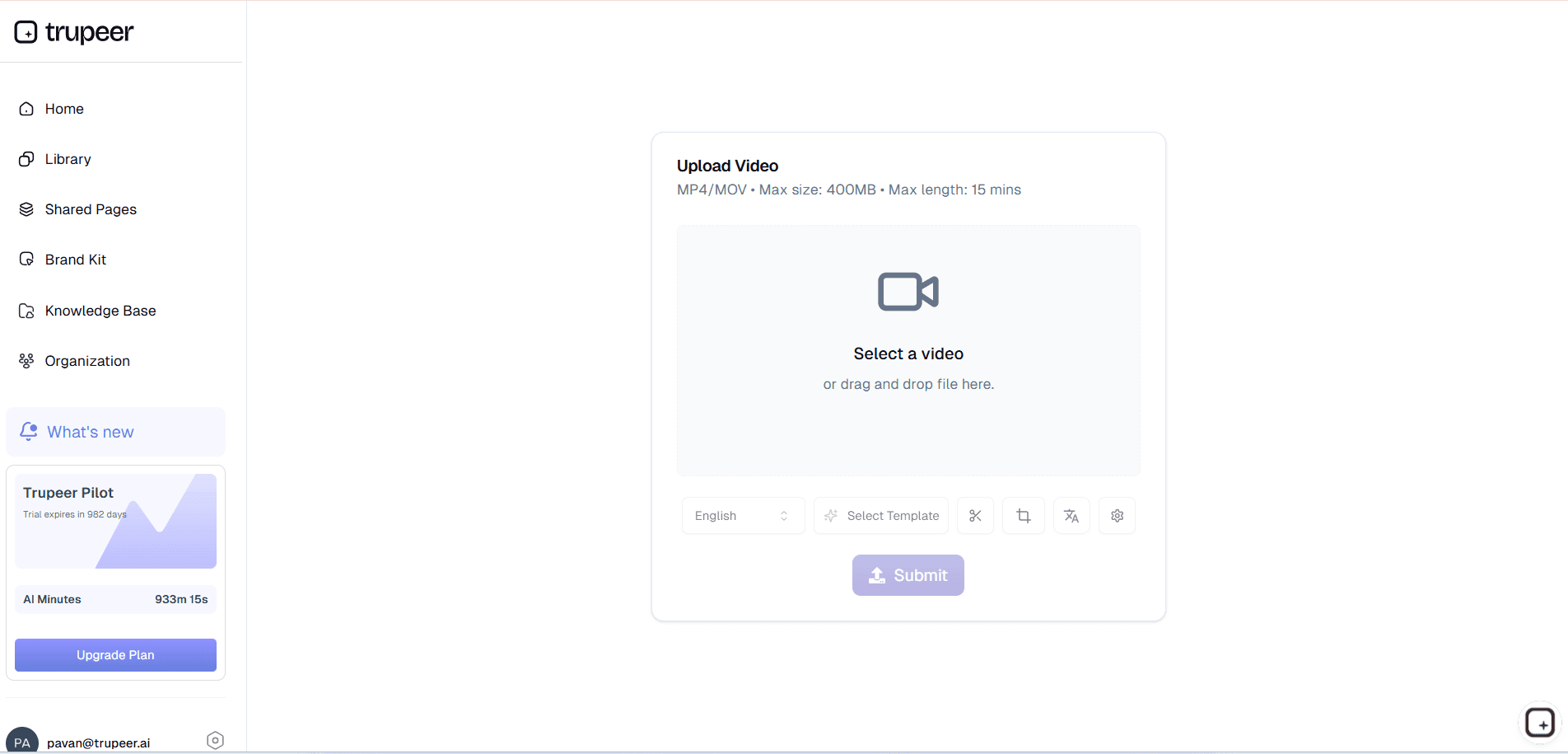
Step 2: Trupeer AI generates the video and help article
Filler words get removed. Zoom and cursor effects get added where they help the viewer follow the resolution. A draft video and a draft written help article show up in the editor together. The custom glossary handles product names, integration names, and feature names that the AI wouldn't otherwise know how to spell or pronounce correctly.
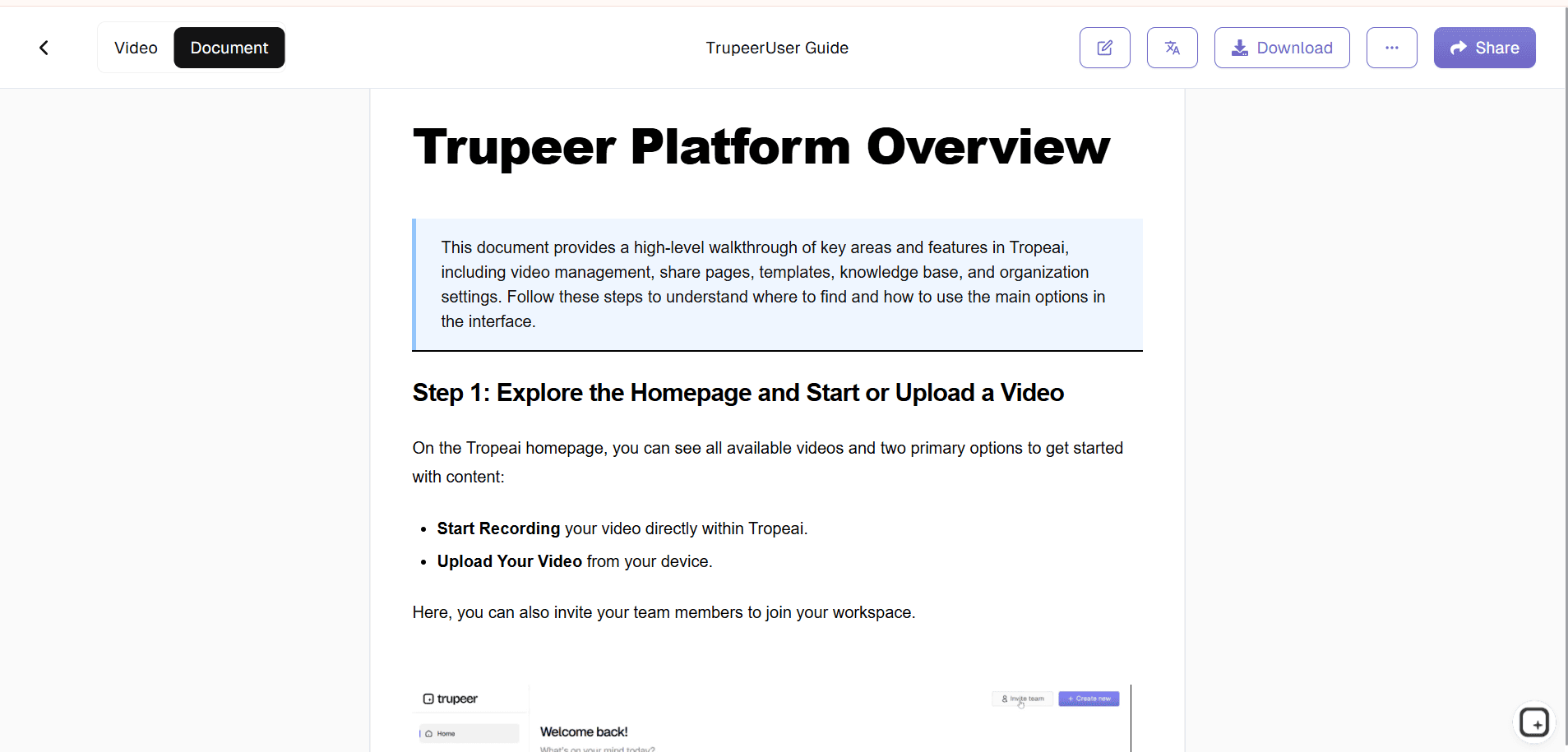
Step 3: Brand, translate, and ship
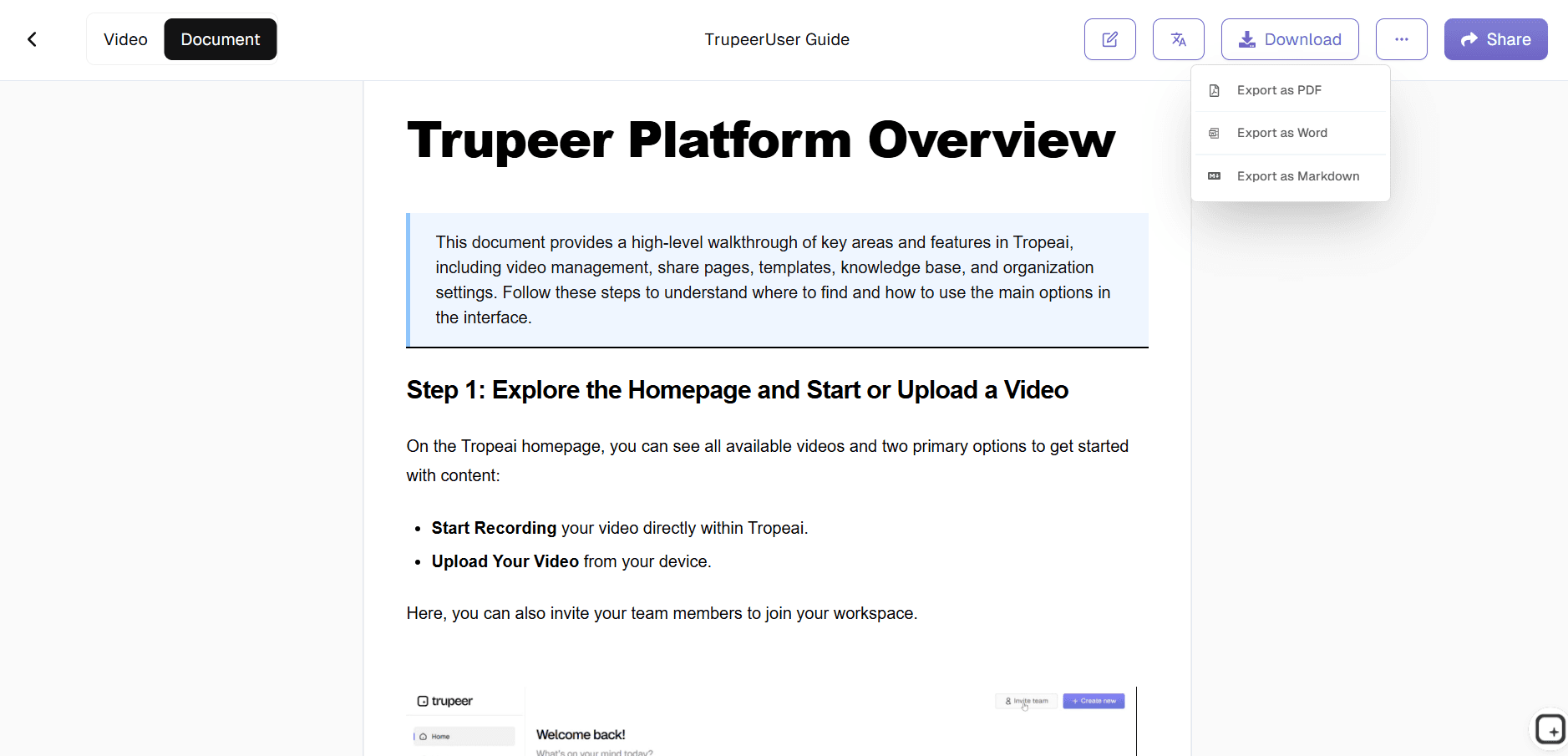
Apply the brand kit so the corporate logo, colors, and intro/outro slides match the rest of the help content library. Translate into Spanish, Portuguese, Mandarin, Hindi, or any of 65+ languages the customer base speaks. Then ship via a Shared Page link agents can paste into ticket replies, embed in the help center, or schedule into proactive outreach.
Who actually opens this customer service AI writer
The person who opens this tool is usually a support manager, knowledge base owner, or customer experience lead at a SaaS company where the top 20 ticket types account for 60% of inbound volume. Consistently, the team knows what those top ticket types are. What slows things down is writing the help articles that would let customers self-serve, since writing one good help article with screenshots and step-by-step instructions takes most of an afternoon and the team has 50 articles on the backlog. Trupeer AI lets a senior agent record the resolution once and ship the article and video together as a published help center entry.
The same workflow shows up across functions. Customer success teams use it to produce feature-specific walkthroughs that get sent in onboarding emails. Knowledge base managers use it to maintain the article library as the product changes. Customer support directors use it to build out the self-service content layer that reduces ticket volume over time. Customer experience leads use it for the long tail of niche features that customers ask about occasionally but consistently. Some teams treat it as a replacement for hiring a dedicated knowledge base writer; others use it alongside one to multiply that person's output.
Help content types Trupeer AI handles for customer service
The categories that come up most often: top-of-funnel onboarding walkthroughs (how to get started), feature-specific guides (how to use a specific capability), troubleshooting walkthroughs (what to do when the common issue happens), integration setup (how to wire up the connection to the customer's other tools), and policy explanations (how billing, refunds, or account changes actually work). Across all of these, the same recording-to-doc flow handles the work. The format adjusts to fit the channel: a help center wants a long-form article with screenshots, an email macro wants a short video, a chatbot fallback wants a link to a self-service page that does the work.
For generative AI in customer service and generative AI for customer service work more broadly, Trupeer AI fills the prevention layer most AI customer service tools leave unaddressed. AI chatbots and AI customer service agents only answer well when they have good source content to pull from. AI customer support tools that hallucinate are usually pulling from thin or out-of-date documentation. Generative AI in customer service performs better when the underlying knowledge base it draws from is current and complete, which is the same problem Trupeer AI solves directly for human agents. A customer service AI software stack with a chatbot at the front and Trupeer AI as the content production layer behind it covers both sides of the workflow: the question gets answered fast, and the source content the answer comes from is actually accurate. Most generative AI customer service deployments succeed or fail on this content layer.
Where Trupeer AI fits next to Intercom Fin, Zendesk AI, and other reply automation
Reply automation tools and conversational AI for customer service tools have a different job from Trupeer AI. Intercom Fin reads incoming tickets and drafts replies. Zendesk's AI agents answer questions in chat without human handoff. Salesforce Agentforce, Forethought, Ada, and similar tools all sit at the reply layer. Trupeer AI sits at the content layer all of these tools depend on. A chatbot that gives accurate answers needs an accurate knowledge base behind it. Reply-drafting agents that don't embarrass the team need current help articles to pull from. Trupeer AI produces those help articles and walkthrough videos faster than any human writer can.
The two categories complement each other. Conversational AI customer service products and reply automation tools handle inbound speed for tickets that do come in. Trupeer AI handles the upstream content production that reduces the volume of tickets in the first place and gives the reply tool good source material when tickets are unavoidable. Most AI customer service companies (and the broader set of customer service AI companies in the space) focus on the reply side because it's the more visible product. The content side is harder to template and harder to produce, which is why most AI customer service software rollouts are still constrained by the knowledge base behind them rather than by the front-end AI itself. Teams evaluating ai powered customer support stacks usually realize this by month two of deployment.
Updates and translation: keep help content current as the product changes
Help content rots faster than support teams expect because products change every release. A UI update breaks the walkthrough video, a new feature changes the resolution path, a workflow change breaks the entire article. Most teams handle this by quietly letting the help center drift and apologizing in tickets when the customer notices. Trupeer AI handles updates by re-recording just the changed step. The AI re-processes only that segment, and both the video and the written article update in place. Anyone visiting the help center sees the current version automatically.
For global customer bases, translation closes the language gap. The same help article reaches customers in Madrid in Spanish, in Tokyo in Japanese, and in Berlin in German, from the same source recording, in the same week. Translation applies to both the video voiceover and the written article, with the brand kit, glossary, and on-screen text carried through. Pairing the customer service AI writer with the Trupeer AI SOP builder covers the agent-facing standard operating procedures that sit underneath the customer-facing help content.
Why customer service teams use Trupeer AI for help content
Help articles and videos in one pass
Record a resolution walkthrough once. Trupeer AI produces both a video and a written article from the same source, ready for the help center.
Prevention layer, not reply layer
Reduces ticket volume by giving customers self-service content for the top 20 ticket types, instead of trying to answer tickets faster after they're opened.
Translation for global customer bases
65+ languages applied to both the video and written article in the same job, with brand kit and glossary carried through.
Generate help content in three steps
Step 1
Record the resolution walkthrough or upload existing footage
Step 2
Trupeer AI generates the video and written help article
Step 3
Brand, translate, and share via one Shared Page link
Frequently Asked Questions
Is the customer service AI writer free to use?
Yes for the core flow. Record a resolution walkthrough, generate the video and written help article, and share via a Shared Page link without paying. Paid tiers add brand kits, AI avatars, custom voice cloning, team workspaces, translation across 65+ languages, and longer recording limits. Pricing details on the pricing page.
Does Trupeer AI draft ticket replies like Intercom Fin or Zendesk AI?
No. Trupeer AI is not a reply automation tool or a conversational AI agent. It generates the help articles, walkthrough videos, and support documentation that agents send in macros and that customers find via self-service. Teams that need a chatbot or AI customer service agent to draft replies should look at Intercom Fin, Zendesk AI, Salesforce Agentforce, Forethought, or Ada. Trupeer AI works alongside any of those by producing the source content their AI draws from.
What inputs and outputs does the customer service AI writer support?
Inputs: screen recordings, webcam recordings, uploaded video files (including Zoom recordings), audio files, and text scripts. Outputs: video as MP4 and help content as PDF or Word (DOCX). Both also ship as a Shared Page, which is a branded link agents can drop into ticket replies, paste into a help center article, or embed anywhere the team already shares customer-facing content.
Can Trupeer AI generate help articles and a knowledge base?
Yes. Generating help articles, FAQs, and knowledge base content is exactly what Trupeer AI does. Record the resolution to a common ticket type, generate the video and written article in the same job, and publish to whatever help center, knowledge base, or developer portal the team already uses. The output works for human-facing help centers and as source content for AI customer service tools that need accurate documentation to answer customers correctly.
How does this reduce ticket volume?
The top 20 ticket types in most SaaS support teams account for 60-70% of inbound volume. When those 20 resolutions exist as searchable help articles and 3-minute walkthrough videos, customers self-serve before opening a ticket. Trupeer AI doesn't drive the reduction directly (the team still has to publish the content and make it discoverable), but it makes the content production fast enough that the team can actually clear the backlog and keep it current as the product evolves.
More Tools


