4.8/5
Free Document Automation Software
Automate document creation from screen recordings and workflows. Let AI generate professional documentation without manual writing.
Try for Free

Trupeer's Document Automation Software automates the creation of professional documentation from screen recordings and workflow demonstrations. Record any process, and the AI automatically generates structured, formatted documentation with screenshots, step-by-step instructions, and optional video walkthroughs - eliminating manual document writing entirely. Worth being clear about what this page is and isn't, before going further. Trupeer's "document automation" is automation of procedural and operational documentation creation. The AI watches recorded workflows and generates SOPs, training guides, step-by-step procedures, help center articles, and onboarding documentation. If you're looking for document automation in the sense of "auto-populating contracts and proposals with data from a CRM" (the PandaDoc, Conga, HotDocs category), Trupeer isn't built for that workflow. The detailed scope section further down on this page covers exactly which document types fit and which don't.
Record workflows and let AI generate complete documentation automatically.
Automated screenshot extraction and annotation at every step.
Structured document output with numbered steps and formatted text.
Consistent branding and templates across all automated documents.
Share, export, or embed generated documentation across any platform.
What Is Trupeer's Document Automation Software?
Trupeer's document automation software transforms the way organizations create business documentation. Instead of manually writing procedures, capturing screenshots, and formatting documents, you simply record your screen while performing a workflow. The AI watches your actions, identifies each step, captures relevant screenshots, and generates a complete, professional document automatically. This is document automation that addresses the most time-consuming part of documentation work: the initial creation. That's also where the demo automation software fits in it takes the documentation you already have and turns it into something you can share.
The realistic scenario. The operations manager at a 80-person company needs to document 30 procedures across the next quarter: the new expense report flow, the updated security incident response, the customer onboarding sequence, the quarterly close steps in Workday, the new vendor approval workflow. Old approach: write each one manually in Google Docs, take screenshots one by one, paste them in, format consistently, send for review. 90-120 minutes per procedure, multiplied by 30 procedures, equals 45-60 hours of work. So the documentation gets postponed. Three quarters later, half the procedures are still undocumented, and the audit cycle catches it. The recording-based flow flips this: record each procedure during the actual work, the AI generates the documents, review and ship. 30 procedures complete in two weeks of recording sessions plus AI processing time, instead of a quarter of dedicated writing time that never gets scheduled.
How Does Document Automation Software Work?
Getting started with Document Automation Software takes just a few minutes
Step 1: Record or Upload
Launch the browser-based screen recorder and perform the workflow you want to document, or upload an existing video recording for AI processing.

Step 2: AI Document Generation
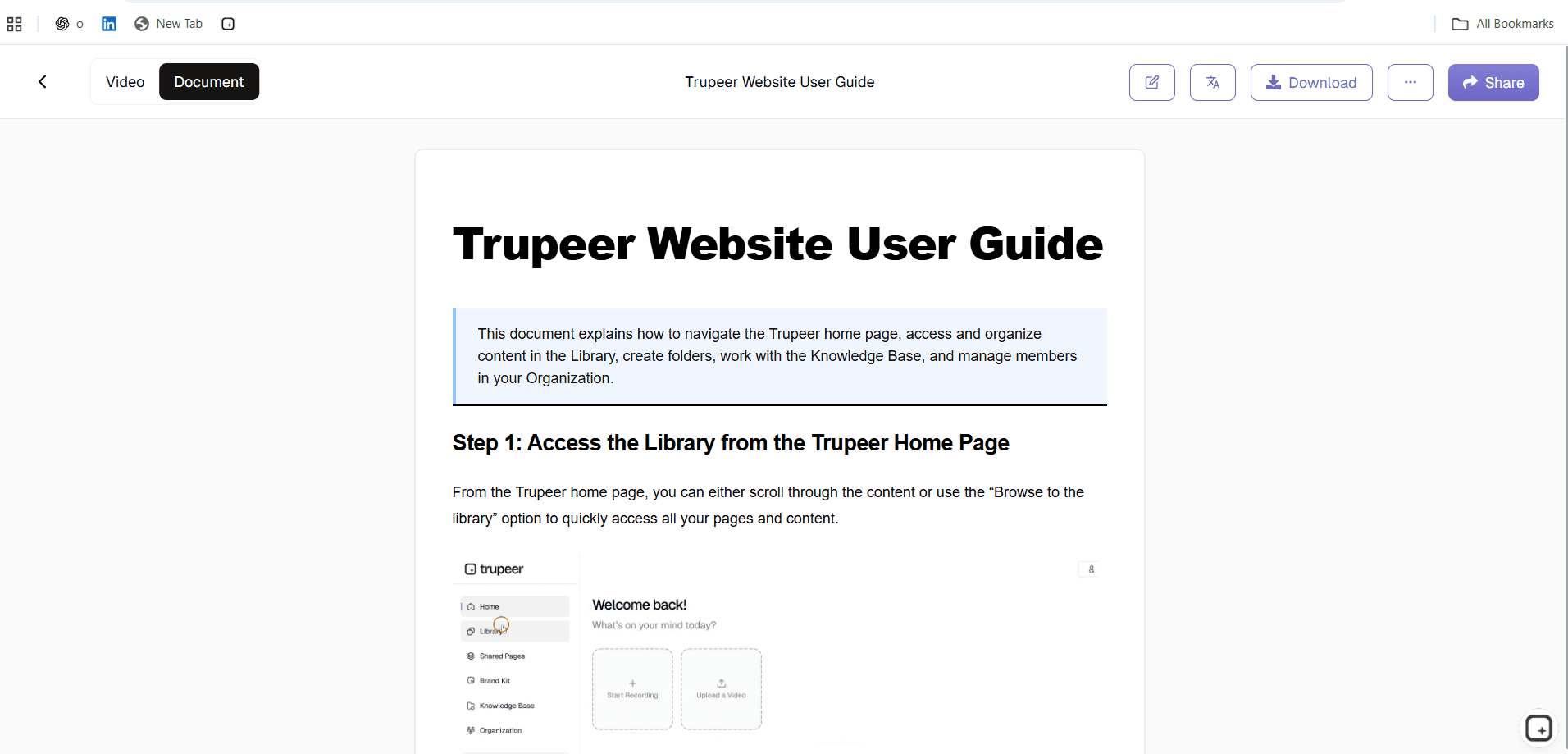
The AI analyzes your recording frame by frame, identifies each workflow step, extracts annotated screenshots, and generates a structured document with clear written instructions for every action.
Step 3: Customize and Distribute
Apply your brand kit for consistent styling, make any edits or additions, and share the generated document via link, embed, or file export.
Key Features of Trupeer's Document Automation Software
Intelligent Screenshot Automation: The AI detects the most relevant screen state at each workflow step and automatically extracts high-resolution screenshots. Each screenshot is annotated with numbered indicators, highlight boxes around active UI elements, and cursor position markers that show exactly where actions occurred. The screenshot work is where most manual procedural documentation actually dies. Old workflow: watch the recording, pause at the right moment, take a screenshot in Cleanshot or similar, crop, annotate, paste into the document, repeat 30 times for a typical SOP. New workflow: the AI does the timing, captures the screenshots at click moments, applies highlight overlays on the specific UI element each step references. So 30 manual screenshot operations turn into zero. The writer reviews what was captured, swaps any that need adjustment, ships.
Natural Language Step Generation: Rather than producing robotic instructions, the AI generates clear, natural-language descriptions of each step. The writing style adapts to the complexity of the action being documented, providing concise instructions for simple clicks and detailed explanations for complex configurations or decision points. The realistic scope worth being honest about. The AI generates step descriptions from the narration plus the visual workflow. So "Click Settings, then Billing, then Export Invoice History" becomes the step text. For procedures with technical or industry-specific terminology, the custom glossary (set up upfront) helps the AI use the right vocabulary. Without the glossary, the AI uses common phrasing that may need editing. Most teams set up the glossary once on day one and the per-document editing time drops to 5-10 minutes of review per document.
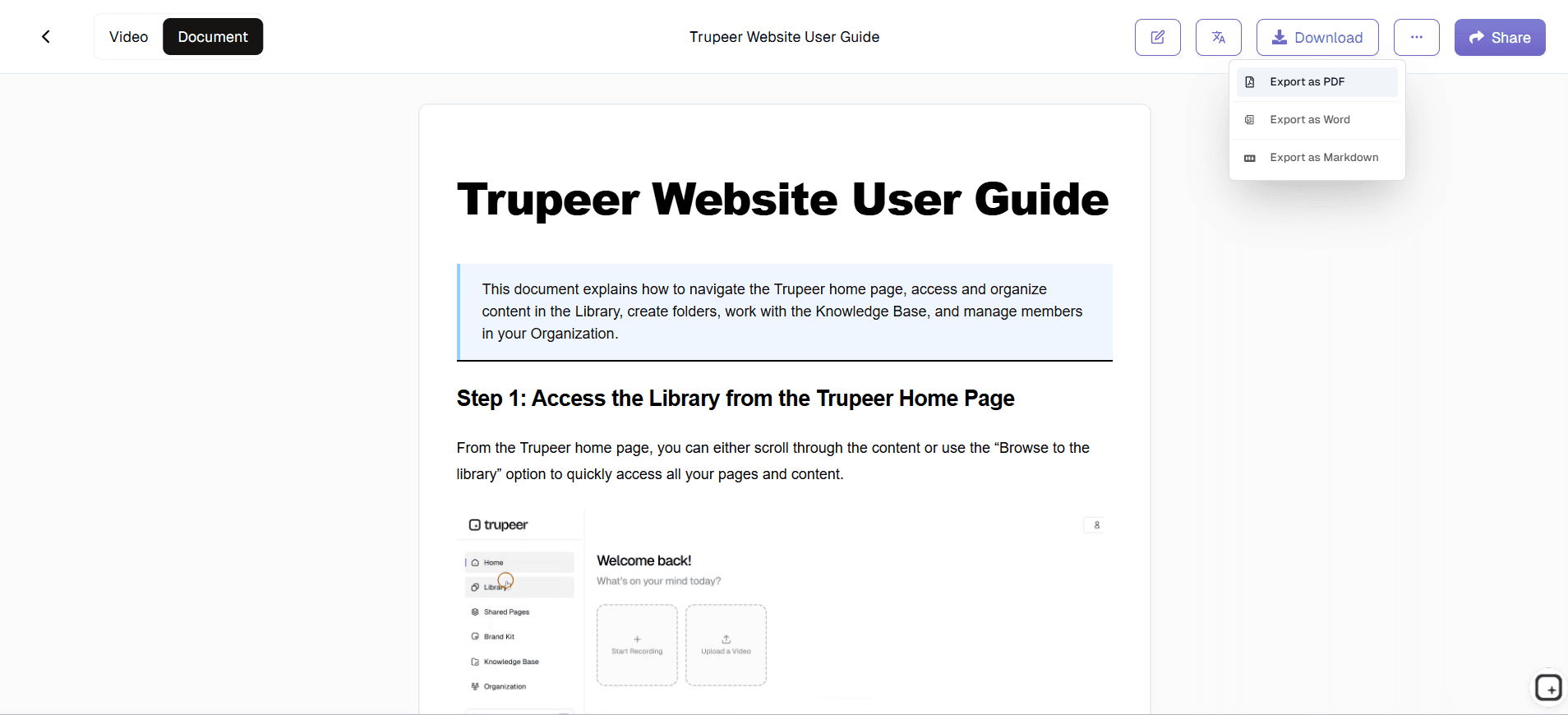
Multi-Format Document Export: Export automated documents in multiple formats suitable for different distribution channels. Generate web-embeddable content for help centers, downloadable files for offline reference, or formatted output compatible with wiki platforms, knowledge bases, and content management systems your organization already uses. The actual export formats. The written document downloads as PDF or Word (DOCX). The matching video walkthrough downloads as MP4. The Shared Page link wraps both into a single branded URL with visibility controls (public, organization-only, selected domains, invite-only). The Shared Page link embeds inside Notion, Confluence, SharePoint, Document360, GitBook, or any platform that accepts iframe embeds. So the document gets produced in Trupeer and hosted wherever the team's existing documentation infrastructure runs.
Conditional Content Logic: The AI recognizes when workflows involve decision points or branching paths and documents each path clearly. When your process includes if-then scenarios, the generated documentation captures alternative steps and conditions, producing comprehensive documentation that covers the full scope of the workflow. Worth being clear about scope. The AI handles linear workflows naturally: do step 1, then step 2, then step 3. For workflows with multiple branching paths ("if the customer is on the Pro plan, do X; if they're on Enterprise, do Y"), the AI's handling is less proven. Teams documenting heavily conditional procedures usually do one of two things: record each branch as a separate recording and generate separate procedural documents for each path, or record one path and add the conditional notes manually during the review step. Worth checking with the product team whether automatic conditional content detection is a real feature or an aspirational one before relying on this claim with prospects.
Why Choose Trupeer's Document Automation Software?
Eliminate Manual Writing: The most time-consuming part of documentation is the writing itself. Document automation converts demonstrated workflows into finished documents, removing the manual writing bottleneck entirely. A specific number. The senior support engineer at a SaaS company spends 90 minutes producing a polished SOP for a recurring issue. The actual procedure takes 6 minutes. So 84 minutes of the 90 is writing, screenshotting, and formatting work. The Trupeer flow inverts this: the 6 minutes of execution generates the document, with AI handling the writing and screenshotting. Total senior engineer time per SOP: about 15 minutes including review. Across 30 SOPs per quarter, the time savings compound to multiple days of senior engineering time recovered for actual technical work.
Guarantee Accuracy: Documents generated from actual workflow recordings reflect exactly how processes work, not how someone remembers them. Automated documentation is inherently more accurate than manually written procedures. The pattern this addresses. Writer documents the procedure from memory three weeks after running it. They remember the gist. They miss the confirmation prompt that appears between steps 3 and 4. They mix up the order of two clicks. Three months later, customers following the documented procedure get stuck at step 4 because the documentation doesn't match what they see on screen. Recording during the actual procedure captures the live behavior including the small details memory loses. So the documentation matches reality, not the writer's three-week-old recollection.
Enforce Consistency: Templates and brand kits ensure every automated document follows organizational standards. Consistent formatting, language, and visual style across all documentation regardless of who recorded the source workflow. The pattern that fails most decentralized documentation. Five different contributors over a year. Each has their own writing style, screenshot conventions, step formatting preferences. Some docs open with context paragraphs, others jump to step 1. Some use callout boxes for warnings, others embed warnings in prose. The reader gets 5 different reading experiences across the documentation library. Templates plus brand kit plus AI generation produce documents that follow the same structure regardless of which contributor recorded the source. So 30 documents shipped across the year read like one team produced them. Which is true one team did, just through 5 different contributors using the same template and AI pipeline.
Scale Documentation: Produce documentation at the pace your organization needs. Whether you are documenting 10 workflows or 1,000, document automation software handles the volume without proportionally increasing effort. The realistic scaling math. Manual documentation production scales linearly with writer headcount: more docs means more writers. AI-generated documentation scales with AI processing capacity: more docs means more processing time, but the per-doc human time stays roughly flat. So a 5-person team producing 30 docs per quarter manually would need a 50-person team to produce 300 docs per quarter which is why most teams stay at 30 docs per quarter or less. With AI generation, the same 5-person team can produce 200-300 docs per quarter without proportional headcount increase. The bottleneck shifts from writing to subject matter expert availability for the recording sessions.
Document Automation Software for Internal Teams
1. Automate the creation of standard operating procedures across departments. Instead of asking team members to write SOPs manually, have them record their workflows and let document automation produce the documentation with full accuracy.
2. Capture institutional knowledge systematically before it is lost to turnover. When experienced employees record their workflows, the automation generates permanent, searchable documentation that preserves their expertise for every future team member.
3. Reduce the administrative burden of documentation maintenance. When processes change, re-record the updated workflow and the automation regenerates the document, eliminating the tedious work of manually revising existing documentation.
4. Create a consistent documentation library across the organization. Automated templates and branding ensure every department's documentation looks professional and follows the same structure, improving navigation and usability across the entire library.
Document Automation Software for SaaS Teams
1. Automate help center documentation as your product evolves. When features change, record the updated workflow and generate new documentation automatically, keeping your help center current without manual rewriting across dozens of articles.
2. Produce customer onboarding documentation at the speed of product development. Document automation lets customer success teams generate professional guides for new features in the same sprint cycle they ship, not weeks later.
3. Keep internal and external documentation synchronized. When the same workflow serves both internal process documentation and customer-facing guides, document automation generates both from a single recording with appropriate formatting for each audience.
4. Scale documentation production without scaling your documentation team. As your product grows in complexity, document automation handles the increasing documentation volume without requiring proportional increases in headcount.
Document Automation Software for Startups
1. Build professional documentation without hiring technical writers. Document automation lets any team member create polished, well-structured documentation by simply recording their workflow, removing the need for dedicated documentation staff.
2. Document processes before rapid growth makes it impossible. Startups that automate documentation early establish a knowledge base that scales smoothly, avoiding the documentation debt that overwhelms fast-growing companies.
3. Present a professional image to enterprise prospects with comprehensive documentation. Automated documentation looks polished and thorough, signaling to potential customers that your organization takes operational excellence seriously.
4. Iterate on documentation as fast as your product and processes change. When startup workflows evolve weekly, document automation keeps documentation current without creating a backlog that no one has time to address.
Document Automation Software for Enterprises
1. Standardize documentation creation across global operations. Document automation ensures that teams in every region produce documentation that follows the same templates, branding, and structural standards, regardless of local preferences or practices.
2. Meet regulatory documentation requirements efficiently and consistently. Automated document generation with version tracking provides the audit trails, consistency, and completeness that compliance frameworks demand without burdening teams with manual documentation work.
3. Reduce documentation costs by automating the most labor-intensive creation steps. Enterprise organizations that previously maintained large technical writing teams or outsourced documentation production achieve significant cost savings through automation.
4. Support enterprise change management with rapid documentation production. When organizations implement new systems, restructure operations, or standardize processes, document automation generates the supporting documentation at the pace the initiative requires.
Document Automation Software for Remote Teams
1. Enable remote team members to create documentation asynchronously without coordination overhead. Any remote employee records a workflow on their schedule, and document automation generates professional documentation without requiring real-time collaboration or review meetings.
2. Build a searchable documentation library that remote workers rely on instead of interrupting colleagues. When finding a documented answer is faster than messaging a coworker in another time zone, remote teams operate more independently and efficiently.
3. Ensure documentation quality consistency regardless of who creates it or where they are located. Document automation applies the same formatting, structure, and branding whether the source recording comes from a home office in Austin or a coworking space in Berlin.
4. Reduce the documentation gaps that remote work environments tend to create. When processes are demonstrated in person, informal knowledge transfer happens naturally. Document automation captures this knowledge formally, preventing the knowledge silos that distributed teams are prone to developing.
Document Automation Software for Developers
1. Automate technical documentation for development workflows, deployment procedures, and system configurations. Record the process in your terminal, IDE, or browser, and let the AI generate structured technical documentation with accurate command sequences and configuration details.
2. Keep API and integration documentation current with automated regeneration. When endpoints, parameters, or authentication methods change, re-record the integration workflow and the automation produces updated documentation that reflects the current implementation.
3. Create developer onboarding documentation that shows real development environment setup. New developers follow automated documentation generated from actual setup recordings, ensuring the instructions work with the current toolchain and configuration.
4. Maintain runbooks and incident response documentation with minimal manual effort. After resolving production issues, record the resolution workflow and let document automation capture the procedure in a format that on-call engineers can follow during future incidents.
Document Automation Software for Onboarding & Support Teams
1. Automate the creation of onboarding documentation for every role and department. Instead of writing onboarding guides manually, record key workflows and let document automation generate comprehensive, consistent onboarding materials automatically.
2. Generate support knowledge base articles from recorded troubleshooting workflows. When support agents solve complex issues, recording the resolution and automating the documentation creates reusable knowledge base content without manual article writing.
3. Produce customer-facing documentation that reduces support ticket volume. Automated documentation published in your help center answers common questions with clear, screenshot-annotated instructions, deflecting tickets before customers need to contact support.
4. Keep onboarding and support documentation current with minimal effort. When processes or products change, re-record the affected workflow and document automation regenerates the documentation, ensuring your team and customers always reference up-to-date materials.
What "document automation" means for Trupeer (and what it doesn't)
The phrase "document automation software" gets used across two different product categories worth distinguishing. The first category is transactional document automation: tools that pull variable data from CRMs, databases, or web forms and generate contracts, proposals, NDAs, MSAs, quotes, invoices, and similar legal/sales documents at scale. PandaDoc, Conga Composer, DocuSign CLM, HotDocs, Templafy, and Docassemble fit this category. The use case: a sales ops team needs to generate 200 customer contracts per month with the customer's name, term length, pricing tier, and signing party auto-populated from Salesforce. Trupeer doesn't fit this use case. If that's what you're looking for, the tools in the first category are the right pick.
The second category is procedural document automation: tools that generate SOPs, training guides, step-by-step procedures, help center articles, technical documentation, and operational playbooks from recorded workflows. Trupeer, Scribe, Tango, and Guidde fit this category. The use case: a documentation team or operations team needs to produce 50 procedural documents per quarter explaining how to do specific tasks, and they want to record the procedures rather than write them up from memory. Trupeer is built for exactly this use case. The AI watches the recording, generates the document with screenshots inline and numbered steps, applies brand styling, and ships the document plus the matching video walkthrough.
The honest scope for Trupeer specifically: it handles screen-recorded procedural documentation well. It doesn't handle pure-text document generation, contract assembly with variable data, CRM-driven document creation, or e-signature workflows. So the right way to use this page if you arrived from a "document automation" search: figure out which of the two categories you actually need. If it's transactional document automation, save time and check PandaDoc or Conga instead. If it's procedural document automation from screen recordings, this is the right page.
Why Teams Choose Trupeer for Document Automation
Zero Manual Writing
AI generates complete documents from screen recordings automatically
Smart Screenshots
Annotated screenshots extracted and placed at every step
Template Automation
Consistent branding and formatting applied to every document
How to Automate Documentation with Trupeer
Step 1
Record your workflow using the browser-based screen recorder
Step 2
AI automatically generates a complete document with screenshots
Step 3
Apply branding and share your automated documentation
Frequently Asked Questions
How is document automation different from document templates?
Document templates provide empty structures you fill in manually. Document automation generates complete, finished documents from your workflow recordings. The AI writes the content, captures the screenshots, and formats the output - you do not fill in anything manually.
What types of documents can I automate?
You can automate any documentation that involves a screen-based workflow, including standard operating procedures, training guides, process documentation, help center articles, onboarding materials, and technical reference documents.
How accurate is the automated documentation?
The AI generates documentation directly from your recorded actions, so it reflects exactly what happened on screen. This approach produces more accurate documentation than manual writing from memory because it captures the actual workflow rather than a recollection of it.
Can I edit the automatically generated documents?
Yes. All generated documents are fully editable after creation. You can add context, modify wording, insert additional screenshots, or restructure sections before sharing. The automation creates a strong first draft that you refine rather than build from scratch.
How do I update automated documents when processes change?
Re-record the changed portion of the workflow. The document automation software regenerates the documentation for that section, maintaining the structure and formatting of the original document while reflecting the updated process accurately.
More Tools


