Trupeer Blog
Loom Alternatives for Enterprise Documentation and SOP Teams

Imagine you're leading an enterprise documentation team. Your goal is to create simplified, efficient, and easily accessible documentation and SOPs for your organization. You're using Loom for quick screen recordings, but you feel it falls short of your comprehensive documentation needs. Loom is great for capturing short, informal videos, but more structured, dynamic content that needs to be updated regularly, it's not enough. The stakes are high. If your documentation process is inefficient, it could lead to confusion, wasted time, or even costly mistakes. A recent study found that
83% of employees waste up to two hours a day searching for information they need to do their jobs.
As an enterprise, you can't afford such inefficiencies. So, you're on the hunt for a Loom alternative that offers more solid features for creating and managing documentation and SOPs. This search is crucial for maintaining productivity and ensuring your team has the resources they need right at their fingertips. By using the right tool, you can enhance collaboration, maintain consistency, and ensure your documentation is always up-to-date.
Why does finding a Loom alternative for enterprise documentation matter?
Enterprise documentation is not just about creating documents; it's about ensuring that information is accurate, accessible, and actionable. When you're dealing with complex processes and a large volume of information, the need for an efficient system becomes even more critical. A tool that doesn't support dynamic updates, detailed analytics, or easy sharing across teams can lead to significant challenges. Teams might spend excessive time searching for the right documents or updating them manually, which can slow down operations and create bottlenecks. For enterprises, especially those with remote teams, having a documentation tool that integrates smoothly with existing workflows is essential.
In a pre-sales workflow, for example, having precise, up-to-date documentation can be the difference between winning and losing a deal. If sales teams can quickly access the latest product information or SOPs, they can respond faster to client queries, giving them a competitive edge. also, as organizations grow and evolve, their documentation needs become more complex. This means the documentation tool must scale and adapt, providing features like AI-driven updates and multi-format exports. Without these capabilities, documentation can become outdated or inconsistent, leading to misunderstandings or errors in critical processes.
What are the benefits of choosing a Loom alternative for enterprise documentation?
Switching to a tool that better suits enterprise documentation needs brings several advantages. Here are six key benefits:
Enhanced collaboration. A solid documentation tool allows multiple team members to work on documents simultaneously, ensuring that everyone is on the same page and reducing the risk of errors.
Improved accuracy. With features like AI-driven updates, you can ensure that your documentation is always up to date, minimizing the risk of relying on outdated information for critical decisions.
Time efficiency. By automating repetitive tasks such as document updates and formatting, teams can focus on more strategic work, reducing operational costs and increasing productivity.
smooth integration. Many enterprise tools integrate with existing systems to simplify workflows and ensure that documentation fits naturally into the team's daily operations.
Scalability. As your organization grows, a pendo alternatives enterprise tool can scale with you, handling increased amounts of data and users without a hitch.
Diverse format support. A AI-powered video tool offers multi-format export options, allowing teams to share documentation in formats like MP4, HTML, and PDF to suit various needs.
Which Trupeer features help you choose a Loom alternative for enterprise documentation?
Trupeer offers a variety of features that specifically address the needs of documentation and SOP teams in enterprise environments. Here are some of the key capabilities that make Trupeer an ideal choice.
AI screen recording with auto-zoom and click detection
Trupeer's AI screen recording capability is designed to capture every detail of your screen with precision. The automatic zoom feature ensures that viewers focus on the relevant parts of the screen, making the content more engaging and easier to understand. Click detection highlights user interactions, which is critical for creating clear and informative tutorials or process demonstrations. This feature is particularly useful for SOP teams that need to demonstrate complex procedures or software functionalities clearly and effectively.
Automatic SOP generation from any recording
One of Trupeer's standout features is its ability to automatically generate SOPs from any recording. This feature transforms recorded content into structured, edit-ready documentation, saving significant time and effort typically required for manual SOP creation. The AI documentation platform ensures that all details are accurately captured and easily editable, allowing teams to maintain up-to-date and accurate SOPs effortlessly.
AI voiceover in 65+ natural voices
Trupeer offers AI voiceover capabilities in over 65+ natural voices, which can be adjusted for pace and tone. This feature allows you to create professional-quality videos that cater to different audience preferences. Whether you're creating content for training, onboarding, or customer support, the ability to customize voiceovers ensures that your documentation is not only informative but also engaging. This is especially beneficial for enterprises with diverse audiences or those that operate in multiple regions.
AI-searchable knowledge base
The AI-searchable knowledge base is a powerful tool for enterprises looking to improve information accessibility. This feature indexes every recording with timestamp-level deep links, enabling team members to quickly find and reference specific content. In fast-paced environments where time is of the essence, being able to locate precise information swiftly can significantly enhance productivity and decision-making.
Custom-domain hosting with SSO
For enterprises, security and brand consistency are paramount. Trupeer offers custom-domain hosting with single sign-on (SSO), ensuring that your documentation aligns with corporate branding and security protocols. This feature not only enhances the user experience by providing smooth access across platforms but also protects sensitive information through secure authentication methods. Enterprises can confidently distribute documentation knowing it meets their security standards.
How do you choose a Loom alternative for enterprise documentation step by step with Trupeer?
Step 1: Start a New Recording
Begin by launching Trupeer’s browser-based recorder or desktop app. No installation is needed for the browser version, which saves time. Click "Start Recording" to capture your screen. Trupeer’s AI screen recording with auto-zoom and click detection ensures critical interactions are highlighted. This feature is essential for creating detailed walkthroughs or tutorials. The auto-zoom adjusts dynamically, focusing on areas of interest, which is perfect for software demonstrations. Once your content is captured, Trupeer automatically saves it for further editing and enhancement. This initial step takes just a few minutes, making it highly efficient.

Step 2: Enhance Your Recording
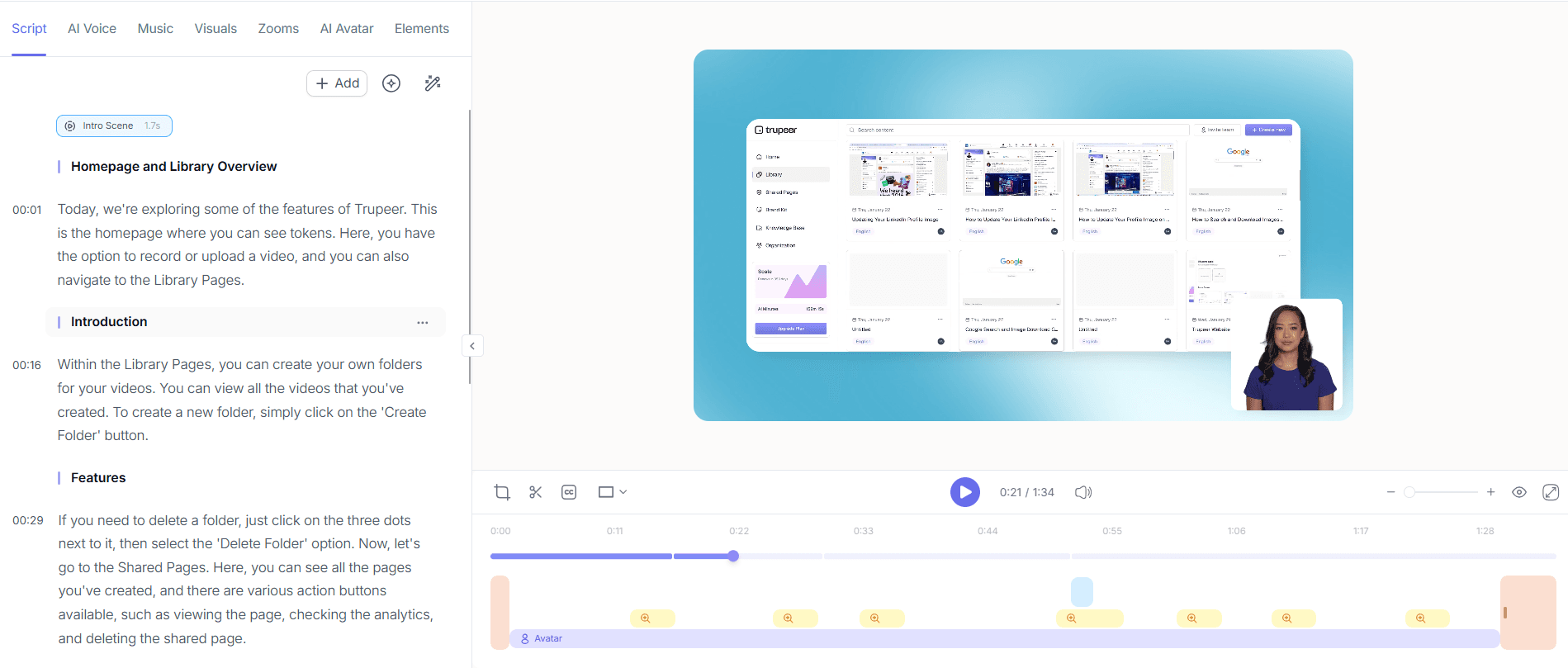
After capturing your screen, navigate to the editing dashboard. Here, Trupeer provides automatic filler-word removal, cleaning up your audio by eliminating "um," "ah," and long pauses. This AI-driven enhancement polishes your content, making it more professional. You can also choose to add an AI voiceover from over 65+ natural voices, adjusting the pace and tone to match your audience's preferences. These enhancements not only improve the viewer's experience but also ensure that your documentation remains engaging and clear. This step can be completed in under 10 minutes, depending on your enhancements.
Step 3: Generate SOPs Automatically
With your video ready, use Trupeer's automatic SOP generation feature. This transforms your recording into structured, editable SOPs. Simply click "Generate SOP" and watch as Trupeer converts the visual content into a text-based guide. This feature is invaluable for teams that require quick and accurate documentation updates. The generated SOPs are ready for export in formats like PDF or HTML. Trupeer saves you hours of manual work, delivering a polished SOP in minutes. This tool is especially useful for complex processes that need frequent updates.

Step 4: Localize Your Content
For enterprises operating in multiple regions, localization is crucial. Use Trupeer’s AI translation and dubbing capabilities to adapt your content for non-English audiences. With support for 40+ languages and lip-sync technology, your video will be accessible to a global audience. Select your target language and click "Translate." Trupeer handles the rest, ensuring accurate translations and synchronized audio. This feature is perfect for companies with international teams, as it maintains the original content's impact while broadening its reach. This step is quick, usually taking less than five minutes per language.

Step 5: Distribute Your Documentation
Once your content is complete, use Trupeer’s custom-domain hosting and shared pages to distribute it. Click "Publish" to make your documentation available on a secure, branded domain. You can also embed video widgets for in-app guidance, enhancing user experience on your platform. Trupeer offers collaborative review workflows, allowing team members to provide feedback before final release. This ensures that all stakeholders are aligned, reducing the risk of errors. This step is crucial for maintaining consistent and secure access to your documentation across your organization. This same approach shows up in the pre sales use case, where teams apply it at scale.

Step 6: Analyze Viewer Engagement
Post-distribution, Trupeer provides viewer engagement analytics, including drop-off rates and heatmaps. Access these insights by selecting "Analytics" from the dashboard. This data helps you understand how your audience interacts with your content, identifying areas for improvement. For example, if viewers consistently drop off at a certain point, you might need to revise that section for clarity or engagement. These insights enable your team to optimize future documentation efforts, ensuring they meet audience needs effectively. This step is ongoing, offering continuous feedback for your documentation strategy.

What tips help you choose a Loom alternative for enterprise documentation?
Choosing the right tool for enterprise documentation requires strategic thinking and practical steps. Here are some tips to guide you through the process:
Evaluate integration needs. Ensure the tool integrates smoothly with your existing systems to maintain workflow efficiency.
Prioritize security. Opt for a solution that offers Scribe alternative comparison with strong security measures, such as SSO and encrypted hosting.
Focus on scalability. Choose a tool that scales with your organization, accommodating growth in users and data volume.
Standardize processes. Use consistent templates and branding across all documentation to maintain a unified corporate identity.
use AI capabilities. use features like AI product documentation tool for automatic updates and translation to enhance accuracy and accessibility.
Gather stakeholder feedback. Regularly seek input from users to ensure the documentation meets their needs and incorporates improvements.
Monitor analytics. Use viewer engagement data to refine and improve your documentation strategy continuously.
Frequently asked questions
How does Trupeer compare to other Loom alternatives?
Trupeer offers unique features like automatic SOP generation and AI-driven enhancements that set it apart from other Loom alternatives. While many tools provide basic screen recording, Trupeer goes further by integrating advanced AI capabilities. These include automatic filler-word removal and AI voiceovers, which significantly enhance the quality of documentation. also, Trupeer's AI-searchable knowledge base allows for efficient information retrieval, making it ideal for enterprise environments where quick access to accurate documentation is crucial.
What makes Trupeer a good choice for remote teams?
Trupeer is well-suited for remote teams due to its cloud-based architecture and collaborative features. The platform allows team members to access, edit, and review documentation from anywhere, ensuring smooth collaboration. Trupeer's AI capabilities also facilitate efficient communication by providing automatic translations and dubbing for global teams. also, the custom-domain hosting with SSO ensures secure access to sensitive information, which is critical for remote teams managing proprietary data. These features make Trupeer a reliable tool for remote work environments.
Can Trupeer handle large volumes of data and users?
Yes, Trupeer is designed to scale with your organization. It can manage large volumes of data and support numerous users simultaneously. This scalability is crucial for enterprises experiencing growth or managing extensive documentation libraries. Trupeer's infrastructure ensures that performance remains consistent even as demands increase. Features like AI-driven updates and efficient data retrieval systems further enhance its capacity to handle sizable workloads without compromising on speed or reliability.
Does Trupeer offer localization features for multilingual documentation?
Absolutely, Trupeer provides comprehensive localization features, including AI translation and dubbing in over 40 languages. This capability ensures your documentation is accessible to a global audience. The platform also supports lip-sync technology, maintaining the natural flow and impact of your original content. These features are essential for enterprises operating across multiple regions, as they ensure that all team members and clients can understand and engage with the content effectively. ai/translation">AI video translation capabilities.
Is Trupeer's analytics feature beneficial for improving documentation?
Trupeer's analytics feature is highly beneficial for refining documentation strategies. By providing insights into viewer engagement, drop-off rates, and interaction patterns, Trupeer enables you to identify which content resonates with your audience and which areas require improvement. This data-driven approach allows you to make informed decisions about content revisions and future documentation projects. Continuous monitoring and adjustment based on these analytics ensure that your documentation remains relevant and effective in meeting user needs.


